

Last updated April 8, 2026. Prices verified from Amazon.in and Flipkart.
The gaming monitor market under ₹10,000 in India has changed completely in the last 12 months. You can now get a genuine 180Hz IPS panel with 1ms response time for ₹8,500. A year ago that spec cost ₹13,000. The era of settling for a 75Hz office monitor for gaming is over at this budget.
Every monitor below is 1080p. At ₹10,000, do not buy a 1440p panel — your GPU cannot drive it at these frame rates, and you lose the refresh rate advantage. If you have a GPU that can handle 1440p (RTX 3060 or higher), see our gaming monitor under ₹20,000 guide where 1440p 180Hz panels start at ₹16,999.
Quick Picks: Best Gaming Monitors Under ₹10,000
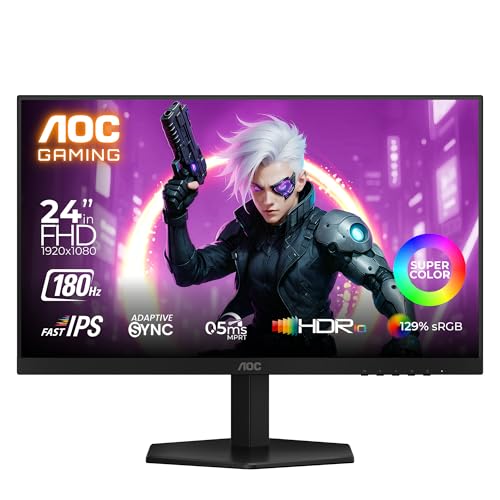
AOC 24G42E 24-inch Gaming Monitor
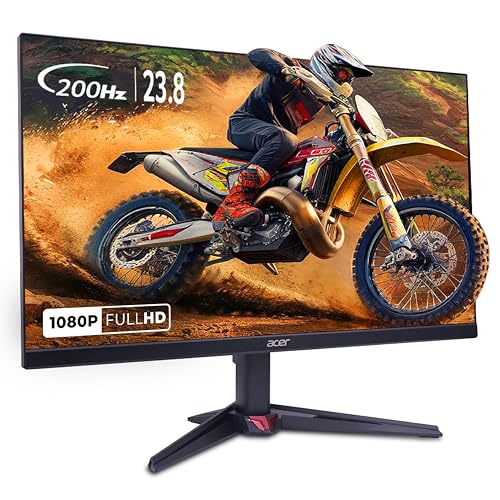
Acer Nitro VG240Y X1 Gaming Monitor
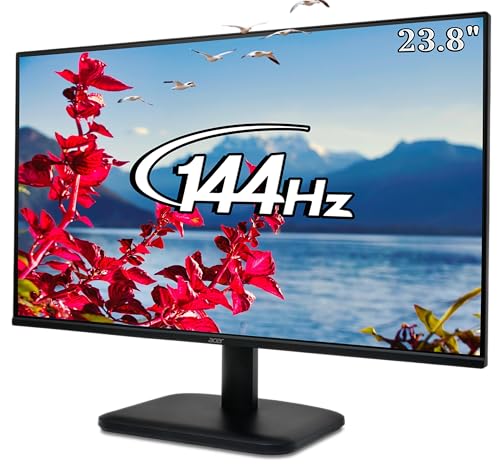
Acer EK240Y P6 Gaming Monitor
Quick Picks: Best Gaming Monitors Under ₹10,000
Top 5 Gaming Monitors Under ₹10,000 in India (April 2026)
| Rank | Monitor | Price | Refresh Rate | Panel | Best For |
|---|---|---|---|---|---|
| 1 | AOC 24G42E | ₹8,499 | 180Hz | Fast IPS | Best overall gaming |
| 2 | Acer Nitro VG240Y X1 | ₹8,599 | 200Hz | IPS | Highest refresh rate under 10k |
| 3 | MSI G244F E2 | ₹8,490 | 180Hz | Rapid IPS | Best color accuracy on budget |
| 4 | Acer EK240Y P6 | ₹6,749 | 144Hz | IPS | Cheapest 144Hz from a major brand |
| 5 | Dell SE2425HG | ₹9,699 | 200Hz | VA | Console gaming (dual HDMI 2.1) |
1. AOC 24G42E: Best Gaming Monitor Under ₹10,000
The AOC 24G42E at ₹8,499 on Amazon.in is the monitor to beat in this segment. It uses a Fast IPS panel with a genuine 180Hz refresh rate and 0.5ms response time. The color reproduction at 129% sRGB is noticeably better than any other monitor at this price, which matters for single-player games where visual quality counts alongside frame rate.
What makes it the top pick: The combination of 180Hz, Fast IPS, and HDR10 support at ₹8,499 is something that simply did not exist under ₹12,000 a year ago. The 24-inch 1080p size is the sweet spot for competitive gaming at normal desk distance (60-80cm). Adaptive Sync works with both AMD FreeSync and Nvidia G-Sync Compatible GPUs. The stand is tilt-only (no height adjustment), which is the main sacrifice at this price.
Connectivity: 1x HDMI 2.0, 1x DisplayPort 1.4. Both cables are included in the box, which saves you ₹300-500 on a DisplayPort cable. Use DisplayPort for your PC and HDMI for a console if you have one.
Who should buy it: Anyone building a gaming PC from ₹40,000-75,000 and pairing it with a GTX 1650, RX 6600, RX 7600, or RTX 4060. For Valorant and CS2 at 180 FPS, this monitor shows every frame. For single-player games at 60 FPS, the IPS colors look meaningfully better than VA alternatives at this price.
2. Acer Nitro VG240Y X1: Highest Refresh Rate Under ₹10,000
The Acer Nitro VG240Y X1 at ₹8,599 pushes to 200Hz, the fastest refresh rate you can buy under ₹10,000 from a recognized brand. The IPS panel delivers 99% sRGB color coverage and 0.5ms MPRT response time with AMD FreeSync Premium support and HDR10.
Why it is second, not first: The AOC 24G42E has slightly better color reproduction (129% sRGB vs 99%) at the same price. Both are 24-inch 1080p IPS panels. The Acer wins on peak refresh rate (200Hz vs 180Hz), which matters only if your GPU consistently pushes above 180 FPS. In Valorant with an RX 7600, both GPUs will exceed 180 FPS, so the 200Hz matters. In Fortnite or GTA V, you are unlikely to exceed 120-140 FPS at these GPU tiers, making the 200Hz headroom less useful.
Connectivity: 2x HDMI 2.0, 1x DisplayPort 1.2. Two HDMI ports are useful if you want to connect both a PC and a console without switching cables.
Who should buy it: Competitive esports players who play Valorant, CS2, or Apex Legends with a GPU that pushes 180+ FPS consistently. If 20 extra Hz matters to your reaction time, this is the monitor.
3. MSI G244F E2: Best Budget Option with Premium Feel
The MSI G244F E2 at ₹8,490 uses MSI’s Rapid IPS technology — a panel type that reduces ghosting and motion blur compared to standard IPS. The 180Hz refresh rate and 1ms GtG response time match the AOC, and the 118% sRGB color gamut is respectable though not class-leading.
Why consider it: MSI’s monitor division has better after-sales service in India than AOC. If warranty support and service centre access matter to you (and in India, they should), the MSI brand carries weight. The build quality also feels slightly more premium — the bezels are thinner and the stand is sturdier than the AOC.
Who should buy it: Buyers who prioritize brand trust and service centre proximity over the marginal spec differences between this and the AOC.
4. Acer EK240Y P6: Cheapest 144Hz IPS in India
The Acer EK240Y P6 at ₹6,749 is the entry point to high-refresh gaming. 144Hz, IPS panel, 1ms VRB response time, FreeSync support. It does not match the 180Hz panels above, and color reproduction is narrower (99% sRGB), but at ₹1,750 less than the AOC it is the right choice for extremely tight budgets.
When to buy this over the AOC: If your total PC build budget is ₹40,000 or under and you are building our ₹40,000 APU build. The Ryzen 5 5600G integrated graphics max out at 120-160 FPS in Valorant — a 144Hz panel captures that performance fully. The extra ₹1,750 saved is better spent on 16GB RAM or a larger SSD at that budget tier.
When not to buy it: If you have a discrete GPU (GTX 1650 or better) that pushes past 144 FPS in competitive titles. Pay the extra ₹1,750 for the AOC or Acer 200Hz and get the full benefit of your GPU.
5. Dell SE2425HG: Best for Console Gaming Under ₹10,000
The Dell SE2425HG at ₹9,699 is the most expensive monitor on this list but has one unique advantage: dual HDMI 2.1 ports. This matters if you are connecting a PS5, Xbox Series X, or both alongside a PC. HDMI 2.1 supports 120Hz on consoles, which HDMI 2.0 monitors cap at 60Hz. The 200Hz refresh rate on the VA panel handles PC gaming smoothly, though the VA panel has slightly slower response times than the IPS options above, which shows up as faint ghosting in fast-paced games like CS2.
Who should buy it: Console gamers who also PC game, and need a single monitor for both. The dual HDMI 2.1 setup means you never unplug cables — switch inputs and you are on the other device.
Who should skip it: PC-only gamers. The VA panel ghosting at fast motion is a meaningful downgrade from the AOC’s Fast IPS in competitive shooters, and the ₹1,200 premium is not justified without the HDMI 2.1 advantage.
Which Monitor Matches Your GPU?
Buying a 200Hz monitor for a GPU that pushes 80 FPS wastes money. Here is the matching table.
| Your GPU | Valorant FPS (1080p) | Best Monitor Pick | Why |
|---|---|---|---|
| Ryzen 5 5600G (APU, no GPU) | 120-160 FPS | Acer EK240Y P6 (₹6,749, 144Hz) | APU maxes at ~160 FPS. 144Hz captures it fully. Save ₹1,750. |
| GTX 1650 / RX 6500 XT | 150-200 FPS | AOC 24G42E (₹8,499, 180Hz) | GPU sits in the 150-200 range. 180Hz is the sweet spot. |
| RX 6600 / RTX 3060 | 200-300 FPS | Acer VG240Y X1 (₹8,599, 200Hz) | GPU exceeds 180 FPS consistently. 200Hz captures the edge. |
| RX 7600 / RTX 4060 | 300+ FPS | Acer VG240Y X1 (₹8,599, 200Hz) | GPU is overkill for 1080p. Consider a ₹17k 1440p monitor instead. |
| PS5 / Xbox Series X | 120 FPS max | Dell SE2425HG (₹9,699, HDMI 2.1) | HDMI 2.1 unlocks 120Hz on consoles. Essential for competitive console play. |
If your GPU is an RX 7600 XT or RTX 4060, you are paying for GPU performance that a 1080p monitor cannot display. At that GPU tier, step up to the LG 27GS60QC-B at ₹16,999 — a 1440p 180Hz monitor that actually uses the GPU’s resolution capability.
What to Look For (and What to Ignore) Under ₹10,000
Panel type matters: IPS or Fast IPS is the right choice at this budget. VA panels (like the Dell) have better contrast ratios (deeper blacks) but suffer from ghosting and smearing in fast-paced shooters. For Valorant, CS2, and Apex, IPS wins. For cinematic single-player games where contrast matters more than response time, VA is acceptable.
Response time marketing is misleading: All five monitors claim “1ms” response time. AOC and Acer specify this as GtG (grey-to-grey) or MPRT (motion picture response time). These are different measurements. In real-world use, the Fast IPS panels (AOC 24G42E) have the least motion blur. Do not compare “1ms” across brands — it is not measured the same way.
HDR10 at this price is a label, not a feature: All these monitors list HDR10 support. At 250-300 nits peak brightness and 8-bit color depth, HDR content looks slightly better than SDR but nowhere close to a real HDR experience (which requires 600+ nits and local dimming). Do not buy any of these monitors specifically for HDR. Buy them for refresh rate and response time.
Stand quality: Every monitor under ₹10,000 ships with a tilt-only stand. No height adjustment, no swivel, no pivot. If ergonomics matter, budget ₹1,500-2,000 for a VESA monitor arm — all five monitors support 100x100mm VESA mounting. A monitor arm is a better investment than spending ₹2,000 more on a monitor with a built-in height-adjustable stand.
Common Mistakes When Buying a Gaming Monitor Under ₹10,000
Buying 75Hz to save ₹2,000: A 75Hz monitor costs ₹4,000-5,000 and “works fine.” But the difference between 75Hz and 144Hz is visible to anyone, gamer or not. Cursor movement feels smoother, scrolling is cleaner, and in competitive games the visual clarity of fast-moving enemies is genuinely better. The ₹2,000-3,000 premium for 144Hz is the single best upgrade for perceived smoothness in your entire build.
Buying a 27-inch 1080p panel: At 27 inches, 1080p pixels become visible at normal desk distance. Text looks fuzzy, game textures lose sharpness, and the overall image quality drops noticeably compared to 24-inch 1080p. All five recommended monitors are 24 inches for this reason. If you want 27 inches, you need 1440p resolution, which starts at ₹16,999.
Ignoring DisplayPort: Some cheaper monitors only have HDMI ports. HDMI 2.0 supports up to 1080p 144Hz, which is fine. But DisplayPort 1.2/1.4 supports higher refresh rates and is the standard connection for PC gaming. All five monitors above have at least one DisplayPort, which is necessary to reach 180Hz or 200Hz from your GPU.
Buying from unknown brands: Monitors from brands like Zebronics, Frontech, or Lapcare at ₹5,000-6,000 may advertise “165Hz gaming monitor” but use budget TN or low-grade VA panels with actual response times of 8-12ms. The pixel density, color accuracy, and motion handling are visibly worse. Stick to AOC, Acer, MSI, Dell, LG, and BenQ at this price tier.
The Verdict
The AOC 24G42E at ₹8,499 is the best gaming monitor under ₹10,000 in India in April 2026. It combines the highest color gamut (129% sRGB), fastest response time (0.5ms), and the 180Hz sweet spot that matches the frame rates most budget GPUs deliver. Buy it on Amazon.in from a Fulfilled by Amazon listing.
If you want the absolute highest refresh rate under ₹10,000, the Acer Nitro VG240Y X1 at ₹8,599 pushes to 200Hz. If your budget is extremely tight, the Acer EK240Y P6 at ₹6,749 delivers 144Hz from a trusted brand. For PS5 or Xbox console gaming, the Dell SE2425HG at ₹9,699 is the only option with HDMI 2.1.
Match the monitor to your GPU, not to the highest number on the spec sheet. A 180Hz monitor paired with a GTX 1650 is a better investment than a 240Hz monitor that your GPU cannot feed.
Related Guides
- Best Gaming Monitor Under ₹60,000 in India (2026): OLED & Top IPS
- Best Gaming Monitor Under ₹50,000 in India (2026): Premium 4K Picks
- Best Gaming Monitor Under ₹40,000 in India (2026): 4K & QHD Picks
- Best Monitor Under ₹8,000 in India (2026): Budget Office & Gaming
- Best Gaming Monitor Under ₹25,000 in India (2026): QHD 165Hz Picks