
Updated August 2026 with current Indian retail prices.
Under ₹50,000 you are buying integrated-graphics laptops: excellent for programming and fine for esports and light gaming, but not AAA titles (that needs an RTX laptop at ₹60k+). Best all-rounder is the HP 15 Ryzen 5 7535U with Radeon 660M. If you code heavy, the 16GB Acer Aspire Lite is the smarter pick.
Key facts
- Best overall + gaming: HP 15 Ryzen 5 7535U, Radeon 660M (₹46,990)
- Best for programming: Acer Aspire Lite i3-1215U, 16GB RAM (₹49,990)
- Best value: Dell Pro 15 Ryzen 5 7520U (₹44,640)
- Most portable: Acer TravelLite Ryzen 5, 14-inch (₹46,710)
- The RAM call: 8GB + a better chip, or 16GB + a weaker chip. 8GB is tight for heavy Docker.
- Gaming reality: integrated graphics handles Valorant, CS2 and older titles on low, not modern AAA.
Affiliate disclosure: GamingNation earns a commission on qualifying purchases made through the Amazon links on this page, at no extra cost to you. Picks are based on independent research and live price and stock checks (June 2026).
India turns out over 1.5 million engineering graduates a year, and most of them want one laptop that survives college coursework, competitive coding, internship work, and a bit of Valorant on the side. The hard truth in 2026: a dedicated gaming GPU starts at around ₹60,000 (RTX 3050 and up). On a strict ₹50,000 budget you are buying integrated graphics, and for programming that is not a compromise at all. Modern integrated GPUs like AMD Radeon 660M and Intel UHD run VS Code, IntelliJ, Android Studio, Docker, and WSL2 without strain.
For gaming, set expectations correctly. These machines handle esports and lighter titles (Valorant, CS2, Rocket League, GTA V on low, older and indie games) well enough, but they are not built for modern AAA games. The single biggest decision at this budget is RAM: you are choosing between 8GB with a stronger CPU and GPU, or 16GB with a weaker chip. We picked one of each so you can match the laptop to how you actually work. All four were verified in stock and under ₹50,000 on Amazon.in in June 2026.
| Pick | Laptop | CPU | RAM | Graphics | From |
|---|---|---|---|---|---|
| Best overall | HP 15 Ryzen 5 7535U | Ryzen 5 7535U | 8GB | Radeon 660M | ₹46,990 |
| Programming | Acer Aspire Lite i3 | Core i3-1215U | 16GB | Intel UHD | ₹49,990 |
| Best value | Dell Pro 15 Ryzen 5 | Ryzen 5 7520U | 8GB | Radeon 610M | ₹44,640 |
| Portable | Acer TravelLite 14″ | Ryzen 5 7430U | 8GB | Radeon iGPU | ₹46,710 |
Prices verified on Amazon.in, June 2026. All four are genuinely under ₹50,000 and in stock at publish. Laptop prices move fast, always check the live price before buying.
 🎁 GiveawayFREE
1. HP 15 (2026) Ryzen 5 7535U, Radeon 660M (Best all-rounder + best for gaming)
The HP 15 with the Ryzen 5 7535U is the closest thing to a do-everything machine on this list. The 7535U is a hexa-core, twelve-thread chip, so it has real multi-threaded muscle for compiling projects, running a couple of Docker containers, or churning through a Gradle build without choking. It is paired with the Radeon 660M, which is the best integrated GPU you will find anywhere near this price.
That 660M is why this is also the pick if gaming is part of the plan. To be clear, this is integrated graphics, not a gaming laptop with a dedicated card. But the 660M comfortably runs esports titles like Valorant and CS2 at 1080p low to medium, and older or lighter games (GTA V on low, Rocket League, indie titles, emulators) are very playable. Do not expect to run Cyberpunk or modern AAA games, that needs an RTX laptop at Rs 60k and up.
The catch is the 8GB of RAM. For coding that is workable but tight the moment you stack a heavy IDE, Docker, and twenty browser tabs. If your workload leans hard into Docker, Android Studio, or data work, look at the 16GB Acer below instead. For most students balancing coursework, web or app development, and some gaming on the side, this HP is the best blend of CPU, GPU, and a clean FHD anti-glare panel, and Windows 11 Pro is a small bonus over the usual Home licence.

HP 15 (2026) Ryzen 5 7535U, Radeon 660M
Price checked June 2026In stock at publishConfirm live before buying
2. Acer Aspire Lite, Intel Core i3-1215U, 16GB (Best for heavy coding (16GB RAM))
If your priority is programming and you keep a lot open at once, RAM beats raw clock speed, and this is the only laptop here with 16GB at the sub-50k price. That extra memory is exactly what lets Docker Desktop, a heavy IDE, a local database, and a wall of browser tabs coexist without the constant disk-swapping that makes an 8GB machine feel sluggish.
The i3-1215U is more capable than its name suggests. It is a six-core chip (two performance plus four efficiency cores) from Intel’s 12th Gen line, so it handles WSL2, Node, Python, Java, and standard CS coursework smoothly. The metal-build Aspire Lite also feels a step above plastic budget rivals, and the FHD IPS panel is easy on the eyes during long sessions.
The trade-off is gaming. The Intel UHD integrated graphics is the weakest GPU in this group, so treat this as a coding machine that can run light esports at low settings, not a gaming pick. If you genuinely want to game, the HP 660M above is the better choice. But for a developer who wants headroom and 16GB without going over budget, this is the smart buy.

Acer Aspire Lite, Intel Core i3-1215U, 16GB
Price checked June 2026In stock at publishConfirm live before buying
3. Dell Pro 15 (2025) Ryzen 5 7520U (Cheapest solid Ryzen 5)
The Dell Pro 15 is the value play. At under Rs 45,000 it gives you a modern Ryzen 5 7520U on a 4nm node, an FHD anti-glare screen, and a backlit keyboard, which is a genuinely useful extra for late-night coding that most laptops at this price skip. Build quality is classic Dell, solid chassis, minimal flex, a hinge that does not wobble after months of daily use.
Performance is a notch below the HP. The 7520U is a four-core, eight-thread chip, so it is efficient and quiet for everyday development (web dev, Python, college projects, competitive coding) but it does not have the multi-threaded headroom of the hexa-core 7535U for big compiles. The Radeon 610M is fine for light esports at low settings and everything a developer’s screen needs, but it is not a gaming GPU.
Like the HP, it ships with 8GB. For the price that is fair, but factor in that 8GB is the tight spot if you live in Docker. If you want the lowest sticker price for a reliable, well-built coding laptop and can live with 8GB, this Dell is the best money-saver on the list.
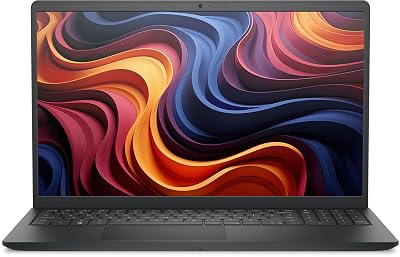
Dell Pro 15 (2025) Ryzen 5 7520U
Price checked June 2026In stock at publishConfirm live before buying
4. Acer TravelLite Ryzen 5 7430U, 14-inch (Most portable (14-inch))
If you commute daily by train, bus, or auto and want something lighter than a 15-inch slab, the Acer TravelLite is the portable pick. The 14-inch FHD panel and thin chassis make it easy to carry between campus, library, and home, and the military-grade durability rating plus a 180-degree hinge are nice touches for a bag-thrown-around student life.
The Ryzen 5 7430U inside is a six-core, twelve-thread processor, so despite the lightweight body it has enough cores to handle real development work, multi-tab browsing, and IDE plus terminal multitasking without stutter. WSL2, Node, Python, and Java environments all run cleanly. It is a capable coding machine that happens to be easy to carry.
As with the other 8GB machines here, memory is the limiting factor for heavy Docker or VM work, and the integrated graphics keeps gaming to light esports at low settings. But if portability is high on your list and you want a genuine hexa-core CPU in a 14-inch body under Rs 47k, this Acer is the one to get.
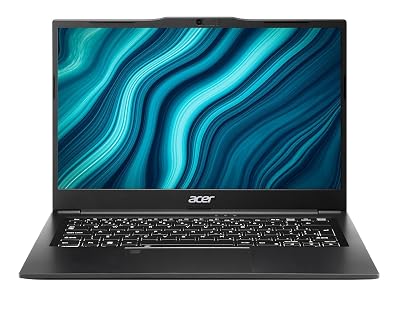
Acer TravelLite Ryzen 5 7430U, 14-inch
Price checked June 2026In stock at publishConfirm live before buying
How to choose a programming and gaming laptop under ₹50,000
RAM first. If you run Docker Desktop with two or three containers, 8GB is genuinely tight: Docker eats 1.5 to 2GB, your IDE another 1GB, and Chrome a couple more, which leaves little for your actual app and triggers constant disk swapping. If your work is Docker, Android Studio, VMs, or data science, prioritise the 16GB Acer. If it is web dev, Python, Java, or college coursework, 8GB on a stronger chip is fine.
Insist on an FHD IPS panel. You stare at text all day, so viewing angles and sharpness matter. Every pick here is FHD IPS or IPS-level. Avoid any sub-50k laptop that does not specify FHD, and steer clear of old HD (1366×768) screens.
You do not need a dedicated GPU to code. VS Code, IntelliJ, Android Studio, Docker, WSL2, Node, Python and Java run on CPU and RAM, not the GPU. A dedicated card only matters for local deep-learning training, 3D rendering, or CUDA work, and for serious AAA gaming. All of those mean stretching to ₹60k+.
512GB SSD is workable, not generous. Windows plus your dev toolchain and Docker images can eat 60GB before you add project files. 512GB leaves roughly 300GB usable, fine if you are disciplined and keep large media on cloud or an external drive.
Decision time
Match the laptop to how you actually work, then check the live price before you buy
Frequently Asked Questions
Is 8GB RAM enough for coding, or do I need 16GB?
For web dev, Python, Java, and college coursework, 8GB works. The moment you run Docker Desktop with a couple of containers, a heavy IDE, and many browser tabs, 8GB gets tight and you will see disk swapping. If that is your workload, get the 16GB Acer Aspire Lite. If you mainly code lighter projects and want a stronger CPU or GPU for the money, 8GB on the HP or Dell is a fair trade.
Can these laptops actually run games?
Yes, light ones. With integrated graphics you can play Valorant, CS2, Rocket League, GTA V on low, and most older or indie titles at 1080p low to medium. The HP 15 with Radeon 660M is clearly the best gamer of the four. What you cannot do is run modern AAA games like Cyberpunk 2077 well, that needs a dedicated RTX GPU, which starts around ₹60,000.
Do I need a dedicated GPU for programming?
For the vast majority of programming, no. IDEs, Docker, WSL2, Node, Python, and Java all run on CPU and RAM. A dedicated GPU only matters for local deep-learning training, 3D rendering, or CUDA work. For ML learning on a budget, do small jobs locally and use free Google Colab or Kaggle GPUs for the heavy training.
Which of these is best for gaming?
The HP 15 with the Ryzen 5 7535U and Radeon 660M. It has the strongest integrated GPU and a hexa-core CPU, so it handles esports titles at smooth frame rates and light games comfortably. The Dell and Acer TravelLite are fine for light esports on low, and the Intel i3 Acer is the weakest for gaming.
Which is best for heavy coding, Docker and data science?
The Acer Aspire Lite with 16GB RAM. At this budget, memory is the bottleneck for container-heavy and data work, and it is the only pick here with 16GB. The six-core i3-1215U is comfortable for WSL2, multiple services, and Jupyter or pandas work, with Colab for the occasional large training run.
Should I wait or stretch my budget to ₹55,000-60,000?
If you can stretch about ₹5,000 to ₹10,000, the picture changes a lot: Ryzen 5 or i5 laptops with 16GB RAM open up around ₹55k, and true gaming laptops with an RTX 3050 start near ₹60k. If gaming or 16GB-plus-strong-CPU is a priority, that stretch is worth it. If your budget is a hard ₹50k, the four picks above are the honest best you can get today.
Is a 512GB SSD enough, or should I get 1TB?
512GB is workable if you are disciplined. Windows plus a full dev toolchain and Docker images can use 60GB or more, leaving roughly 300GB. Keep large videos and datasets on the cloud or an external SSD. Adding a 1TB external drive later is usually cheaper than paying for a 1TB laptop upfront.
Does display type matter for coding?
Yes. You read text all day, so an FHD IPS panel with good viewing angles and sharp text reduces eye strain far more than a cheap HD or TN screen. Every laptop on this list uses an FHD IPS or IPS-level panel. Avoid any sub-₹50k laptop that does not specify FHD.