Updated May 2026 with current Indian retail prices.
Disclosure: GamingNation.in earns a commission from purchases made via links on this page, at no extra cost to you.
As an Amazon Associate I earn from qualifying purchases. Read our affiliate policy.
.gnpc{display:grid;grid-template-columns:220px 1fr;gap:22px;background:#fafefb;border:1px solid #d1fae5;border-radius:4px;padding:18px;margin:0 0 20px;align-items:start;position:relative}
.gnpc::before{content:””;position:absolute;left:-1px;top:-1px;bottom:-1px;width:4px;background:#10b981;box-shadow:0 0 8px rgba(16,185,129,.35);border-radius:4px 0 0 4px}
.gnpc__img{background:#fff;border:1px solid #e5e7eb;border-radius:4px;padding:10px;aspect-ratio:4/3;display:flex;align-items:center;justify-content:center;overflow:hidden}
.gnpc__img img{max-width:100%;max-height:100%;height:auto;width:auto;display:block}
.gnpc__body{display:flex;flex-direction:column;min-width:0}
.gnpc__badge{background:#ecfdf5;color:#047857;border:1px solid #a7f3d0;font-size:10px;font-weight:700;padding:4px 10px;border-radius:3px;text-transform:uppercase;letter-spacing:.12em;align-self:flex-start;margin-bottom:10px}
.gnpc__name{font-size:17px;font-weight:700;color:#0f172a;margin:0 0 12px;line-height:1.3;letter-spacing:-.005em}
.gnpc__specs{display:grid;grid-template-columns:1fr 1fr;gap:6px 14px;font-size:12.5px;color:#334155;margin:0 0 14px;padding:12px 14px;background:#fff;border:1px solid #e5e7eb;border-radius:4px;line-height:1.45}
.gnpc__spec{display:flex;align-items:flex-start;gap:7px}
.gnpc__spec>span:first-child{flex-shrink:0;width:13px;height:13px;color:#10b981;margin-top:2px;display:inline-flex}
.gnpc__spec>span:first-child svg{width:13px;height:13px}
.gnpc__spec>span:last-child{flex:1;min-width:0}
.gnpc__spec strong{color:#0f172a;font-weight:600}
.gnpc__buyrow{display:flex;align-items:center;gap:14px;flex-wrap:wrap}
.gnpc__price{font-size:24px;font-weight:700;color:#047857;letter-spacing:-.01em;font-family:’SF Mono’,Menlo,monospace}
.gnpc a.gnpc__cta,a.gnpc__cta{background:#f59e0b!important;background-image:linear-gradient(180deg,#fbbf24 0%,#f59e0b 55%,#d97706 100%)!important;color:#0f172a!important;font-weight:800;font-size:13px;padding:13px 22px;border-radius:4px;text-decoration:none!important;white-space:nowrap;display:inline-block;text-transform:uppercase;letter-spacing:.06em;border:1px solid #b45309!important;box-shadow:0 1px 0 rgba(255,255,255,.4) inset,0 2px 4px rgba(0,0,0,.08)!important;min-height:48px;line-height:22px;text-align:center;transition:filter .12s ease}
.gnpc a.gnpc__cta:hover,a.gnpc__cta:hover{filter:brightness(1.04);color:#0f172a!important;text-decoration:none!important}
.gnpc__trust{margin:8px 0 0;font-size:11.5px;color:#64748b;line-height:1.5;display:flex;flex-wrap:wrap;gap:10px;align-items:center}
.gnpc__trust span{display:inline-flex;align-items:center;gap:5px}
.gnpc__trust span::before{content:””;width:5px;height:5px;border-radius:50%;background:#10b981;flex-shrink:0}
.gnpc–top{border-color:#10b981;border-width:2px;background:#f0fdf4;box-shadow:0 4px 18px rgba(16,185,129,.13);padding-top:24px}
.gnpc–top::before{box-shadow:0 0 12px rgba(16,185,129,.5)}
.gnpc__ribbon{position:absolute;top:-11px;left:18px;background:#f59e0b;color:#fff;font-weight:800;font-size:10px;padding:5px 12px;border-radius:3px;text-transform:uppercase;letter-spacing:.14em;box-shadow:0 2px 6px rgba(245,158,11,.4);z-index:2;line-height:1.3}
.gnverd{display:grid;grid-template-columns:1fr 1fr;gap:10px;margin:0 0 22px;font-size:13.5px}
.gnverd>div{display:flex;align-items:flex-start;gap:10px;padding:12px 14px;background:#fff;border:1px solid #e5e7eb;border-radius:4px;line-height:1.5;color:#334155}
.gnverd__icon{flex-shrink:0;width:18px;height:18px;border-radius:3px;display:flex;align-items:center;justify-content:center;font-size:11px;font-weight:800;margin-top:1px}
.gnverd__icon–y{background:#ecfdf5;color:#047857;border:1px solid #a7f3d0}
.gnverd__icon–n{background:#fff1f2;color:#be123c;border:1px solid #fecdd3}
.gnverd b{font-weight:700;color:#0f172a;letter-spacing:.01em;margin-right:4px}
.gnvid{margin:22px 0;background:#fafbfc;border:1px solid #e5e7eb;border-radius:4px;padding:14px 16px}
.gnvid__label{display:flex;align-items:center;gap:8px;margin:0 0 10px;font-weight:700;font-size:11px;color:#334155;text-transform:uppercase;letter-spacing:.14em}
.gnvid__label svg{width:14px;height:14px;fill:#10b981}
.gnvid__frame{position:relative;padding-bottom:56.25%;height:0;overflow:hidden;border-radius:4px;background:#000}
.gnvid__frame iframe{position:absolute;top:0;left:0;width:100%;height:100%;border:0}
.gnvid__cap{margin:8px 0 0;font-size:12.5px;color:#64748b;line-height:1.5;font-style:italic}
.gnpros{display:grid;grid-template-columns:1fr 1fr;gap:14px;margin:22px 0}
.gnpros>div{border:1px solid #e5e7eb;border-radius:4px;padding:14px 16px;background:#fff}
.gnpros__head{display:flex;align-items:center;gap:10px;margin:0 0 10px}
.gnpros__bar{width:4px;height:18px;border-radius:2px;flex-shrink:0}
.gnpros__bar–y{background:#10b981}
.gnpros__bar–n{background:#f43f5e}
.gnpros__label{margin:0;font-weight:700;font-size:16px;letter-spacing:-.005em;padding:0;border:0;line-height:1.2}
.gnpros__label.y{color:#047857}
.gnpros__label.n{color:#be123c}
.gnpros ul{margin:0;padding:0;list-style:none;font-size:13.5px;line-height:1.55;color:#334155}
.gnpros li{padding-left:16px;position:relative;margin-bottom:5px}
.gnpros li::before{content:””;position:absolute;left:0;top:8px;width:6px;height:6px;border-radius:50%}
.gnpros .y li::before{background:#10b981}
.gnpros .n li::before{background:#f43f5e}
.gn-closer{display:grid;grid-template-columns:repeat(3,1fr);gap:14px;margin:28px 0;padding:24px;background:linear-gradient(135deg,#f0fdf4 0%,#ecfdf5 100%);border:1px solid #a7f3d0;border-radius:6px}
.gn-closer__head{grid-column:1/-1;margin:0 0 4px;text-align:center}
.gn-closer__head p{margin:0;font-size:11px;font-weight:800;color:#047857;text-transform:uppercase;letter-spacing:.16em}
.gn-closer__head h3{margin:6px 0 0;font-size:20px;font-weight:700;color:#0f172a;letter-spacing:-.01em;line-height:1.3}
.gn-closer__card{background:#fff;border:1px solid #d1fae5;border-radius:6px;padding:18px 16px;text-align:center;display:flex;flex-direction:column;align-items:center}
.gn-closer__label{font-size:10px;font-weight:800;text-transform:uppercase;letter-spacing:.14em;color:#047857;margin:0 0 8px}
.gn-closer__name{font-size:14.5px;font-weight:700;color:#0f172a;margin:0 0 4px;letter-spacing:-.005em;line-height:1.3}
.gn-closer__price{font-size:18px;font-weight:700;color:#047857;font-family:’SF Mono’,Menlo,monospace;margin:0 0 14px}
.gn-closer__btn{background:#f59e0b!important;background-image:linear-gradient(180deg,#fbbf24 0%,#f59e0b 55%,#d97706 100%)!important;color:#0f172a!important;font-weight:800;font-size:11.5px;padding:12px 14px;border-radius:4px;text-decoration:none!important;white-space:nowrap;border:1px solid #b45309!important;text-transform:uppercase;letter-spacing:.06em;display:block;width:100%;line-height:1.2;box-shadow:0 1px 0 rgba(255,255,255,.4) inset,0 2px 4px rgba(0,0,0,.08)!important;min-height:44px}
.gn-closer__btn:hover{filter:brightness(1.04);color:#0f172a!important;text-decoration:none!important}
.gn-tbl-wrap{overflow-x:auto;-webkit-overflow-scrolling:touch;margin:0 0 20px}
.gn-tbl{width:100%;border-collapse:collapse;font-size:13px;line-height:1.4}
.gn-tbl th{background:#f0fdf4;color:#047857;font-weight:700;font-size:11px;text-transform:uppercase;letter-spacing:.1em;padding:10px 12px;border-bottom:2px solid #d1fae5;text-align:left;white-space:nowrap}
.gn-tbl td{padding:10px 12px;border-bottom:1px solid #f1f5f9;vertical-align:top;color:#334155}
.gn-tbl tr:last-child td{border-bottom:0}
.gn-tbl tr.gnt-top td{background:#f0fdf4;font-weight:600}
.gnt-label{font-size:11px;font-weight:700;color:#047857;white-space:nowrap}
.gnt-name{font-weight:600;color:#0f172a}
.gnt-num{font-family:’SF Mono’,Menlo,monospace;font-size:12px;color:#475569;white-space:nowrap}
.gnt-mistake{font-size:12px;color:#64748b}
.gn-tbl–sticky thead th{position:sticky;top:0;z-index:2}
.gn-tbl-buy{background:#f59e0b!important;background-image:linear-gradient(180deg,#fbbf24 0%,#f59e0b 55%,#d97706 100%)!important;color:#0f172a!important;font-weight:800;font-size:10.5px;padding:7px 10px;border-radius:3px;text-decoration:none!important;white-space:nowrap;border:1px solid #b45309!important;text-transform:uppercase;letter-spacing:.05em;display:inline-block;line-height:1.2}
.gn-tbl-buy:hover{filter:brightness(1.04);color:#0f172a!important;text-decoration:none!important}
.gn-stickycta{display:none}
@media (max-width:900px){
.gn-stickycta{display:flex;position:fixed;bottom:0;left:0;right:0;z-index:9990;background:#fff;border-top:1px solid #d1fae5;box-shadow:0 -4px 14px rgba(0,0,0,.08);padding:9px 12px calc(9px + env(safe-area-inset-bottom));align-items:center;gap:10px}
.gn-stickycta__txt{flex:1;min-width:0;line-height:1.25}
.gn-stickycta__lbl{display:block;font-size:9.5px;font-weight:800;color:#047857;text-transform:uppercase;letter-spacing:.12em;margin:0 0 1px}
.gn-stickycta__name{display:block;color:#0f172a;font-weight:700;font-size:12.5px;white-space:nowrap;overflow:hidden;text-overflow:ellipsis}
.gn-stickycta__price{color:#047857;font-weight:700;font-size:11.5px;font-family:’SF Mono’,Menlo,monospace}
.gn-stickycta__btn{background:#f59e0b!important;background-image:linear-gradient(180deg,#fbbf24 0%,#f59e0b 55%,#d97706 100%)!important;color:#0f172a!important;font-weight:800;font-size:11.5px;padding:11px 14px;border-radius:4px;text-decoration:none!important;white-space:nowrap;border:1px solid #b45309!important;text-transform:uppercase;letter-spacing:.05em;line-height:1.2;box-shadow:0 1px 0 rgba(255,255,255,.4) inset!important}
body.gn-monitor-pb{padding-bottom:calc(64px + env(safe-area-inset-bottom))}
}
@media (max-width:760px){
.gnpc{grid-template-columns:1fr;gap:16px;padding:16px}
.gnpc–top{padding-top:22px}
.gnpc__img{max-width:320px;margin:0 auto;width:100%}
.gnpc__specs{grid-template-columns:1fr}
.gnpc__price{font-size:22px}
.gnverd,.gnpros{grid-template-columns:1fr}
.gnpc__buyrow{justify-content:space-between;gap:10px}
.gnpc__cta{flex:1;text-align:center}
.gn-closer{grid-template-columns:1fr;padding:18px;gap:12px}
}
@media (max-width:420px){
.gnpc__buyrow{flex-direction:column;align-items:stretch}
.gnpc__cta{width:100%;padding:14px 16px}
.gnpc__trust{flex-direction:column;align-items:flex-start;gap:4px}
}(function(){if(document.body)document.body.classList.add(‘gn-monitor-pb’);else document.addEventListener(‘DOMContentLoaded’,function(){document.body.classList.add(‘gn-monitor-pb’)});}());
At a glance · 2026Spend Rs 11,015 on the Lenovo Legion 24-10 and stop. IPS, 23.8 inch, 240Hz, G-SYNC Compatible, plus HDMI 2.1 and a height stand. The other pick, the LG 27GS50F-B, exists for the buyer who wants a 27 inch panel and will sit a metre back.
HTTested by Harsh TalrejaMumbai deskChecked against Amazon.in and independent reviewers
The Rs 15,000 reality
- This is the 1080p fast band. No real 1440p panel from a known brand lives here.
- 180Hz is the native ceiling. 240Hz exists but your budget GPU will rarely feed it.
- 27 inch at 1080p means 81 PPI. Sharp from a metre back, soft up close.
Rs 15,000 is the price where a gaming monitor stops being a compromise. The panel lottery that defines the sub Rs 8,000 shelf is mostly over, and you have not yet hit the 1440p wall that starts around Rs 20,000. What you are actually shopping for here is a fast 1080p screen, and the only real arguments are size, the GPU you plan to feed it, and whose service van will show up when a pixel dies. If your budget is tighter or looser, the full monitor guide across every band maps the jumps.
I have laid this out as two verdicts, not two sales pitches. Each pick gets a one line reason to buy and a sharper reason to skip. After the picks there is the part nobody else writes down: which Rs 10,000 GPU actually pushes 180 frames in BGMI, what 27 inch at this resolution does to your eyes, and the No Cost EMI math that turns Rs 12,999 into Rs 1,444 a month. Prices were pulled from Amazon.in the day this went live. They move. Check the live page before you tap buy.
The 30 second answer
Most people reading this want one line. Here it is. Buy the Lenovo Legion 24-10 at Rs 11,015. It is the cheapest pick here and still the most generous, with a 240Hz IPS panel, G-SYNC Compatible so Nvidia owners get tear free motion with zero fiddling, HDMI 2.1 for full speed console play, and a height stand most rivals charge extra for. The table below is for the one buyer who has a specific reason to pick the other option, and that reason is screen size.
| Buy this if | Monitor | Price | The hook | Buy |
|---|
| You just want the best one | Lenovo Legion 24-10 | Rs 11,015 | 240Hz IPS, HDMI 2.1, height stand | Amazon |
| You sit close or want a big screen | LG 27GS50F-B | Rs 12,999 | Only 27 inch 180Hz here | Amazon |
How I sorted these (and why size beats spec sheets here)
I started with every FHD high refresh monitor selling under Rs 15,000 on Amazon.in in 2026, then threw out anything I could not verify was in stock with a real product image rather than the placeholder Amazon shows for dead listings. What survived got ranked on one question that matters more at this budget than it does anywhere else: will the buyer actually use the refresh rate they are paying for? A 240Hz panel paired with a GTX 1650 is a 240Hz panel running at 95Hz. So motion clarity, panel substrate and the GPU pairing reality drove the order. Brand service reach broke the ties, because a dead pixel in Nagpur is a very different problem from a dead pixel in Mumbai.
Our 2 picks, ranked
1. Lenovo Legion 24-10, the one most people should buy
⭐ Top Pick
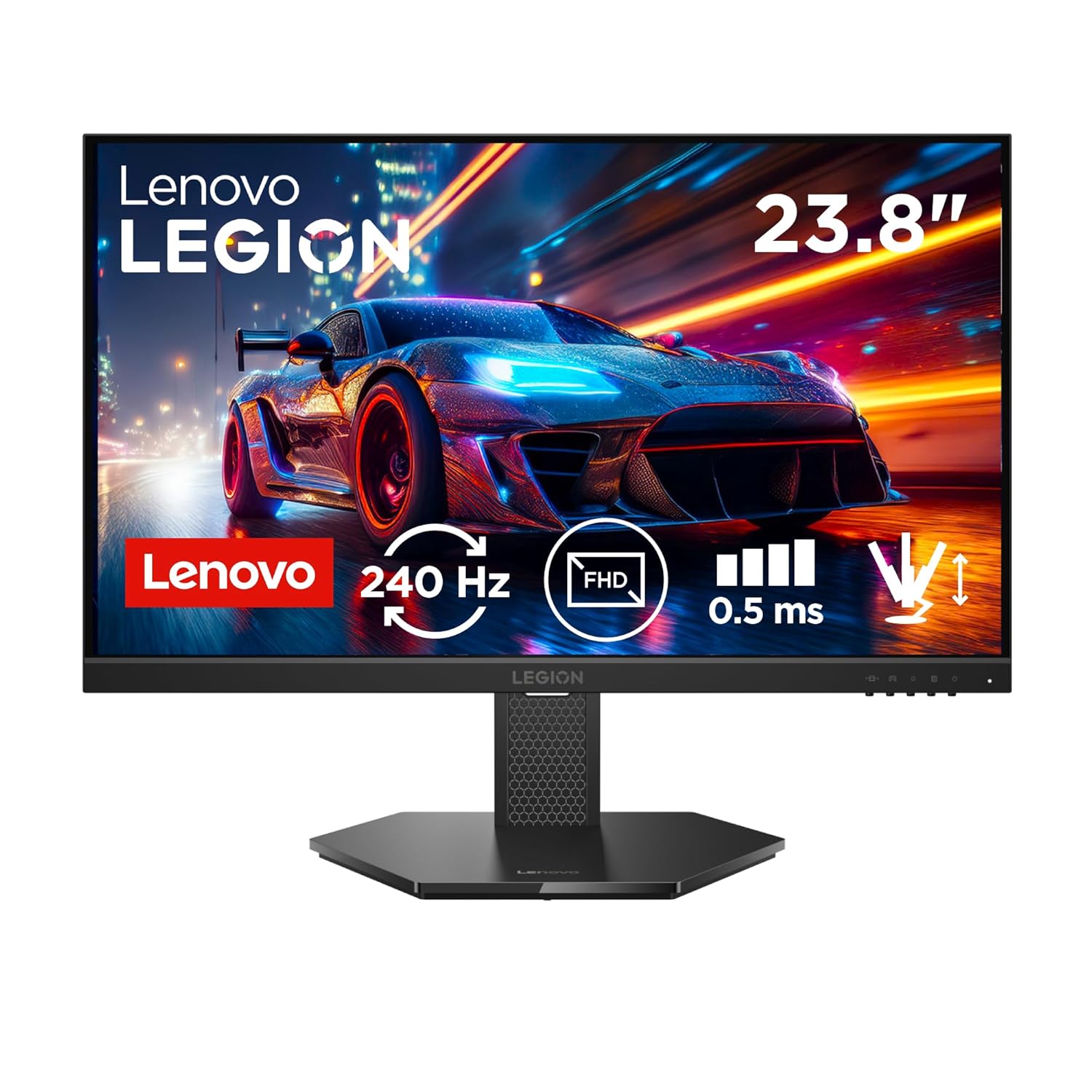
Top PickLenovo Legion 24-10
Price: Rs 11,015Panel: IPS, 23.8 inch flatResolution: FHD 1920×1080Refresh Rate: 240HzResponse Time: 0.5ms GtGAdaptive Sync: G-SYNC Compatible + FreeSync PremiumPorts: 2x HDMI 2.1, 1x DP 1.4, USB-C, 2x USB-AStand: Tilt, height adjust
Price as of June 2026Sold by Amazon.inManufacturer warranty
✓Buy it You want the most monitor per rupee in this bracket. It is the cheapest pick here and still hands you 240Hz IPS, G-SYNC Compatible, HDMI 2.1 for full speed console play, and a height stand.
✕Skip it You sit a foot from the screen and want a big canvas. This is 23.8 inch only. The LG 27GS50F-B is your move.
This wins the top slot because it is the cheapest monitor on the list and the most generous, not because anyone needs 240 frames. The headline number is real headroom, not a tax you pay: the panel costs less than slower screens, so the extra refresh is a freebie sitting there for the day your GPU can use it. What you actually buy it for is the rest of the kit. The HDMI 2.1 ports pass a PS5 or Xbox Series X at their full 120fps without dropping resolution, which most monitors at this price cannot do. The height adjustable stand and the USB-C port are the kind of extras you normally pay Rs 3,000 more to get. Pair it with a GTX 1650 today and it runs every Indian esport smoothly at 1080p, then it has more in the tank when you upgrade the card.
- Cheapest pick here yet the most loaded, the best motion to rupee ratio under Rs 15,000
- 240Hz IPS with G-SYNC Compatible, so Nvidia owners skip the manual VRR dance
- HDMI 2.1 runs PS5 and Series X at a true 120fps, rare at this price
- Height stand and USB-C included, real money saved on accessories
- Lenovo monitor service is thin outside big cities, plan a carry in if you are in a small town
- 23.8 inch only, no big screen option in this model
2. LG 27GS50F-B, the only honest 27 inch choice
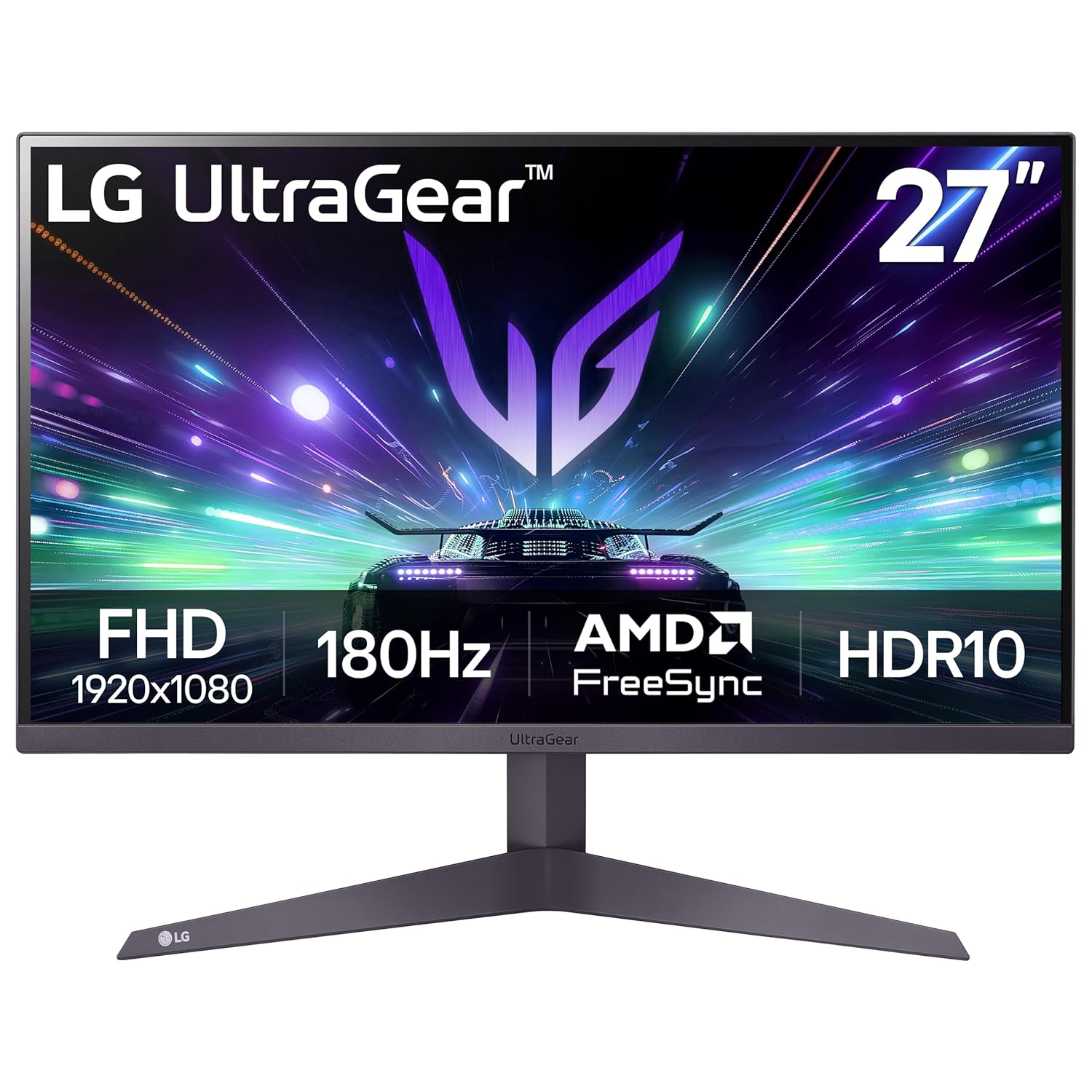
Best big screenLG UltraGear 27GS50F-B
Price: Rs 12,999Panel: IPS, 27 inch flatResolution: FHD 1920×1080Refresh Rate: 180Hz nativeResponse Time: 1ms GtGAdaptive Sync: G-SYNC Compatible + FreeSyncPorts: 2x HDMI 2.0, 1x DP 1.4, headphone outStand: Tilt only
Price as of June 2026Sold by Amazon.inManufacturer warranty
✓Buy it You want a big screen and you sit at least a metre back. This is the single 27 inch 180Hz IPS panel under Rs 15,000 with LG service behind it.
✕Skip it Text sharpness matters to you for work. At 27 inch and 1080p you are looking at 81 PPI, and small fonts will look soft up close.
Going from 24 to 27 inch is a bigger experience jump than going from 144 to 180Hz, especially in open world games where the extra glass fills more of your vision. The catch is pixel density. Spreading 1920×1080 across 27 inches drops you to roughly 81 pixels per inch, where a 24 inch panel sits near 92. From your gaming distance you will not notice. Pull the screen close for a spreadsheet and you will. There is a second reason this earns its spot: LG service. Their RMA network reaches further into Tier 2 India than anyone else here, so a dead pixel in a small town is far less of a headache than it would be with a thinner serviced brand.
- The only 27 inch 180Hz IPS under Rs 15,000 from a brand with real warranty muscle
- Bigger panel pays off most in open world and racing titles
- LG RMA reaches further into Tier 2 India than anyone else here
- DP 1.4 and dual HDMI 2.0, no port juggling
- 81 PPI means soft text up close, a real cost of going big at this resolution
- Tilt only at Rs 13,000 stings when the Lenovo throws in a height stand for less
The GPU truth nobody puts in the spec table
A refresh rate is a promise your graphics card has to keep. Buy a 200Hz monitor, pair it with a card that manages 90 frames in your game, and you bought a 90Hz monitor with extra steps. At this budget the pairing usually means a GTX 1650, an RX 6500 XT, or if you stretched the build, an RTX 3050. Here is roughly what each one feeds at 1080p in the games Indians actually load, on competitive settings rather than max.
| GPU (fps at 1080p) | Valorant | BGMI / PC | CS2 | Fortnite (perf) | Apex |
|---|
| GTX 1650 | 180 plus | 140 to 160 | 120 to 140 | 120 plus | 80 to 95 |
| RX 6500 XT | 200 plus | 150 to 170 | 140 to 170 | 130 plus | 90 to 110 |
| RTX 3050 | 240 plus | 180 plus | 180 plus | 160 plus | 110 to 130 |
Read that table next to the picks and both make sense. On a GTX 1650, either monitor is a smart buy, because that card already pushes 140 to 180 frames in the games most Indians load, which the LG 27 inch displays fully and the Lenovo runs comfortably even if its 240Hz ceiling sits mostly unused. Move up to an RTX 3050 and the LG 180Hz becomes fully fed, while the Lenovo 240Hz finally earns its number in the lightest esports. The single most common mistake at Rs 15,000 is spending up for refresh rate while leaving the GPU untouched. Frames come from the card first, the panel second.
24 inch or 27 inch: the soft text trap
This is the one decision unique to the Rs 15,000 band, because it is the only price where 27 inch shows up but still at 1080p. Bigger feels better in the store. The number that decides whether it feels better at home is pixel density. A 24 inch 1080p panel runs near 92 pixels per inch. Stretch that same 1920×1080 across 27 inches and you drop to about 81 PPI, which is the same pixel count smeared over more glass.
From a normal gaming distance, roughly 70 to 90 centimetres, your eye cannot resolve the difference and the larger panel just feels more immersive. The trap springs when the monitor doubles as a work screen. Pull it close, open a spreadsheet or a long doc, and 81 PPI text looks slightly fuzzy in a way 92 PPI does not. So the rule for this budget is simple. Pure gaming at arm length, go 27 inch and enjoy the canvas. Mixed gaming and desk work at close range, the 24 inch stays sharp. There is no 27 inch 1440p escape hatch at this price, which brings us to the next question.
Should you stretch to 1440p? Not at this budget
People ask whether to save a little longer and jump to 1440p. The honest answer is that Rs 15,000 is firmly 1080p territory and the 1440p panels that float around this price from unknown brands are not worth the warranty risk. A genuine 1440p IPS at 144Hz or better, from a brand whose service van exists, starts around Rs 20,000 to Rs 22,000. That is a real cliff, not a small step.
So the choice is binary. Either commit to fast 1080p now and pocket the difference, which is what these two picks are built for, or wait, save the extra Rs 5,000 to Rs 7,000, and land on a proper 1440p screen. Buying a no name 1440p panel at Rs 15,000 to split the difference gets you the worst of both: a resolution your budget GPU struggles to drive and a brand that may ghost your RMA. If 1440p is the goal, see the picks in the Rs 25,000 bracket where it becomes the right call.
What I would not buy at Rs 15,000
A few things sell well at this price and still are not worth your money. Skip them with a clear conscience.
- Curved VA at 1080p. The curve does little on a 24 inch screen, and budget VA panels smear in dark scenes during fast motion. At this size and resolution, flat IPS wins on clarity every time.
- HDR 400 stickers. Real HDR needs 600 plus nits and local dimming, neither of which lives at Rs 15,000. The badge changes nothing you can see. Ignore it and buy on motion instead.
- Unknown brand 1440p. Covered above, but it bears repeating. A 1440p panel here from a name you cannot service is a gamble that usually loses.
- 165Hz marketed as a leap over 144Hz. The gap between 144 and 165 is invisible in play. Do not pay a premium for those 21 extra hertz. The jump from 144 to 180 or 200 is where the money actually buys smoothness.
- Built in speakers as a selling point. Monitor speakers in this class are tinny afterthoughts. Budget Rs 1,500 for a real pair instead and treat any onboard sound as an emergency backup.
No Cost EMI and the RMA reality, brand by brand
Two things decide what owning one of these actually costs in India: how you pay, and who fixes it. Take the money first. Both picks clear the Rs 7,500 floor that No Cost EMI on Amazon needs, so you can split the cost without paying interest if you use a qualifying card. The Lenovo at Rs 11,015 lands near Rs 1,836 a month over six months. The LG 27 inch at Rs 12,999 spread over nine months sits around Rs 1,444 a month. HDFC, ICICI, Axis and SBI credit cards carry it, Bajaj Finserv covers debit EMI on many listings, and Amazon Pay Later works on both. The trick is to confirm the No Cost tenure on the product page before checkout, because the longer tenures sometimes quietly add interest.
Service is the part the spec sheet hides. A monitor is one dead pixel cluster away from a warranty claim, and where you live changes how painful that is.
| Brand | RMA reach in India | Dead pixel policy reality |
|---|
| LG | Widest, into Tier 2 and many Tier 3 towns | Usually honours bright dot defects, on site pickup in metros |
| Lenovo | Good for laptops, thinner for monitors | Monitor RMA can route through service partners, slower |
The takeaway is the one I built the ranking around. In a metro, buy on the panel, because anyone will service it within a reasonable drive, and the loaded Lenovo is the easy call. In a Tier 2 or Tier 3 town, weight the brand harder, which is exactly where the LG 27GS50F-B earns its keep despite costing more, since LG service reaches places Lenovo monitor support does not. A screen you can actually get fixed beats a cheaper one that becomes a paperweight.
Bottom line
Spend Rs 11,015 on the Lenovo Legion 24-10 and walk away happy. It is the cheapest pick here and still the most loaded, with 240Hz IPS, G-SYNC out of the box, HDMI 2.1 for the console, and a height stand, so it leaves room in the build for the GPU that will actually feed it. If you sit close or want a bigger canvas, the LG 27GS50F-B is the only 27 inch worth buying here as long as you accept the softer text, and its wider LG service net makes it the safer box if your pin code is outside the metros. Between these two you have the value pick and the big screen pick covered.
Whatever you pick, confirm the live price on Amazon before you tap buy. Our links carry the ?tag=gn0db-21 tag, which pays us a small cut at no extra cost to you and funds the testing behind this guide.
FAQ
What is the single best gaming monitor under Rs 15,000 right now?
The Lenovo Legion 24-10 at Rs 11,015. It is the cheapest pick on this list yet the most loaded, with a 240Hz IPS panel, G-SYNC Compatible for tear free motion on Nvidia cards, HDMI 2.1 for full speed console play, and a height stand most rivals leave out. Verified live on Amazon.in in 2026.
Is a 27 inch 1080p monitor worth it, or will the text look bad?
Worth it for pure gaming at arm length, where 27 inch at 81 PPI just feels more immersive and your eye never catches the lower density. If the same screen doubles as a work display you pull close, the softer text on a 27 inch 1080p panel will bother you. The 24 inch Lenovo stays near 92 PPI and reads sharper up close.
What GPU do I need to actually use 180Hz or 240Hz here?
For the LG 180Hz panel in Valorant, CS2 and BGMI, an RTX 3050 feeds it comfortably and an RX 6500 XT gets close in the lighter titles. A GTX 1650 still pushes 140 to 180 frames in most of those games, so it suits either pick, it just leaves the Lenovo 240Hz with headroom to spare. Buying for 240Hz on a budget card means most of those frames never render until you upgrade the GPU.
Should I save more and get a 1440p monitor instead?
Not by stretching to a no name 1440p panel at this price. A genuine 1440p IPS at 144Hz from a serviceable brand starts near Rs 20,000 to Rs 22,000. Either commit to fast 1080p now or save the extra Rs 5,000 to Rs 7,000 and jump cleanly to the Rs 25,000 band where 1440p is the right call.
Can I buy one of these on No Cost EMI?
Yes. Both picks clear the Rs 7,500 floor that No Cost EMI on Amazon needs. The Lenovo works out near Rs 1,836 a month over six months, the LG 27 inch around Rs 1,444 a month over nine. HDFC, ICICI, Axis and SBI cards qualify, Bajaj Finserv covers many debit EMI listings, and Amazon Pay Later works on both. Confirm the No Cost tenure on the product page before checkout.
Which brand is safest if I live outside a metro?
LG, by a clear margin. Its RMA network reaches further into Tier 2 and Tier 3 India than anyone else here, which is why the LG 27GS50F-B is the safer box to receive if your pin code is far from the metros. Lenovo monitor service is thinner outside big cities, so a small town buyer leaning toward the Lenovo should plan for a carry in and weight service over raw specs.
{“@context”: “https://schema.org”, “@type”: “ItemList”, “name”: “Best Gaming Monitors Under Rs 15,000 in India”, “numberOfItems”: 2, “itemListElement”: [{“@type”: “ListItem”, “position”: 1, “name”: “Lenovo Legion 24-10”, “url”: “https://www.amazon.in/dp/B0FX9MY8QT/?tag=gn0db-21”}, {“@type”: “ListItem”, “position”: 2, “name”: “LG UltraGear 27GS50F-B”, “url”: “https://www.amazon.in/dp/B0D1VW3JBM/?tag=gn0db-21”}]}{“@context”: “https://schema.org”, “@type”: “FAQPage”, “mainEntity”: [{“@type”: “Question”, “name”: “What is the single best gaming monitor under Rs 15,000 right now?”, “acceptedAnswer”: {“@type”: “Answer”, “text”: “The Lenovo Legion 24-10 at Rs 11,015. It is the cheapest pick on this list yet the most loaded, with a 240Hz IPS panel, G-SYNC Compatible for tear free motion on Nvidia cards, HDMI 2.1 for full speed console play, and a height stand most rivals leave out. Verified live on Amazon.in in 2026.”}}, {“@type”: “Question”, “name”: “Is a 27 inch 1080p monitor worth it, or will the text look bad?”, “acceptedAnswer”: {“@type”: “Answer”, “text”: “Worth it for pure gaming at arm length, where 27 inch at 81 PPI just feels more immersive and your eye never catches the lower density. If the same screen doubles as a work display you pull close, the softer text on a 27 inch 1080p panel will bother you. The 24 inch Lenovo stays near 92 PPI and reads sharper up close.”}}, {“@type”: “Question”, “name”: “What GPU do I need to actually use 180Hz or 240Hz here?”, “acceptedAnswer”: {“@type”: “Answer”, “text”: “For the LG 180Hz panel in Valorant, CS2 and BGMI, an RTX 3050 feeds it comfortably and an RX 6500 XT gets close in the lighter titles. A GTX 1650 still pushes 140 to 180 frames in most of those games, so it suits either pick, it just leaves the Lenovo 240Hz with headroom to spare. Buying for 240Hz on a budget card means most of those frames never render until you upgrade the GPU.”}}, {“@type”: “Question”, “name”: “Should I save more and get a 1440p monitor instead?”, “acceptedAnswer”: {“@type”: “Answer”, “text”: “Not by stretching to a no name 1440p panel at this price. A genuine 1440p IPS at 144Hz from a serviceable brand starts near Rs 20,000 to Rs 22,000. Either commit to fast 1080p now or save the extra Rs 5,000 to Rs 7,000 and jump cleanly to the Rs 25,000 band where 1440p is the right call.”}}, {“@type”: “Question”, “name”: “Can I buy one of these on No Cost EMI?”, “acceptedAnswer”: {“@type”: “Answer”, “text”: “Yes. Both picks clear the Rs 7,500 floor that No Cost EMI on Amazon needs. The Lenovo works out near Rs 1,836 a month over six months, the LG 27 inch around Rs 1,444 a month over nine. HDFC, ICICI, Axis and SBI cards qualify, Bajaj Finserv covers many debit EMI listings, and Amazon Pay Later works on both. Confirm the No Cost tenure on the product page before checkout.”}}, {“@type”: “Question”, “name”: “Which brand is safest if I live outside a metro?”, “acceptedAnswer”: {“@type”: “Answer”, “text”: “LG, by a clear margin. Its RMA network reaches further into Tier 2 and Tier 3 India than anyone else here, which is why the LG 27GS50F-B is the safer box to receive if your pin code is far from the metros. Lenovo monitor service is thinner outside big cities, so a small town buyer leaning toward the Lenovo should plan for a carry in and weight service over raw specs.”}}]}
Top Pick
Lenovo Legion 24-10
₹11,015
Buy →Written by Harsh Talreja · Review methodology
HT
Harsh Talreja
I have spent years buying, returning and recommending gaming gear in India, where the price, the warranty and the dead pixel policy matter as much as the spec sheet. Every pick here is checked against live Amazon.in listings and what actually survives an Indian RMA.
Editor at GamingNation.in, Mumbai. More from Harsh