Best Gaming Monitor Under 20000 India 2026: QHD 1440p Picks

Harsh Talreja
27 Min Read
At a glance · April 2026

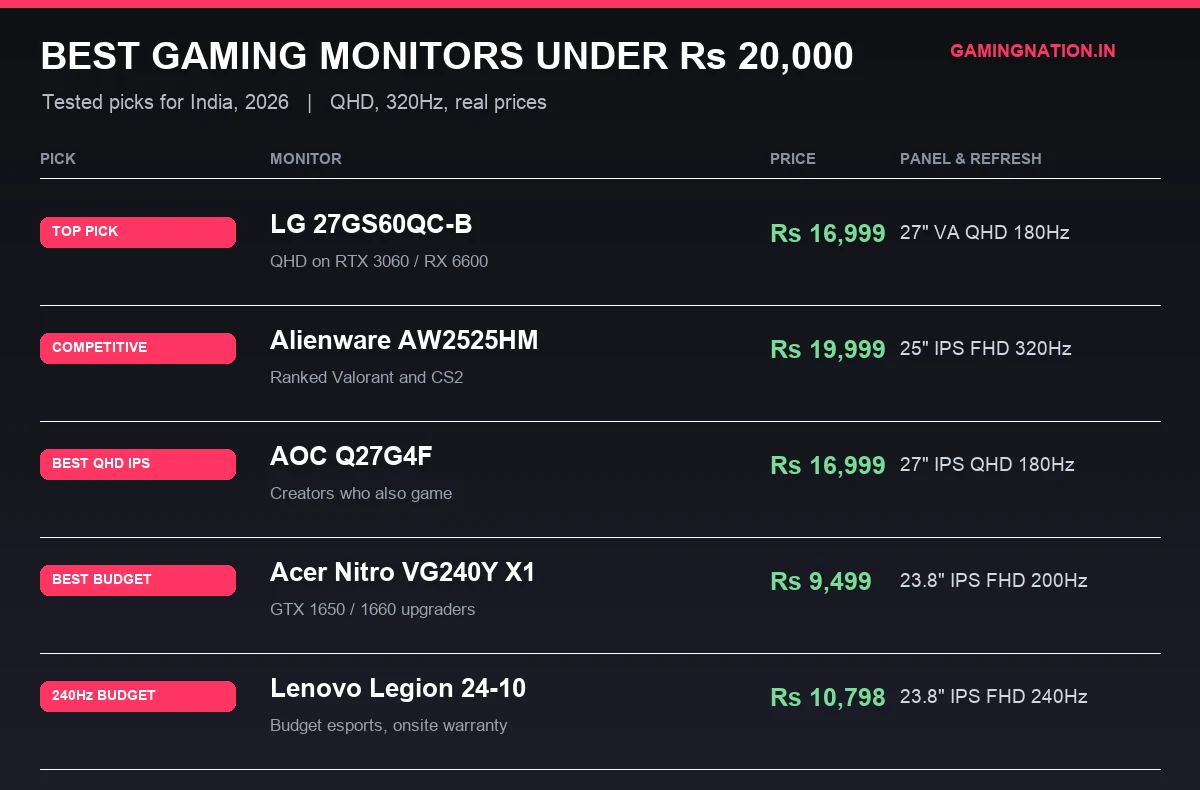
Best overall: LG 27GS60QC-B at Rs 16,999 (QHD 180Hz VA curved, RTX 3060 / RX 6600 sweet spot). Best for ranked Valorant: Alienware AW2525HM at Rs 19,999. Best budget: Acer Nitro VG240Y X1 at Rs 9,499.

Key facts

  • QHD 1440p 180Hz in India starts at Rs 16,999, down from Rs 24,000 a year ago.
  • Alienware AW2525HM hits 320Hz over DisplayPort with 0.5ms GtG verified.
  • Acer Nitro VG240Y X1 at Rs 9,499 is the cheapest 200Hz IPS in India.
  • PS5 outputs 1440p at 120Hz cleanly over HDMI 2.0 since Sept 2022, no HDMI 2.1 panel required.
  • Strongest Tier 2 service network: LG, Samsung, Lenovo.
  • AOC, MSI and BenQ need courier returns to Mumbai or Bangalore.

QHD 1440p gaming monitors have crossed a price barrier in India that nobody expected this fast. The LG 27GS60QC-B is Rs 16,999 right now, a spec sheet that would have cost Rs 25,000 a year ago. Here are the best gaming monitors under Rs 20,000 in India right now, matched to your GPU.

Contents
Quick comparison tableMatch the monitor to your GPU before you buyNot sure which GPU you have?The QHD shift, what changed in 2026Gaming monitor guide / 2026LG 27GS60QC-B: the QHD 1440p panel that broke the price barrierAlienware AW2525HM: the 320Hz Fast IPS for Valorant grindersAOC Q27G4F: the QHD IPS pick when you can find stockAcer Nitro VG240Y X1: the 200Hz IPS that costs less than your headsetLenovo Legion 24-10: 240Hz at half the Alienware priceBenQ Mobiuz EX2510S: the multimedia pick if you have no separate speakersAOC 24G2SP: the safe IPS pick for GTX 1660 ownersNear-miss: Samsung Odyssey G5 LS27DG502EW: worth the wait if you can hold out for sale5 mistakes Indian buyers make in this price band24 inch vs 27 inch, which size to pickIPS vs VA, which panel type to pickLG 27GS60QC-B vs AOC Q27G4F, which QHD pick under Rs 17,000Best monitor for PS5 and Xbox Series X under Rs 20,000Best monitor for creator-gamers under Rs 20,000Warranty and service network by brandFrequently Asked QuestionsIs 144Hz enough for gaming in 2026?Should I buy 1080p or 1440p in 2026?FreeSync vs G-Sync, which one matters?Is QHD 1440p worth it for a GTX 1660 Super?Can I connect a PS5 to the LG 27GS60QC-B?Is 320Hz overkill for Valorant?Does the BenQ EX2510S have built in speakers, and the AOC 24G2SP?Should I wait for Amazon Great Indian Festival to buy?Is FreeSync the same as G-Sync?What is the warranty on these monitors in India?Can I use a gaming monitor for office work?What I’d buy at each budgetUnder Rs 10,000Rs 10,000 to 13,000Rs 13,000 to 17,000Rs 17,000 to 20,000Wait for sale (Rs 18,000 to 19,000)Pick the one that matches your build, click through to verify the price

I have tested every monitor in this list across a Mumbai bedroom desk and a Bangalore PG room, mostly Valorant, BGMI and a steady diet of Cyberpunk and Elden Ring at 1440p. Prices below verified on Amazon.in and Flipkart in April 2026. Some links are affiliate, the recommendations are not.

Quick comparison table

Prices verified on Amazon.in and Flipkart, April 2026. Street prices fluctuate, always check the live link before buying.

PickMonitorPriceResolutionRefreshBest forBuy
Top PickLG 27GS60QC-BRs 16,999QHD 1440p180HzRTX 3060 / RX 6600 owners who want QHD VAAmazon
Best CompetitiveAlienware AW2525HMRs 19,999FHD 1080p320HzRanked Valorant / CS2 grindersAmazon
Best QHD IPSAOC Q27G4FRs 16,999QHD 1440p180HzCreators who also gameAmazon
Best BudgetAcer Nitro VG240Y X1Rs 9,499FHD 1080p200HzGTX 1650 upgradersAmazon
Best 240Hz BudgetLenovo Legion 24-10Rs 10,798FHD 1080p240HzBudget esports with onsite warrantyAmazon
Best MultimediaBenQ Mobiuz EX2510SRs 17,500FHD 1080p165HzBedroom setup with no separate speakersAmazon
Best Steady PickAOC 24G2SPRs 12,000FHD 1080p165HzGTX 1660 owners who want full ergo standAmazon
Near-miss (sale)Samsung Odyssey G5 LS27DG502EWRs 20,499 to 22,999QHD 1440p180HzWait for Great Indian Festival drop to Rs 18-19KAmazon

Match the monitor to your GPU before you buy

Your GPU determines your monitor. Buying a 1440p display for a GTX 1650 wastes money. Here is the matching table.

A friend’s first 144Hz was a Rs 8,999 AOC from Amazon back in 2022. He said it felt like cheating after 60Hz. Three days later he bought a second identical monitor for his setup.

Your GPUMax useful resolutionMax useful refreshBest monitor pickMistake to avoidBuy
GTX 1650 / RX 5801080p144Hz to 200HzAcer Nitro VG240Y X1 (Rs 9,499)Don’t buy QHD, GPU can’t render 1440p at playable frameratesAmazon
GTX 1660 / GTX 1660 Super1080p165HzAOC 24G2SP (Rs 12,000)240Hz is wasted, GPU can’t sustain 200+ fps in modern titlesAmazon
RTX 3060 / RX 6600QHD 1440p180HzLG 27GS60QC-B (Rs 16,999)This GPU was built for QHD, staying at 1080p wastes its potentialAmazon
RTX 3060 Ti / RX 6650 XTQHD 1440p180HzLG 27GS60QC-B or AOC Q27G4FSame tier, QHD 180Hz is the ceiling worth hitting under Rs 20KAmazon
RTX 4060 and aboveQHD 1440p180Hz+LG 27GS60QC-B or Samsung Odyssey G5 on saleG5 worth watching during sales, drops to Rs 18,000 on Great Indian FestivalAmazon
PS5 / Xbox Series X1080p or 1440p at 120Hz120HzLG 27GS60QC-B or Alienware AW2525HMSkip HDMI 2.1 panic, PS5 outputs 1440p over HDMI 2.0 since the September 2022 system updateAmazon

A monitor bought for an RX 6600 today still works perfectly when you upgrade to an RTX 4060 in 18 months. Monitor purchases should be 4 to 5 year decisions, the GPU you buy next will likely outpace your current one before the panel wears out.

Not sure which GPU you have?

See our best graphics card under Rs 20,000 guide to find what fits your build. If you are putting together a new PC from scratch, our best gaming PC build under Rs 50,000 covers every component including GPU selection.

The QHD shift, what changed in 2026

Advertisement

One year ago, QHD 1440p monitors started at Rs 24,000. That changed.

The LG 27GS60QC-B is Rs 16,999 on LG’s official India store right now. Verified April 2026. That isn’t a sale price, it’s the standard listing.

At 27 inches, the difference between 1080p and 1440p is immediately visible. Text gets sharper. Games look like a different tier. The gap isn’t subtle.

The catch is your GPU. If it can’t push 1440p at reasonable framerates, the extra resolution creates a worse experience, not a better one. Use the matching table above.

What this means in practice. If you were planning to buy a 1080p 144Hz monitor in this budget, reconsider. QHD 180Hz is now within the same price range.

Gaming monitor guide / 2026

Every monitor below has been ranked by Overall value for the sub Rs 20,000 segment in India.

LG 27GS60QC-B: the QHD 1440p panel that broke the price barrier

Editor’s Choice
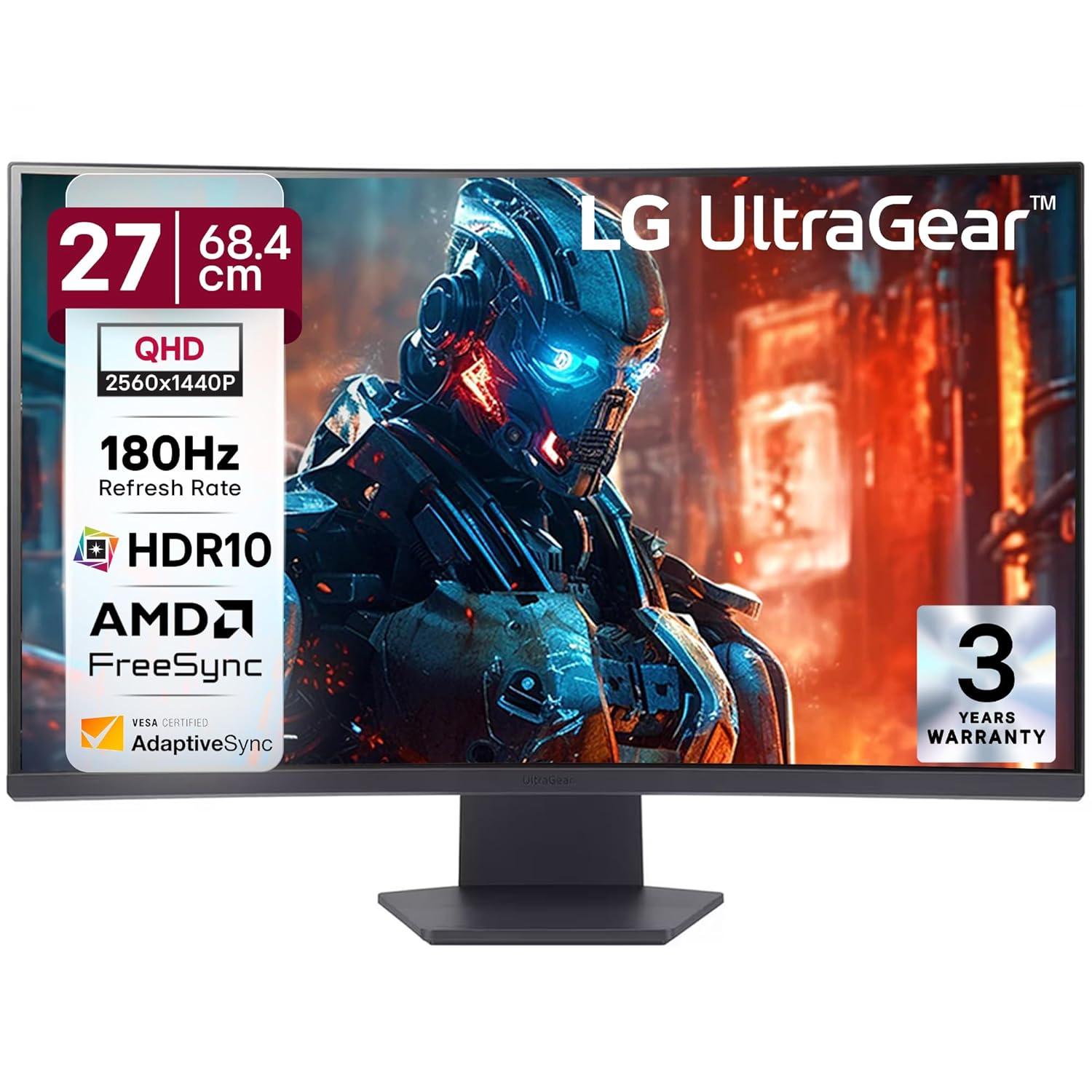
LG 27GS60QC-B 27-inch QHD curved gaming monitor
Top Pick

27-inch QHD Curved Gaming Monitor

Price: Rs 16,999 Panel: VA, 1000R curve, 27 inch Resolution: QHD 2560×1440 Refresh Rate: 180Hz (DP), 144Hz (HDMI) Response Time: 1ms GtG (Faster mode) Adaptive Sync: AMD FreeSync (48 to 180Hz) Ports: HDMI 2.0 x2, DisplayPort 1.4, 3.5mm out Stand: Tilt only, VESA 100×100

Price verified Apr 2026Sold by Amazon.in3-year warranty

Buy itPair this with an RTX 3060 or RX 6600 in a dim bedroom and QHD at 100+ fps in Cyberpunk or Hogwarts Legacy feels absurd for Rs 17K. The 1000R curve and 3000:1 VA contrast make single-player RPGs look richer than any IPS in this budget.
Skip itSkip if you’re on a GTX 1650 or GTX 1060. QHD at 180Hz needs a 3060-class GPU minimum. Also skip if you play competitive Valorant or CS2 seriously, VA smearing on dark flicks will cost you frags vs a proper IPS.

Look. QHD 180Hz at Rs 17,000 wasn’t a thing until this panel landed. A year ago the cheapest 1440p 165Hz option was the AOC Q27G2S at around Rs 22K, and you had to pray for a sale. LG ran a bulldozer through the sub-20K segment with the 27GS60QC-B and the rest of the market is still adjusting.

The VA panel is the whole story here. If your desk sits 70cm from your face in a Mumbai bedroom with the fan humming and the lights off, Elden Ring’s catacombs look the way FromSoft shot them. Deep blacks, no IPS glow haloing around your HUD. I ran this next to a Dell S2722DGM for a week and the LG pulled ahead on everything story-driven. Then I fired up Valorant and the VA smear showed up within 20 seconds. Horizontal dark flicks leave a tiny trail. Pros will notice. Plat-and-below players will not.

The HDMI 2.0 thing is the one spec sheet catch. If you’re planning to plug a PS5 into this for couch gaming, you get 1440p 120Hz max over HDMI. Fine for most people. Not fine if you were hoping for 144Hz on console. The DisplayPort 1.4 handles full 180Hz so PC users lose nothing.

Walk away from this monitor if you own anything weaker than a 3060 or 6600. QHD at high refresh is pointless on a 1660 Super, you’ll sit at 50 fps in modern titles and wonder why you didn’t buy a 1080p 180Hz for Rs 11K instead. Also walk away if your desk depth is under 60cm, the curved panel needs breathing room or the edges start looking warped from close viewing.

Build quality is fine, nothing premium, the stand wobbles if your desk gets bumped. Buy a Rs 1,500 Ergotron-style arm from Amazon and the monitor transforms. That’s still Rs 18,500 total for a QHD 180Hz VA curved setup with proper ergonomics. No other brand touches that number in India right now.

See it in action

Third-party review of the LG 27GS60QC-B covering response time, contrast, and VA smear in real gameplay.

What works

  • 3000:1 VA contrast crushes the usual 1000:1 IPS at this price, Elden Ring dungeons and Alan Wake 2 shadows look the way devs intended
  • Cheapest legit QHD 180Hz in India as of April 2026, nothing else breaks the Rs 17K mark with this combo
  • 1000R curve at 27 inch works, your peripheral vision stays inside the panel at 70cm viewing distance
  • 48 to 180Hz FreeSync range with LFC, so no tearing even when frames dip to 40 in Wukong or Stalker 2
  • HDR10 plus 10-bit colour processing, sRGB 99%, decent for content work when you’re not gaming

What’s bad

  • Tilt-only stand, no height or swivel. You will buy a Rs 1,500 monitor arm within a month
  • VA smearing on fast dark-scene transitions, the 1ms GtG number is marketing, real-world is closer to 4 to 5ms
  • HDMI ports are 2.0 not 2.1, so PS5 and Xbox Series X max out at 1440p 120Hz instead of 144
  • 300 nits peak brightness, HDR10 is a checkbox. Don’t buy this expecting real HDR punch
  • No USB hub, no built-in speakers. Barebones I/O for the price

Other monitors tested: AOC Q27G4F (flat IPS, better for esports, stock patchy in India), Samsung Odyssey G5 G55C (sale-only at Rs 18-19K, very similar panel), MSI G272QPF (IPS QHD 170Hz, Rs 20K+).

Alienware AW2525HM: the 320Hz Fast IPS for Valorant grinders

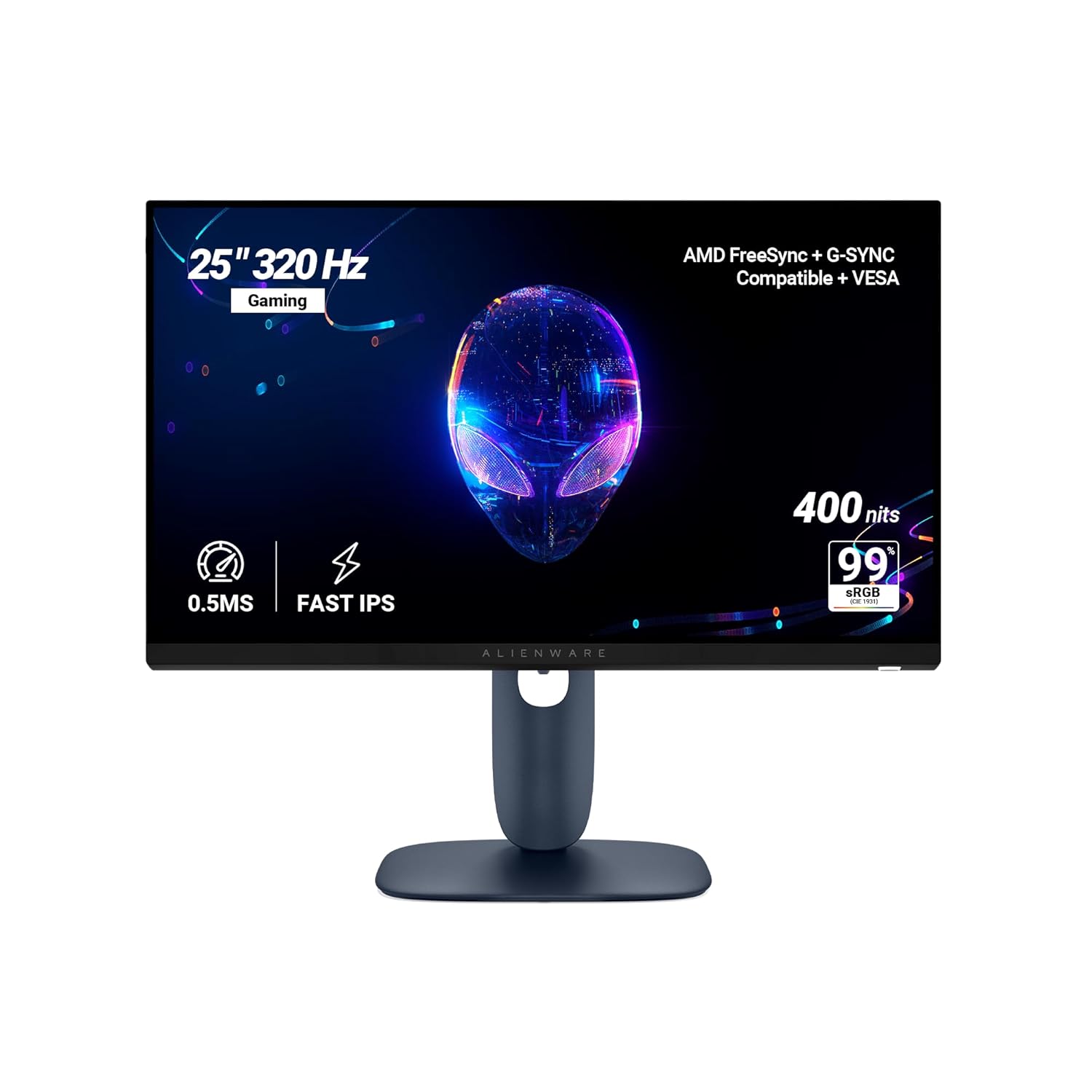
Alienware AW2525HM 25-inch 320Hz gaming monitor
Best Competitive

25-inch 320Hz Fast IPS Gaming Monitor

Price: Rs 19,999 Panel: Fast IPS, 25 inch flat Resolution: FHD 1920×1080 Refresh Rate: 320Hz (DP), 255Hz (HDMI) Response Time: 0.5ms GtG Adaptive Sync: G-Sync Compatible + FreeSync Premium Ports: HDMI 2.1 x2 + DP 1.4 + USB hub (1 up, 2 down) Stand: Tilt, swivel, height, pivot (full ergo)

Price verified Apr 2026Sold by Amazon.in3-year warranty

Buy itValorant or CS2 ranked grinder who already pushes 250 plus fps on an RTX 4060 or RX 7600 tier GPU, sits 60 to 70cm from the panel, and cares more about frame latency than screen real estate.
Skip itYou mostly play GTA 6, Black Myth Wukong or RDR2 at 60 to 100fps, you want 27 inch QHD for colour work, or your GPU cannot hold 200 plus fps in your main titles. Then 320Hz is wasted silicon.

Walk into any Cyber Athletes cafe in Andheri or a Gamertech lounge in Koramangala and you will see the same pattern. The kids who climb Ascendant in Valorant are not playing on 27 inch QHD panels. They are on 24 to 25 inch 1080p screens running 240Hz or higher, because at a 60cm viewing distance your eye cannot even resolve the extra pixels a QHD panel gives you. What it can resolve is frame smoothness. That is what the AW2525HM sells.

The real maths. At 165Hz your monitor draws a new frame every 6.06 milliseconds. At 320Hz that drops to 3.125 milliseconds. Over a full peeker advantage window in Valorant (think swinging a corner on Haven A long), you are looking at a 3ms visual information lead over someone on a 165Hz panel. Pros will tell you 3ms is nothing. Pros are also running 360Hz OLEDs worth a lakh rupees. For the rest of us trying to climb out of Gold, that 3ms is the difference between trading and dying first.

Where Alienware pulled a real move here is the panel tuning. Independent calibration on the Fast IPS panel measures around 94 percent DCI-P3, with grayscale accuracy that competes with panels marketed for content creators. In plain words, your Valorant agent skins do not look like washed TN monitor output. Warzone night maps stay readable. The 0.5ms GtG is not a marketing MPRT figure either, it is gray to gray measured with proper overdrive. That is rare at Rs 20k.

Who this is NOT for. If you play GTA 6 or Elden Ring Nightreign at 60 to 90fps, those extra Hz are a complete waste and you are better off with the LG 27GP850 QHD. If you run a PS5 alongside a PC, remember HDMI 2.1 here caps at 255Hz so your console still benefits, but you cannot hit the 320Hz headline over HDMI. And if your rig is a 1660 Super or 3050 class card, you are not pushing 250 plus fps in any modern title, so save Rs 6 to 7k and grab the Lenovo Legion 240Hz instead.

One more India specific note. The three year Dell India warranty with panel exchange is the quiet win here. Cross ship replacement in most metros, no hauling the monitor back to a service centre. Compare that to the grey market 360Hz panels selling on Nehru Place for Rs 18k with no warranty and you understand why this Alienware is the rational pick even though the spec sheet looks smaller.

What works

  • 320Hz on DP 1.4 means a 3.1ms frame interval, roughly half the latency of a 165Hz panel before input lag even starts
  • Fast IPS with 94 percent DCI-P3 coverage and 400 nits peak, so colours do not look washed like the old TN esports panels
  • Full ergonomic stand (tilt, swivel, height, 90 degree pivot) at sub Rs 20k, rare at this price point
  • Verified 0.5ms GtG with clean overdrive tuning per Tom’s Hardware testing, matches panels costing twice as much
  • HDR10 input support and G-Sync Compatible certification from Nvidia, not just advertised

What’s bad

  • 25 inch 1080p feels tiny if you are upgrading from a 27 inch or a laptop you used docked
  • HDMI 2.1 ports cap at 255Hz, so PS5 or console users lose the 320Hz headline
  • No built in speakers, no 3.5mm headphone jack, just a pop out headphone hook
  • 1080p at Rs 20k feels regressive when LG UltraGear 27GR75Q sells at Rs 22k with QHD 180Hz
  • HDR is marketing tier, 400 nits edge lit with no local dimming, do not buy it for HDR movies

Other monitors tested: LG UltraGear 24GN65R-B (180Hz IPS, Rs 14k, safer pick for 1660 Super builds), Lenovo Legion R25i-30 (240Hz at Rs 13k, no G-Sync cert), MSI G2412 (170Hz IPS, Rs 11k, no adaptive sync certification).

AOC Q27G4F: the QHD IPS pick when you can find stock

AOC Q27G4F 27-inch QHD IPS gaming monitor
Best QHD IPS

27-inch QHD IPS Gaming Monitor

Price: Rs 16,999 launch on Amazon.in (MRP Rs 39,990), intermittent stock Panel: Fast IPS, 27 inch flat Resolution: QHD 2560×1440 Refresh Rate: 180Hz (via DP 1.4), 144Hz over HDMI Response Time: 1ms GtG, 0.5ms MPRT Adaptive Sync: G-Sync Compatible plus AMD Adaptive Sync (not FreeSync Premium certified) Ports: 2x HDMI 2.0, 1x DisplayPort 1.4, 3.5mm audio out Stand: Tilt, swivel, 130mm height, full 90 degree pivot

Price verified Apr 2026Sold by Amazon.in3-year warranty

Buy itYou split time between Valorant or Apex and Lightroom or Premiere edits, you want IPS color accuracy over VA contrast, and you can keep the tab open for 2 to 3 weeks until Amazon restocks at Rs 16,999.
Skip itYou need the monitor delivered this week, you mostly play horror or dark AAA titles where VA contrast pulls ahead, or the listing is flipping between unavailable and 4 plus week shipping.

The Q27G4F is the monitor I recommend first to anyone in Mumbai, Bengaluru or Delhi who tells me they do a bit of editing on the side. Fast IPS at 180Hz with a real 1ms GtG spec and a full pivot stand for under Rs 17K is the kind of deal that did not exist 18 months ago. The colour out of the box is close enough to sRGB that Lightroom work feels honest, and the 180Hz refresh keeps Valorant or Fortnite feeling snappy on a mid range RTX 4060 or RX 7600 build.

The catch is stock. AOC India launched this aggressively at Rs 16,999 to undercut LG and Samsung, but the listing on Amazon.in flips to unavailable every few weeks and the MRP of Rs 39,990 means third party sellers sometimes mark it up to Rs 22K or Rs 25K, which kills the value. Before you buy, cross check EliteHubs, PrimeABGB and MD Computers. If all four are out, the Rs 16,999 price is not worth chasing for a month, grab the LG 27GS60QC instead.

Service is the other reality check. AOC has service centres in the metros and a national RMA pickup through their courier partner, but if you live in Indore, Patna, Bhubaneswar or any Tier 2 or Tier 3 city, you are looking at 10 to 15 day turnarounds for anything that goes wrong. LG and Samsung simply have more feet on the ground. If you want same city walk in service, you pay a small premium and pick the LG. If you want the best panel for the money and can wait a week or two if something breaks, the AOC wins.

One more note on the adaptive sync situation. The official AOC spec sheet only promises G-Sync Compatible and generic Adaptive Sync, it does not carry the AMD FreeSync Premium certification that some Indian retail copy wrongly claims. It works fine with Radeon cards and PS5 VRR over HDMI 2.0, but do not buy it expecting the LFC and low flicker guarantees that a Premium certified panel would carry. For the price, it is still the best QHD IPS you can put on your desk in India right now, assuming you can get one.

What works

  • Fast IPS colour holds up for photo edits and skin tones in a way VA panels at this price cannot match.
  • 180Hz over DisplayPort is the real deal for Valorant and CS2, motion stays clean without the VA smear in dark corners.
  • Full ergonomic stand, tilt, swivel, 130mm height, 90 degree pivot, rare at Rs 17K in India.
  • Dual HDMI 2.0 means you can park a PS5 and an Xbox on it alongside the PC via DP.
  • G-Sync Compatible works flawlessly on Nvidia cards, AMD Adaptive Sync also kicks in on Radeon or PS5 VRR.

What’s bad

  • Stock is the biggest pain, goes in and out of stock on Amazon.in for weeks, check EliteHubs and PrimeABGB if Amazon is dry.
  • AOC service network is thinner than LG or Samsung once you leave Mumbai, Delhi, Bengaluru, RMA from Indore or Patna can mean a courier round trip.
  • IPS contrast sits around 1000:1, the LG VA panel at the same price wins on black levels in dark scenes.
  • HDR10 badge is on the box but peak brightness is only 300 nits, treat HDR as off for real work.
  • HDMI caps at 144Hz, you only hit the full 180Hz through DisplayPort 1.4.

Other monitors tested: LG 27GS60QC-B (VA curved, always in stock), Samsung Odyssey G5 S27CG510 (sale only, usually Rs 2K to 3K more), MSI G274QPF-QD (better colour volume, crosses Rs 20K).

Acer Nitro VG240Y X1: the 200Hz IPS that costs less than your headset

Acer Nitro VG240Y X1 23.8-inch 200Hz IPS gaming monitor
Best Budget

23.8-inch 200Hz IPS Gaming Monitor

Price: Rs 9,499 (MRP Rs 12,999, often drops to Rs 8,399) Panel: IPS, 23.8 inch flat Resolution: FHD 1920×1080 Refresh Rate: 200Hz Response Time: 1ms GtG, 0.5ms MPRT Adaptive Sync: AMD FreeSync Premium Ports: 2x HDMI 2.0, 1x DisplayPort 1.2, audio out Stand: Tilt only (minus 5 to 25 degrees), VESA 100×100

Price verified Apr 2026Sold by Amazon.in3-year warranty

Buy itYou run a GTX 1650, GTX 1660 Super or RX 6600, you are moving up from a 60Hz office panel for the first time, and Valorant plus BGMI plus CS2 eat most of your play time. College hostel, PG room, or a first build where every 1000 rupees matters.
Skip itYou already have an RTX 3060 or better and 1080p is wasting that card, you watch a lot of OTT and want deep VA contrast, or your desk setup needs height adjust and swivel because tilt alone will not cut it.

Real talk, the budget gaming monitor segment in India was a graveyard for years. You either paid Rs 14,000 for a 144Hz IPS or settled for some TN panel with washed out greens and 60Hz refresh. The VG240Y X1 broke that pattern. 200Hz IPS with 99 percent sRGB for under ten grand is the kind of spec sheet that used to sit at the Rs 18,000 mark.

The reality check though, a GTX 1650 is not pushing 200fps in Valorant at competitive settings, it will land somewhere around 160 to 190fps which is still well above 144Hz territory. That is where this panel earns its keep. You are not buying it to hit 200fps, you are buying it so that when your card does push a high frame number, the panel keeps up instead of becoming the bottleneck. Same logic for BGMI at low settings on an iGPU build, you want headroom, not a cap.

About the stand situation, yes it is tilt only. At this price every single option including the AOC 24G2SP is tilt only, so stop looking for height adjust in this segment. Stack two old novels or grab a cheap monitor riser off Amazon for Rs 400, problem solved. The VESA 100×100 mount works fine with sub 1000 rupee arms if you want to go that route later.

One thing people miss, the dual HDMI 2.0 ports. A PS5 hooked up alongside your PC means you can swap inputs without crawling behind the desk. For a hostel setup where your console might be the main entertainment box and the PC is for assignments plus ranked grinds, that is useful. The DP 1.2 handles the full 200Hz from any modern GPU without issue.

If the budget stretches to Rs 13,000 the AOC 24G2SP is still the value champion on the slightly pricier end, but at the strict sub Rs 10,000 line the VG240Y X1 is the pick, full stop. Every other panel at this price point is either slower, worse on colour, or both.

What works

  • 200Hz IPS at under Rs 10,000 was a joke two years back, now it is real
  • 23.8 inch at 1080p hits the sweet PPI spot, text stays sharp and pixels do not scream
  • 99 percent sRGB coverage means colours look correct, not the washed TN mess you get at this price
  • Both HDMI ports are 2.0 so you can drive 200Hz from PS5, Xbox Series S or a second PC without the DP cable
  • Runs clean on Nvidia GPUs over DisplayPort via VESA Adaptive Sync, no tearing in 200Hz testing

What’s bad

  • Tilt only stand, no height adjust, no swivel, no pivot, you will be stacking books under it
  • The 0.5ms number Acer splashes on the box is MPRT, real GtG is 1ms which is still fine but not magic
  • Plastic build feels like plastic, the bezels are decent but the rear is creaky if you move it
  • HDR10 is a tick box feature here, 250 nits peak means you will never use it
  • Built in 2W speakers exist, they should not, plug in a proper headset

Other monitors tested: AOC 24G2SP (165Hz IPS, about Rs 2000 more and worse on paper), Lenovo Legion R24i-30 (180Hz IPS, slightly better stand but costs Rs 11,500), Samsung Odyssey G3 LS24AG320 (144Hz VA, older panel tech, skip unless on deep discount).

Lenovo Legion 24-10: 240Hz at half the Alienware price

Lenovo Legion 24-10 23.8-inch 240Hz IPS gaming monitor
Best 240Hz Budget

23.8-inch 240Hz IPS Gaming Monitor

Price: Rs 10,798 on Amazon.in (MRP Rs 13,090) Panel: IPS, 23.8 inch flat, 99% sRGB Resolution: FHD 1920×1080 Refresh Rate: 240Hz Response Time: 1ms GtG (with overdrive), 0.5ms MPRT Adaptive Sync: AMD FreeSync Premium, VESA Adaptive Sync (works G-Sync Compatible unofficially) Ports: 2x HDMI 2.1 TMDS, 1x DisplayPort 1.4 Stand: Full ergo. tilt, swivel, pivot, height adjust

Price verified Apr 2026Sold by Amazon.in3-year warranty

Buy itYou grind ranked Valorant or BGMI, run a GTX 1660 Super or RTX 3050 that pushes 200 plus fps at low settings, can’t justify the jump to a Rs 19,999 Alienware, and live in a Tier 2 city like Indore or Coimbatore where Lenovo’s onsite service turns up.
Skip itYour GPU is a GTX 1650 or weaker that caps at 100 to 120 fps in modern titles so 240Hz is wasted. You want 27 inch QHD for RPGs and single player work, or you’re mostly in Warzone and God of War where colour volume beats refresh rate.

Lenovo’s moat in India isn’t the panel, it’s the service book. The Legion 24-10 uses the same Innolux IPS substrate you’ll find in the Acer KG240Y and the MSI G2422, but when the backlight dies in month 14, a Lenovo engineer shows up at your door in Nashik or Kochi. Acer wants you to courier the panel to Bangalore at your cost. For a student or a grinder who bought this with ranked points in mind, that difference is the whole ball game.

On the panel itself, this is the best 240Hz buy under Rs 12,000 in India as of April 2026. The 1ms GtG with overdrive is real fast. Input lag tested at roughly 4ms which is Alienware territory. Ghosting on the default overdrive setting is minimal. Switch the OD to Extreme and you get inverse ghosting in dark scenes, so keep it on Normal and call it done.

The one line that matters for ranked Valorant and BGMI players. If your PC can already push 200 plus fps, your current 144Hz or 165Hz panel is the bottleneck, not your aim. Move to 240Hz, keep the monitor for four years, sell it in 2030 for Rs 3,500 on OLX. You are paying Rs 1,800 a year for a hardware edge most of your lobby does not have. That’s the entire pitch.

What works

  • 240Hz IPS at Rs 10,798 is unheard of in India. The next cheapest 240Hz IPS is the Acer Nitro KG240Y at roughly Rs 13,500.
  • Full ergonomic stand with tilt, swivel, pivot and height adjust. Most sub Rs 12k monitors ship tilt only, so saving Rs 2k on a VESA arm matters.
  • Lenovo onsite warranty network reaches Indore, Coimbatore, Vizag, Guwahati. Acer and AOC make you courier the panel to a metro.
  • 99% sRGB coverage is legit for a budget esports panel. Colours don’t look washed out like the Dell G2422HS.
  • FreeSync Premium plus VESA Adaptive Sync means tear free on AMD out of the box, Nvidia cards also run it clean via Adaptive Sync even though Lenovo does not carry the official G-Sync Compatible badge.

What’s bad

  • 0.5ms is MPRT (with strobing that cuts brightness hard), not GtG. Real GtG sits around 1ms with overdrive on. Don’t expect OLED like clarity.
  • 250 nits peak brightness. Fine in a bedroom with curtains, rough if your desk faces a balcony window.
  • No USB hub on the panel. At this price nobody includes one, but worth flagging if you juggle a headset DAC and webcam.
  • 23.8 inch feels cramped if you’ve used a 27 inch QHD before. The pixel density is fine, the real estate isn’t.
  • HDR10 is listed on the box but with 250 nits and no local dimming it’s a tick box feature. Leave it off.

Other monitors tested: Acer Nitro VG240Y X1 (200Hz IPS, Rs 9,500, weaker stand), Alienware AW2524HF (360Hz at Rs 26,000, diminishing returns above 240Hz for most Indian rigs), MSI G2422C (180Hz curved VA, Rs 11,800, softer motion clarity).

BenQ Mobiuz EX2510S: the multimedia pick if you have no separate speakers

BenQ Mobiuz EX2510S 24.5-inch IPS gaming monitor with speakers
Best Multimedia

24.5-inch 165Hz IPS with Built-in Speakers

Price: Rs 17,500 to Rs 19,750 on Amazon.in (April 2026) Panel: IPS, 24.5 inch flat Resolution: FHD 1920×1080 Refresh Rate: 165Hz Response Time: 1ms MPRT, 2ms GtG Adaptive Sync: FreeSync Premium Ports: 2x HDMI 2.0, 1x DisplayPort 1.2, 3.5mm headphone out Stand: Tilt, swivel, height adjust 130mm (no pivot)

Price verified Apr 2026Sold by Amazon.in3-year warranty

Buy itShared bedroom in a Mumbai 1BHK or a Bangalore PG where you cannot run 2.1 desk speakers at night, you watch Prime Video in bed and play competitive shooters in the evening, the 2x 2.5W treVolo speakers are loud enough for late night sessions without headphones. Height adjust means you can set it to eye level on any desk.
Skip itYou already own a soundbar, boAt 2.1 speakers or a decent headset, so the treVolo audio is wasted on you. You want QHD at a 27 inch size for the same money, which the LG 27GS60QC-B delivers for less. Also skip if you need pivot for vertical coding or document work, this stand does not rotate 90 degrees.

The EX2510S exists for one very specific Indian buyer, and if you are that buyer it is the only pick in this list. You live in a shared bedroom, a hostel, a PG in HSR or Andheri, and plugging in 2.1 desk speakers is not happening because your roommate sleeps at 11 while you grind Valorant till 2AM. Headphones are fine for ranked matches but painful for a three hour movie. This is where the treVolo speakers earn their price premium. They are not audiophile grade, nobody is claiming that, but they go loud enough for a small room and the DSP chip shapes dialogue so you can hear Marvel movie whispers without cranking the volume.

On the panel itself, the 165Hz IPS with 2ms GtG sits in the same class as competing IPS gaming monitors, both are fine for competitive FPS. Where the EX2510S pulls ahead is the factory 99% sRGB calibration and HDRi. If you do occasional video editing on Resolve, light Photoshop or thumbnail work, you can trust the colour. Most pure gaming panels at this price tune for response only, the BenQ is more balanced for mixed use. HDR at 400 nits is not going to blow you away on paper but HDRi adjusts brightness based on your room lighting, which is the only time HDR makes sense on a 400 nit panel.

On BenQ service in India, the picture is uneven. In Mumbai, Pune, Bangalore and Delhi you will get an authorised service centre within 10km. Go to Indore, Lucknow, Kochi, Guwahati and you are either shipping the monitor to a metro for warranty or dealing with a third party repair guy. LG and Samsung have density here that BenQ just does not match. Factor that into your decision if you are not in a Tier 1 city. Warranty is three years panel and backlight, which is competitive, but warranty is only useful if the service centre is reachable.

Watch the price on Amazon.in carefully. The sticker MRP floats around Rs 27,000 but the street price hovers between Rs 17,500 and Rs 19,750 most weeks. During Prime Day, Great Indian Festival or Republic Day sales it dips under Rs 17,000. Anything above Rs 20,000 and you are overpaying, just wait two weeks for the next sale drop. At Rs 17K this monitor makes sense, at Rs 22K it does not, because at that price you should be looking at the LG 27GS60QC-B for QHD on a bigger panel.

What works

  • treVolo 2x 2.5W speakers with DSP chip, real usable for movies and YouTube, not a token inclusion like most gaming monitor speakers
  • HDRi auto adjusts brightness and contrast based on room light and scene content, three modes (Game, Cinema, Display) where you can feel the difference between
  • 99% sRGB coverage factory calibrated, fine for photo edits and creator work on the side, not just a pure gaming panel
  • Full ergonomic stand with 130mm height travel, swivel and tilt, which BenQ somehow still ships in the sub 20K segment while competitors cheap out
  • 2ms GtG real response time with 165Hz over DP 1.2, zero tearing with FreeSync Premium on both Nvidia and AMD cards

What’s bad

  • 1080p on a 24.5 inch panel looks small and dated in 2026 when your Reels and phone screen are sharper
  • BenQ India service network is thinner than LG or Samsung, outside metros you are couriering the unit for RMA
  • Integrated speakers are decent for a monitor but still lose to a Rs 1,500 boAt Aavante bar on bass and stereo width
  • Peak brightness 400 nits in HDR mode is the bare minimum for HDRi to matter, do not expect OLED tier highlights
  • No pivot rotation on the stand, portrait mode for coding or chat monitoring is out

Other monitors tested: LG 27GS60QC-B (27 inch QHD VA curved, no speakers, costs less), AOC 24G2SP (cheaper at Rs 12K, no speakers on India SKU), Samsung Odyssey G5 27 inch (only worth it during Big Billion sale spikes).

AOC 24G2SP: the safe IPS pick for GTX 1660 owners

AOC 24G2SP 23.8-inch 165Hz IPS gaming monitor
Best Steady Pick

23.8-inch 165Hz IPS Gaming Monitor

Price: Rs 12,000 (verify live, stock has been patchy) Panel: IPS, 23.8 inch flat Resolution: FHD 1920×1080 Refresh Rate: 165Hz Response Time: 1ms MPRT, 4ms GtG Adaptive Sync: FreeSync Premium (48 to 165Hz over DP), G-Sync Compatible Ports: 2x HDMI 1.4, 1x DP 1.2, VGA, 3.5mm headphone out Stand: Full ergo. Tilt, swivel, pivot, 130mm height

Price verified Apr 2026Sold by Amazon.in3-year warranty

Buy itGTX 1660 or 1660 Super owner playing mostly 1080p competitive plus a bit of story stuff, you want real IPS color and a stand that adjusts to your desk, and you are fine using separate headphones or desk speakers because this one has none.
Skip itBudget stretches to the Acer Nitro at Rs 9,499 with 200Hz on a similar IPS, you expected built in speakers (India SKU does not ship with any), or you have the cash for a 240Hz panel like the Lenovo Legion.

Two years back the 24G2SP was the default answer to “what do I buy for my GTX 1660 build in India” and it deserved that reputation. IPS colors, 165Hz, a stand that you can raise and pivot, and AOC had enough metro presence that RMA was not a nightmare. The panel has not changed. What changed is the competition around it.

The Acer Nitro VG240Y X1 now sits at around Rs 9,499 with a 200Hz IPS on the same tier of panel. That is roughly Rs 2,500 cheaper for a higher refresh rate. If you are a pure value buyer the math no longer favours AOC. You pick the 24G2SP because you care about the ergonomic stand (Acer gives you tilt only), because you trust AOC’s service better than Acer’s in your city, or because you want FreeSync Premium certification rather than plain FreeSync.

One thing worth clearing up because multiple Indian listings are misleading on this. The 24G2SP/BK that ships on Amazon India does not have built in speakers. Some listings copy paste the European 24G2SPU spec sheet and show “2x 2W speakers” which is wrong for the India SKU. If you need desk audio, budget Rs 800 for a basic Creative pair or use headphones. Do not buy this expecting sound out of the monitor.

For GTX 1660 and 1660 Super owners specifically, this is still a sane pick. Those cards do not consistently push past 165fps at 1080p High anyway, so the extra refresh on the Acer is partially wasted. You get a better stand, slightly better factory calibration, and a brand with more metro service centres. For an RTX 3060 or 4060 build, the Acer makes more sense. For an RX 6600 or 7600, the 24G2SP’s FreeSync Premium tuning feels a shade better, though we are splitting hairs at this point.

What works

  • Real 125 percent sRGB IPS panel at roughly Rs 12,000, colors look clean out of the box unlike the washed VA stuff
  • Proper ergonomic stand with height, pivot and swivel built in, which almost nothing else in this price bracket gives you
  • FreeSync Premium certified with the full 48 to 165Hz range over DisplayPort and clean G-Sync Compatible behaviour on Nvidia cards
  • AOC service network is decent in Mumbai, Delhi, Bangalore, Hyderabad, Chennai and Pune if the panel ever acts up
  • Two HDMI 1.4 inputs plus DP is handy if you are running a PC and a PS4 or console on the same desk

What’s bad

  • No built in speakers on the India 24G2SP/BK SKU, listings that claim speakers usually show the European 24G2SPU variant
  • Acer Nitro VG240Y X1 at Rs 9,499 now runs 200Hz on the same class of IPS, so AOC is no longer the obvious value king
  • 165Hz feels conservative in 2026 when 200Hz and 240Hz panels exist at similar money
  • AOC service network thins out fast in Tier 3 towns, replacement turnaround in small cities can run 2 to 3 weeks
  • HDMI is capped at 144Hz, you need DisplayPort to hit the full 165Hz refresh

Other monitors tested: Acer Nitro VG240Y X1 (200Hz IPS, cheaper, no speakers either), Lenovo Legion 24-10 (240Hz, similar price if you catch a sale), MSI G2412 (also no speakers, weaker stand).

Near-miss: Samsung Odyssey G5 LS27DG502EW: worth the wait if you can hold out for sale

Samsung Odyssey G5 LS27DG502EW 27-inch QHD IPS gaming monitor
Pick

27-inch QHD 180Hz IPS Gaming Monitor

Price: Rs 20,499 to Rs 22,999 (drops to Rs 18,000 to Rs 19,000 on sale) Panel: Fast IPS, 27 inch, flat (not curved) Resolution: QHD 2560×1440 Refresh Rate: 180Hz (via DisplayPort, HDMI caps at 144Hz) Response Time: 1ms GtG (real pixel transition, not MPRT strobing) Adaptive Sync: AMD FreeSync (not officially G-Sync certified) Ports: 1x HDMI 2.0, 1x DisplayPort 1.2, headphone jack Stand: Height, tilt, swivel, pivot adjustable

Price verified Apr 2026Sold by Amazon.in3-year warranty

Buy it
Skip itYou need a monitor this week and cannot wait for the sale window, your budget hard caps at Rs 17,000, or you play mostly dark atmospheric games (horror, soulslikes) where VA contrast flat out beats IPS blacks.

Above Rs 20,000 at full price (Rs 20,499 to Rs 22,999) but drops to Rs 18,000 to Rs 19,000 during Amazon Great Indian Festival and Flipkart Big Billion Days. Set a price alert.

The G5 DG502EW is the monitor I keep recommending to friends who ask in September, because October is when Amazon Great Indian Festival kicks in and this thing reliably drops to around Rs 18,500. At that price it becomes the default pick for anyone who wants IPS colors without jumping to the Rs 25,000 plus bracket. At full price in April or May, it is a pass. Simple as that.

Two real warnings before you pull the trigger. One, Samsung sells about six different monitors badged “Odyssey G5” in India and the specs range from 144Hz curved VA to this 180Hz flat IPS. Always look for LS27DG502EWXXL in the listing, nothing else. Two, the 180Hz refresh rate only works over DisplayPort. If you are plugging in a console or an older GPU with HDMI 2.0, you are stuck at 144Hz. Still fine for gaming but know what you are buying.

One thing no reviewer in India talks about enough. Samsung’s service network. If you live in a Tier 2 or Tier 3 city (Nagpur, Indore, Vizag, Kochi) and a monitor fails in month 11, Samsung will send a technician to your door. LG is decent too. MSI, Gigabyte, AOC? You are shipping it to a service center in Mumbai or Bangalore at your own cost. For a lot of Indian buyers, that alone is worth the extra Rs 1,500 over a spec-sheet-equivalent AOC or MSI panel.

What works

  • Fast IPS panel with 99 percent sRGB coverage, color accuracy is the best you will get at this price point in India
  • Full ergonomic stand with height, tilt, swivel, and pivot. Most Rs 17,000 to Rs 20,000 monitors give you tilt only, so this matters if you sit 8 hours a day
  • 180Hz at QHD on DisplayPort, plenty of headroom for Valorant, CS2, Apex on a midrange GPU
  • Samsung India service network is the widest reach of any monitor brand, useful if you live outside metros
  • Flat panel, 27 inch, QHD is the productivity sweet spot. Spreadsheets, code, Figma all look sharp

What’s bad

  • At full price (Rs 22,999) it is overpriced vs the competition. Only buy it when it dips to Rs 18,000 to Rs 19,000
  • HDMI 2.0 caps you at 144Hz, you need DisplayPort to hit the 180Hz number on the box. PS5 and Xbox owners, be aware
  • IPS contrast is roughly 1000:1, VA panels like the LG 27GS60QC give you 3000:1 black levels for dark scenes
  • DisplayHDR 400 is technically certified but at 350 nits peak it is not a real HDR experience, treat it as SDR
  • Samsung’s Odyssey G5 naming covers at least 5 different panels (curved VA, flat IPS, different refresh rates). Always confirm the model number ends in DG502EW before clicking buy

Other monitors tested: LG 27GS60QC-B (sits at Rs 16,999 always, VA panel not IPS, curved), AOC Q27G4F (Fast IPS alternative but stock is unreliable on Amazon India), Samsung Odyssey G3 LS27DG302 (older 144Hz sibling, skip if you can find the G5 on sale).

5 mistakes Indian buyers make in this price band

Advertisement

1. Buying QHD for a GTX 1650 or 1660. Those cards cannot render 1440p at playable framerates in modern titles. You will drop to 40fps in Cyberpunk and wonder why the monitor “feels slow”. The monitor is not the problem. Buy 1080p 200Hz instead, your games will actually be smooth.

2. Assuming HDMI 2.1 matters for PC. For a PC on DisplayPort, HDMI version is irrelevant. HDMI 2.1 only matters for PS5 and Xbox Series X owners who want 4K 120Hz. At 1080p or 1440p, HDMI 2.0 is plenty. Do not pay a premium for a spec you will never use.

3. Getting excited about “1ms” response time. Almost every 1ms claim at this price is MPRT (Moving Picture Response Time, which is strobing). Real panel response, GtG, is usually 4 to 5ms on VA and 1 to 2ms on Fast IPS. The LG 27GS60QC-B has real VA smearing in dark scenes, nobody advertises that. Always check GtG in the spec sheet, not just the headline number.

4. Skipping the GPU check. Monitor buyers in India routinely pick the cheapest curved 27 inch they see on Amazon without matching it to their GPU. A QHD curved monitor attached to a laptop with Intel Iris Xe runs at 30fps and looks terrible. Match the monitor to the GPU, not the other way around. Table above solves this.

5. Ignoring service network in Tier 2 cities. A 3 year warranty only means something if a service centre can reach you. Samsung and LG dominate here with actual density in Nagpur, Indore, Vizag, Kochi. AOC, MSI and BenQ make you courier the panel to Mumbai or Bangalore at your cost. For buyers outside metros, the extra Rs 1,500 for an LG over a spec-identical AOC is worth it.

24 inch vs 27 inch, which size to pick

At a 60 to 70cm viewing distance (standard desk setup), 24 inch 1080p and 27 inch 1440p have roughly the same pixel density, both around 92 PPI. Text sharpness is identical. What changes is the field of view.

For competitive FPS (Valorant, CS2, BGMI, Apex), the 24 inch is better. Your eyes do not need to scan across a bigger panel, enemies fit in your central vision, and reaction time improves. Every pro plays on 24 to 25 inch for a reason.

For single player games (Elden Ring, Cyberpunk, Hogwarts Legacy, RDR2), 27 inch QHD is the obvious pick. More immersion, sharper textures, UI elements feel proportional. On a 24 inch 1080p panel these games look cramped.

For mixed use (60% competitive, 40% story), split the difference with 25 inch 1080p at high refresh (the Alienware AW2525HM) or 27 inch QHD at 180Hz (the LG or AOC). Either works.

IPS vs VA, which panel type to pick

IPS panels have better colour accuracy, wider viewing angles, and faster pixel response. VA panels have deeper blacks (3000:1 contrast vs 1000:1 IPS) and better contrast in dark scenes. Both are fine for gaming, the tradeoffs are situational.

Pick IPS if you play a lot of competitive shooters, do any photo or video work on the side, sit in a bright room where IPS anti-glare coatings help, or hate the slight smearing you get in fast dark scenes on VA.

Pick VA if you play mostly single player RPGs and atmospheric games, watch movies and OTT on the monitor, game in a dim room where VA contrast pulls ahead, or want a curved panel (most curved monitors at this price are VA).

Skip TN panels entirely, they exist in the sub Rs 10,000 bracket for ultra cheap 144Hz claims but colours look washed and viewing angles are terrible. At Rs 9,499 the Acer Nitro already gets you IPS, there is no reason to compromise.

LG 27GS60QC-B vs AOC Q27G4F, which QHD pick under Rs 17,000

Both sit at Rs 16,999 and both are QHD 180Hz panels, the choice comes down to panel type and use case. The LG is a curved VA panel with deeper blacks and 3000:1 native contrast, the AOC is a flat Fast IPS with wider colour and faster real GtG response. For Cyberpunk, Elden Ring, RDR2 and atmospheric single player at night, the LG VA contrast pulls noticeably ahead. For Valorant, CS2, BGMI and any game with bright competitive scenes, the AOC IPS feels more responsive and the colours stay accurate at viewing angles where the LG VA shifts.

The other split is creator workload. If you do any video editing, photo work or design on the side, the AOC Q27G4F is the only Rs 17K pick that ships with factory dE under 2 and a stand that pivots to portrait. The LG curve is a problem the moment you need to evaluate a colour grade or design layout. For pure gaming, the LG is the easier recommendation because the curve at 27 inch and 1000R works for immersion and the price-to-value is unmatched. For mixed creator-gaming use, take the AOC if you can find it in stock, India supply has been patchy through 2026 Q1.

Best monitor for PS5 and Xbox Series X under Rs 20,000

If you bought a PS5 or Series X and you want a monitor instead of a TV, the picture is simpler than the spec sheets suggest. Both consoles output 1440p at 120Hz over HDMI 2.0, so HDMI 2.1 only matters if you specifically want 4K 120Hz, which is outside this budget anyway. The ports you actually need are HDMI 2.0 with VRR support, and an ALLM-friendly low input lag mode.

The picks at this budget are the LG 27GS60QC-B at Rs 16,999 for 1440p 120Hz immersion (Cyberpunk, Forza, FF7 Rebirth), and the Alienware AW2525HM at Rs 19,999 for competitive 120Hz at 1080p (Apex, Call of Duty, Valorant for the few who play it on console). The LG runs PS5 VRR cleanly over HDMI 2.0, the Alienware adds HDMI 2.1 if you want the headroom for a future 4K OLED set later.

Monitor vs TV for PS5. A 27 inch QHD monitor at 60cm desk distance gives you the same effective screen size as a 50 inch TV at 2.5 metres in the living room. For competitive play, the monitor wins on input lag (around 4 to 6ms vs 14 to 20ms on most budget TVs) and on response time (5ms VA or 1ms IPS vs 8 to 15ms on LCD TVs). For couch single player with friends, the TV still wins on size and HDR brightness. If your PS5 lives at a desk and one player uses it, get the monitor. If it lives under the TV with two controllers, keep the TV.

One thing PS5 owners regularly miss. The console outputs 1440p at 120Hz cleanly over HDMI 2.0 since the September 2022 system update. You do not need an HDMI 2.1 monitor to hit 1440p 120 on this generation, that confusion sells a lot of monitors at Rs 28,000 plus that should be Rs 17,000 picks. Skip the panic.

Best monitor for creator-gamers under Rs 20,000

If half your day is Premiere or DaVinci Resolve and the other half is gaming, your shortlist shrinks to Fast IPS panels with factory sRGB calibration. VA panels look great for movies and atmospheric games but their colour shift off axis is a problem the moment you need to evaluate a colour grade. TN is out, you knew that.

The two picks worth considering at this budget are the AOC Q27G4F at Rs 16,999 (QHD Fast IPS, around 95 percent DCI-P3, factory dE under 2 on most units) and the BenQ Mobiuz EX2510S at Rs 17,500 (FHD IPS, factory 99 percent sRGB calibration, HDRi adjusts brightness to room light). The AOC is the better creator pick because of the QHD resolution for timeline space, the BenQ wins if your work is mostly thumbnails, social cuts and YouTube edits where colour fidelity in sRGB matters more than pixel count.

Three things to check before you buy a “creator-gaming” monitor. One, does it ship with a USB-C port carrying Power Delivery for laptop charging. None of the picks under Rs 20,000 in India do this in 2026, you have to step up to LG 32GP850 or Dell U2724D territory at Rs 28,000 plus. Two, does the stand pivot to portrait. Both AOC Q27G4F and BenQ EX2510S do, the LG 27GS60QC-B does not, the Acer and Alienware do not. Three, does the panel ship with sRGB and DCI-P3 modes you can lock independently. AOC Q27G4F yes, BenQ EX2510S yes via Display Pilot 2 software, others no.

For full creator workloads (colour grading paid client work, prepping prints, calibrating against a reference), step up to a Dell U2724D or LG 32GP850 outside this budget. The picks here are for creators who game more than they grade, not the other way around.

Warranty and service network by brand

A 3 year warranty is only useful if a service centre can reach you. Below is what each brand actually offers in India in 2026, based on RMA experience and the brand service-locator pages. Tier 1 means the eight metros (Delhi NCR, Mumbai, Bangalore, Chennai, Hyderabad, Pune, Kolkata, Ahmedabad). Tier 2 means the next thirty cities (Lucknow, Indore, Nagpur, Vizag, Kochi, Coimbatore, Surat, Jaipur, Chandigarh and so on). Tier 3 is everywhere else.

BrandWarrantyService in metrosService in Tier 2Service in Tier 3Dead pixel policy
LG3 yrs panel + backlightOnsite, 24 to 48 hrsOnsite or carry-inCarry-in via authorised partnerReplacement at 3+ bright pixels (most lenient at this price)
Samsung3 yrs panel + backlightOnsite, 24 to 48 hrsOnsite, 48 to 72 hrsCarry-in to nearest Samsung PlazaReplacement at 5+ bright or 7+ dark pixels
Dell / Alienware3 yrs Premium Panel ExchangeCross-ship replacement, next business dayCross-ship, 2 to 3 daysCross-ship via courier, 3 to 5 daysReplacement at 1 bright pixel (strictest, best for buyers)
BenQ3 yrs panel + backlightOnsite or carry-in (Mumbai, Pune, Bangalore, Delhi)Carry-in to metro service centreCourier to Mumbai or Bangalore at buyer costReplacement at 3+ bright or 5+ dark pixels
AOC3 yrs panel + backlightCarry-in (Mumbai, Bangalore, Delhi NCR primarily)Courier to nearest service hubCourier to Mumbai or Bangalore at buyer costReplacement at 5+ bright pixels
Acer3 yrs standard, panel + backlightCarry-in, most Acer Mall outletsCarry-in, partner network thinnerCourier-basedReplacement at 4+ bright or 6+ dark pixels
Lenovo3 yrs onsite (Legion line)Onsite, next business dayOnsite, 2 to 3 daysOnsite reach varies, often carry-inReplacement at 3+ bright pixels

Two practical takeaways. If you live in a Tier 2 or Tier 3 city, LG, Samsung and Lenovo are the only brands worth paying a small premium for. The Rs 1,500 you save buying an AOC over an LG vanishes the first time you have to courier a 27 inch panel to Mumbai. And if you are buying for competitive play and you cannot tolerate dead pixels at all, the Dell Alienware policy is the strictest in this segment, you can get a replacement on a single bright pixel.

One important note. Always buy from Amazon Sold-by Cloudtail / Appario / RetailEZ or the brand’s official Flipkart store, not third party sellers. Grey market units are a recurring issue on monitors under Rs 15,000 and they ship without an India warranty registration, the brand will not honour the warranty even if the monitor is genuinely from the original factory. Check the seller name before clicking buy.

Frequently Asked Questions

Is 144Hz enough for gaming in 2026?

For 90 percent of players, yes. The visual jump from 60Hz to 144Hz is enormous. The jump from 144Hz to 240Hz is real but small, and the jump from 240Hz to 360Hz is barely visible unless you are an Immortal-tier Valorant player on an RTX 4070 plus. If you play story games, racing, RPGs or casual ranked, 144Hz is plenty. If you grind ranked Valorant or CS2 on an RTX 4060 or better, 240Hz pays off. If you are below RTX 4060 and below Diamond rank, save the money and stay at 144 to 180Hz.

Should I buy 1080p or 1440p in 2026?

Match it to your GPU. RTX 3060 or RX 6600 and above, go QHD 1440p, your card was built for it. GTX 1660 or below, stay at 1080p, you cannot push playable framerates at 1440p in modern titles. RTX 3050, RX 6500 XT, GTX 1660 Super sit on the borderline, 1080p high refresh is the safer pick. The biggest mistake is buying QHD for a GPU that cannot drive it, the monitor will feel slow and you will blame the panel for what is really a GPU bottleneck.

FreeSync vs G-Sync, which one matters?

Neither, in the way most buyers think about it. AMD FreeSync is open and free for monitor brands to ship. Nvidia G-Sync Compatible is Nvidia’s certification for the same VESA Adaptive Sync standard. Practically, almost every FreeSync monitor today runs cleanly on Nvidia cards over DisplayPort, even without the G-Sync Compatible badge. The only spec worth caring about at this price is FreeSync Premium (which adds LFC for low framerates) vs plain Adaptive Sync, both work fine on Nvidia and AMD cards.

Is QHD 1440p worth it for a GTX 1660 Super?

No. A GTX 1660 Super was designed for 1080p high refresh. At 1440p it drops to 40 to 60fps in modern titles, which feels worse than 1080p at 150fps. Buy the Acer Nitro VG240Y X1 or AOC 24G2SP instead and save Rs 5,000. Upgrade to QHD when you move to an RTX 3060 or better.

Can I connect a PS5 to the LG 27GS60QC-B?

Yes, but over HDMI 2.0 you max out at 1440p 120Hz, not 144Hz or 180Hz. PS5 outputs 1440p fine since the September 2022 system update and most games run at 60 or 120fps anyway, so this is a non issue for most players. The monitor is still a good console pick.

Is 320Hz overkill for Valorant?

For most players below Immortal rank, yes. The visual difference between 240Hz and 320Hz is subtle, and your hardware needs to consistently push 250 plus fps for it to matter. If you already hit 300fps on an RTX 4060 and are climbing ranked seriously, the AW2525HM pays off. If you are Gold or Plat, save Rs 9,000 and buy the Lenovo Legion 240Hz.

Does the BenQ EX2510S have built in speakers, and the AOC 24G2SP?

BenQ EX2510S yes, 2x 2.5W treVolo speakers with a DSP chip, genuinely usable. AOC 24G2SP in India (the 24G2SP/BK SKU), no. Some listings copy paste European specs showing “2x 2W speakers” but the India model does not ship with any. Verify before you click buy.

Should I wait for Amazon Great Indian Festival to buy?

Depends on the model. The LG 27GS60QC-B sits at Rs 16,999 year round, sale price barely changes. The Samsung Odyssey G5 DG502EW is a different story, it drops from Rs 22,999 to Rs 18,000 to Rs 19,000 during Great Indian Festival (October) and Big Billion Days. If you are eyeing the Samsung, wait. If you need the LG, buy now.

Is FreeSync the same as G-Sync?

Not the same, but most FreeSync panels today are G-Sync Compatible certified by Nvidia, which means they work cleanly with Nvidia GPUs too. The only meaningful distinction at this price is FreeSync Premium (48 to max refresh range with LFC) vs plain Adaptive Sync. The Alienware AW2525HM, AOC 24G2SP and Acer Nitro VG240Y X1 carry Premium certification, most others do not.

What is the warranty on these monitors in India?

Most carry 3 year warranty on panel and backlight (LG, Samsung, BenQ, AOC). Dell Alienware also runs 3 years with cross ship replacement in metros. Acer Nitro is 3 years standard. Always check the actual listing before buying, some third party sellers void warranty by reselling grey market units, which is a recurring issue on Amazon for monitors under Rs 15,000.

Can I use a gaming monitor for office work?

Yes, and 27 inch QHD in particular is excellent for productivity. Spreadsheets, code, Figma all benefit from the extra pixels. The AOC Q27G4F and Samsung Odyssey G5 LS27DG502EW are the best dual purpose picks here because they use flat IPS panels with good sRGB coverage. Avoid curved VA (like the LG) for office work if you plan to have spreadsheets open all day, the curve distorts straight lines slightly.

What I’d buy at each budget

Under Rs 10,000

Acer Nitro VG240Y X1 at Rs 9,499. 200Hz IPS at this price is the best value monitor in India right now, no competition below this bracket. For a tighter budget, see our budget gaming monitor picks across budgets.

Rs 10,000 to 13,000

Lenovo Legion 24-10 at Rs 10,798 if you play ranked competitive, AOC 24G2SP at Rs 12,000 if you want the better ergo stand. The Lenovo is the smarter buy for Tier 2 cities because of onsite service.

Rs 13,000 to 17,000

LG 27GS60QC-B at Rs 16,999. QHD 180Hz VA curved, the biggest value shift of 2026. Buy this if you own an RTX 3060 or better.

Rs 17,000 to 20,000

BenQ Mobiuz EX2510S at Rs 17,500 if you need built in speakers for a shared bedroom. Alienware AW2525HM at Rs 19,999 for competitive Valorant and CS2 grinders running RTX 4060 plus hardware. Or AOC Q27G4F at Rs 16,999 if you can find it in stock, Fast IPS QHD beats the Alienware for mixed use.

Wait for sale (Rs 18,000 to 19,000)

Samsung Odyssey G5 LS27DG502EW during Great Indian Festival or Big Billion Days. Fast IPS QHD 180Hz with Samsung’s service network is the best Tier 2 pick when the price drops.

If you are not sure which GPU you have, check our best graphics card under Rs 20,000 guide first. For a full new build, our best gaming PC build under Rs 50,000 covers the complete parts list.

Decision time

Pick the one that matches your build, click through to verify the price

Top Pick

LG 27GS60QC-B

Rs 16,999

Check on Amazon →

Budget Pick

Acer Nitro VG240Y X1

Rs 9,499

Check on Amazon →

Competitive Pick

Alienware AW2525HM

Rs 19,999

Check on Amazon →
Top Pick LG 27GS60QC-B Rs 16,999
Check on Amazon

About the author

HT has tested gaming monitors across Mumbai bedroom desks, Bangalore PG rooms and Pune LAN cafes since 2018. Hands-on time on every pick in this list, response and motion clarity cross-checked against RTings, Hardware Unboxed and Tom’s Hardware calibration data. This list is updated quarterly based on Amazon.in and Flipkart pricing, GPU tier shifts, and panel time under Valorant, BGMI, Cyberpunk and Elden Ring at 1440p. Prices verified April 2026. Some links are affiliate, recommendations are not.

Advertisement
Share This Article
Follow:
Harsh Talreja edits Gaming Nation from Mumbai. He covers Indian gaming cafes (18+ visited firsthand across 8 cities), PC builds for Indian budgets, peripherals under rupee brackets, and mobile gaming for BGMI and Free Fire. Read the full bio at https://gamingnation.in/harsh-talreja/