
Updated June 2026 with current Indian retail prices.
Under ₹5,000 you should buy a real mechanical keyboard, and you can even get a wireless one. Best overall: Kreo Swarm X (wireless, hot-swap). Best value full-size: Zebronics Zeb-MAX Chroma. Best compact: the 65% Kreo Hive 65 or the 60% Redragon K617 Fizz. Proven budget classic: Redragon Kumara K552.
What to look for
- Mechanical, not membrane: tactile, durable switches are the whole point of upgrading.
- Layout: full-size keeps the numpad, TKL and 65%/60% free up mouse space for FPS.
- Switch feel: Red (smooth), Blue (clicky), Brown (middle), pick by sound and feel.
- Hot-swap + wireless are now affordable here and worth it if you can.
At ₹5,000 the gaming-keyboard question is settled: buy mechanical. You get tactile, long-lasting switches, full RGB, and at the top of this budget even wireless and hot-swap, features that cost three times as much a couple of years ago. The harder question is which type of mechanical board, because layout and switch choice change the feel completely.
This guide ranks the keyboards genuinely worth buying right now, with a clear Buy-it / Skip-it verdict on each, then explains the things that actually decide your pick, switch types, layouts, hot-swap, wired versus wireless, and the warranty reality in India, so you choose the right board the first time.
Best gaming keyboards under ₹5,000 compared
See current prices on Amazon.in. Street prices shift, check the live link.
| Keyboard | Best for | Layout | Price | Buy |
|---|---|---|---|---|
| Kreo Swarm X Wireless Mechanical | Best overall (wireless) | Wireless mechanical | Check price | Amazon |
| Zebronics Zeb-MAX Chroma Mechanical | Best value full-size | Full-size mechanical | Check price | Amazon |
| EvoFox Ronin Wired Mechanical | Best all-rounder | Mechanical, RGB | Check price | Amazon |
| Kreo Hive 65 RGB Mechanical | Best 65% compact | 65% mechanical | Check price | Amazon |
| Redragon K617 Fizz 60% RGB | Best 60% compact | 60% wired RGB | Check price | Amazon |
| Redragon Kumara K552 TKL | Best budget classic | TKL mechanical | Check price | Amazon |
The keyboards, ranked
1. Kreo Swarm X Wireless Mechanical
The standout of this list and the one worth stretching for. A genuine wireless mechanical keyboard under five thousand is rare, and the Swarm X adds hot-swappable switches (so you can change the feel later without soldering) and triple connectivity, low-latency 2.4GHz for gaming, Bluetooth for your other devices, and wired when you want zero lag. The compact layout frees mouse space. It is the most modern, future-proof board here.

Kreo Swarm X Wireless Mechanical
2. Zebronics Zeb-MAX Chroma Mechanical
A full-size mechanical with a numpad and bright RGB for well under the budget. If you use a numpad for spreadsheets, accounting or shortcuts and do not want to give it up for gaming, this is the most sensible buy. Build quality is solid for the money and the switches feel crisp.

Zebronics Zeb-MAX Chroma Mechanical
3. EvoFox Ronin Wired Mechanical
A dependable, well-built wired mechanical with crisp switches and plenty of RGB modes. Nothing flashy, but it is the kind of board you set up and forget, it just works for years. A safe middle-ground pick if you do not need wireless or a numpad.

EvoFox Ronin Wired Mechanical
4. Kreo Hive 65 RGB Mechanical
The 65% layout is the sweet spot for many gamers, it ditches the numpad and function row to free up desk space for big mouse swings, but keeps the arrow keys (unlike a 60% board). The Hive 65 adds per-key RGB and a modern feel. Ideal for FPS players who still want arrows for everyday use.

Kreo Hive 65 RGB Mechanical
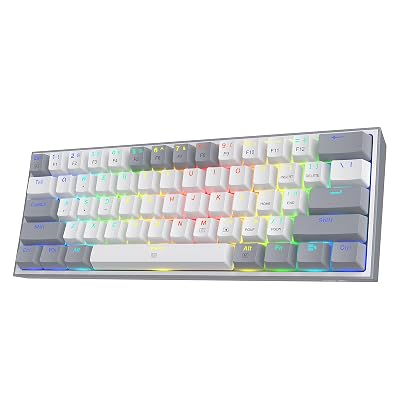
5. Redragon K617 Fizz 60% RGB
The smallest layout here. A 60% board drops the numpad, function row and arrow keys (accessed via a function layer), leaving a tiny footprint and maximum room for low-sensitivity mouse movement. It is a cult favourite among competitive FPS players and a great, cheap first 60% board.
Redragon K617 Fizz 60% RGB
6. Redragon Kumara K552 TKL
The legend of budget mechanical keyboards. The Kumara K552 has been a default recommendation for years because it is tough, reliable and cheap. The build is metal-topped and sturdy, the Outemu blues are satisfyingly clicky, and it simply lasts. Backlighting is rainbow (zones), not per-key RGB, which is the main concession.

Redragon Kumara K552 TKL
How we picked these
We focused on genuine mechanical (or, at the very bottom, semi-mechanical) keyboards on Amazon India at or under ₹5,000, weighting switch quality and build first, then layout choice, connectivity, RGB and after-sales support. We excluded boards that use marketing-speak “gaming” membrane internals. Where two boards were close, the one with better build, a more useful layout, or hot-swap and wireless got the nod.
Switch types explained (Red, Blue, Brown)
Mechanical switches are the heart of the keyboard, and the colour tells you the feel:
Red (linear): smooth and quiet with no bump, light and fast, the popular choice for gaming because rapid presses feel effortless.
Blue (clicky): a distinct tactile bump and a loud click, very satisfying to type on but noisy, great for typing, less ideal for a shared room or voice chat.
Brown (tactile): the middle ground, a soft bump without the loud click, a fine all-rounder for both gaming and typing.
Most boards at this budget use Outemu or similar switches in these colours. If noise matters, avoid Blue. If you cannot decide, Brown or Red are the safe gaming picks. A hot-swappable board (like the Kreo Swarm X) lets you change your mind later.
What “hot-swappable” means (and why it is worth it)
Hot-swap means the switches plug into sockets instead of being soldered to the board, so you can pull one out and push another in by hand, no soldering iron, no skill needed. Why care? If a switch ever fails you replace just that switch instead of the whole keyboard, and if you decide Reds feel too light you can swap to Browns later. It future-proofs the board and is a genuine value-add when you find it at this price (the Kreo boards here offer it). Check the listing for “3-pin” or “5-pin” hot-swap, both are fine; 5-pin holds switches more firmly.
Full-size vs TKL vs 65% vs 60%: which layout?
Layout is the biggest day-to-day difference, and it is mostly a trade-off between keys and mouse space:
Full-size: every key including the numpad. Best for work (data entry, shortcuts) but takes the most desk space.
TKL (tenkeyless): drops only the numpad, keeps arrows and function row. A great all-round gaming choice (the Kumara K552).
65%: drops the numpad and function row but keeps the arrow keys, compact yet practical (the Kreo Hive 65).
60%: the smallest, no numpad, function row or dedicated arrows (you use a function layer). Maximum mouse room, loved by low-sensitivity FPS players (the K617 Fizz), but a learning curve.
If you play FPS and move the mouse a lot, smaller is better. If you use the numpad daily, stay full-size. TKL is the safest compromise.
Mechanical vs membrane (and wired vs wireless)
At ₹5,000 there is no reason to buy a membrane keyboard, even ones marketed as “gaming”. Mechanical switches are more responsive, far more durable (rated for tens of millions of presses), and simply feel better. The only sub-mechanical pick worth considering is a semi-mechanical board on a rock-bottom budget, which is a different guide.
On wired vs wireless: a good 2.4GHz wireless connection (like the Kreo Swarm X) is effectively as fast as wired for all but elite competitive play, and most wireless boards also work wired. Bluetooth alone adds noticeable latency, so use it for typing and the 2.4GHz dongle for gaming. Wired boards (most of this list) save money and never need charging.
What to avoid at this budget
A few traps: “mechanical-feel” membrane boards, the listing will dodge the word “mechanical”, read carefully. No anti-ghosting / N-key rollout, you want at least solid anti-ghosting so simultaneous presses register in games. Non-detachable cables are a minor durability risk. And be wary of unknown brands with no Indian seller support, a keyboard you cannot get serviced is a false economy. Every pick above is from a brand with a real presence in India.
Warranty and after-sales in India
Budget keyboards do fail, so warranty matters more than the spec sheet suggests. Indian gaming brands like Redragon, EvoFox (Amkette), Zebronics and Kreo typically offer a 1-year warranty handled through the Amazon seller or the brand, and all have a real service presence in India, which is exactly why we stuck to known names rather than no-name imports with a cheaper sticker price. Keep your Amazon invoice for any claim, and if a board arrives dead, use Amazon’s replacement window immediately rather than waiting on the longer warranty.
Frequently Asked Questions
Is a mechanical keyboard worth it for gaming under ₹5,000?
Yes. At this budget you get genuine mechanical switches that are more tactile, responsive and durable than membrane keyboards, plus RGB and even wireless or hot-swap options. For both gaming and typing it is a clear upgrade, and there is no reason to buy membrane at this price.
Which switch is best for gaming, Red, Blue or Brown?
Red (linear) switches are smooth, light and quiet, the most popular for fast gaming. Blue (clicky) are loud and tactile, great for typing but noisy. Brown (tactile) are the middle ground. For pure gaming, Red; if you also type a lot and do not mind noise, Blue or Brown.
What does hot-swappable mean?
It means the switches plug into sockets instead of being soldered, so you can replace or change them by hand without any tools. It future-proofs the keyboard, you can fix a failed switch or change the feel later. The Kreo boards here offer it.
Full-size, TKL, 65% or 60%, which layout should I pick?
Full-size keeps the numpad (best for work). TKL drops only the numpad. 65% keeps arrow keys in a compact body. 60% is the smallest with no numpad, function row or dedicated arrows. The smaller the board, the more mouse space for FPS, pick by how many keys you actually use.
Are wireless mechanical keyboards good for gaming?
Yes. Modern 2.4GHz wireless (like the Kreo Swarm X) is effectively as fast as wired for almost everyone, and most also work wired. Just avoid gaming on Bluetooth alone, which adds latency, use Bluetooth for other devices and the 2.4GHz dongle for play.
Do I need RGB on a gaming keyboard?
No, RGB is cosmetic and does not affect performance. Most boards here have it anyway. Per-key RGB (each key individually lit) looks best and allows custom lighting, while zone or single-colour backlighting is cheaper. Prioritise switches, build and layout over lighting.
What is anti-ghosting and do I need it?
Anti-ghosting (and N-key rollover) ensures multiple simultaneous key presses all register, which matters in games where you move, jump and shoot at once. Any decent mechanical board here handles it. Avoid cheap boards that do not mention anti-ghosting at all.
Which is the best gaming keyboard under ₹5,000 in India?
The Kreo Swarm X is the best overall, a wireless, hot-swappable mechanical board. For the best value full-size, the Zebronics Zeb-MAX Chroma, and the Redragon Kumara K552 is the proven budget classic if you want to spend less.
How long do these keyboards last and what about warranty?
Mechanical switches are rated for tens of millions of presses, so the board typically outlasts a couple of PCs. The brands here (Redragon, EvoFox, Zebronics, Kreo) usually give a 1-year India warranty via the Amazon seller or brand. Keep your invoice, and use Amazon’s replacement window if a unit arrives faulty.