
Best Gaming Keyboard Under 1500 in India (2026): Real Mechanical, Real RGB

Harsh Talreja
42 Min Read

Updated April 2026 with current Indian retail prices.

Disclosure: GamingNation.in earns a commission from purchases made via links on this page, at no extra cost to you. As an Amazon Associate I earn from qualifying purchases. Read our affiliate policy.

Last updated April 12, 2026. Prices checked on Amazon.in.

The Rs 1500 range is where budget gaming keyboards stop being a compromise. Below Rs 1000, you are mostly choosing between membrane boards and semi-mechanical keyboards with short lifespans. At Rs 1500, proper Outemu mechanical switches with 50 million keystroke ratings are standard. The keyboard under this article sits between our Rs 1000 guide and our Rs 2000 guide. If you landed here because the Rs 1000 options felt too fragile, or the Rs 2000 options are out of reach right now, you are in the right place.

Also worth pairing: best gaming mouse under Rs 1500 and best gaming headphones under Rs 2000 if you are building a full setup at this budget.

Quick Reference: Best Gaming Keyboards Under Rs 1500 (April 2026)

KeyboardPriceSwitchLayoutBest For
Redragon K552 Kumara~Rs 1,200Outemu Blue / RedTKL (87-key)Best overall: metal plate, N-key rollover
Cosmic Byte Firefly~Rs 1,300Outemu Red65%Best compact: per-key RGB, tight footprint
Ant Esports MK3400~Rs 1,400Outemu BlueFull-size (104-key)Best full-size: numpad, USB-C detachable
Frontech KB-0010P~Rs 1,300Outemu Blue60%Best 60%: detachable cable, lowest price
EvoFox Fireblade TKL~Rs 1,200EvoFox mechanicalTKL (87-key)Best for BGMI/Valorant: responsive switches

1. Redragon K552 Kumara: Best Gaming Keyboard Under Rs 1500

Redragon K552 Kumara
Top Pick

Redragon K552 Kumara

The Redragon K552 Kumara costs around Rs 1,200 and it is the most recommended budget mechanical keyboard in India for a simple reason: the metal top plate. Every other keyboard at this price uses a plastic frame throughout. The K552 has a steel backplate under the keys, which gives it a weight and solidity that plastic boards at Rs 2000 sometimes cannot match. Pick it up and it feels like a keyboard that costs twice as much.

Switch options are Outemu Blue (clicky, tactile click sound on actuation) or Outemu Red (linear, smooth, quieter). For gaming, Red is the better choice. For typing and gaming mixed, Blue has the feedback some people find satisfying, but it is loud enough that roommates in the next room will hear you during a late-night BGMI session.

The TKL layout removes the numpad, cutting the total key count from 104 to 87. This moves the mouse 10 to 15 cm closer to the keyboard, which is a genuine advantage in FPS games where low-sensitivity play requires wide mouse swings. Full N-key rollover over USB means every key you press simultaneously registers. That matters when you are sprinting, crouching, reloading, and activating an ability at the same time.

What is not great: The braided cable is thick and stiff. It fights you when you try to route it cleanly on a desk. No software for RGB customisation either. You cycle through preset lighting modes with a key combination. That is fine for most buyers, but if you want to sync RGB to your mouse and headset, this is not the keyboard for it.

Verdict: Buy this if you want the best build quality under Rs 1500 without any debate. The metal plate alone separates it from every other option at this price.

2. Cosmic Byte Firefly: Best Compact Under Rs 1500

Advertisement
Cosmic Byte Firefly
Best Compact

Cosmic Byte Firefly

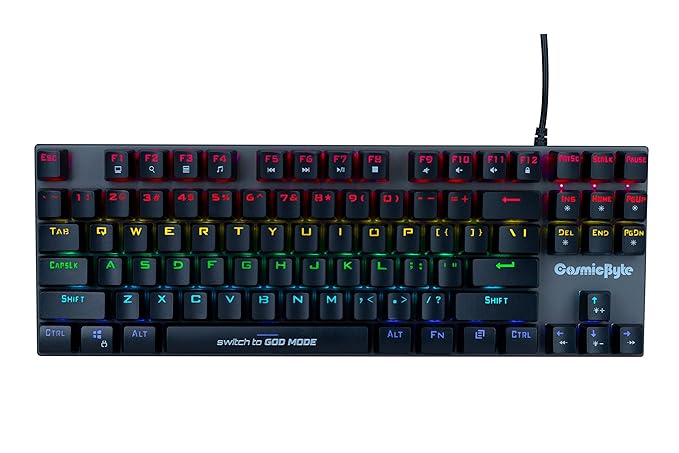
The Cosmic Byte Firefly sits at around Rs 1,300 and uses a 65% layout: 68 keys total, which keeps the arrow keys while dropping the function row and numpad. Per-key RGB with 18 preset modes is good at this price. Most keyboards under Rs 1500 have a single-colour backlight or a fixed rainbow mode. The Firefly cycles through per-key effects that look noticeably better on a desk setup.

Outemu Red switches make this keyboard well suited for gaming. Linear switches with a 45g actuation force are faster to press repeatedly than Blue or Brown switches. If you play Valorant and spam the peek-counter-peek movement on A and D keys, linear switches let you do that with less finger fatigue over a long session.

The 65% footprint is the smallest among the keyboards here that still keeps arrow keys. Going to a 60% layout means losing dedicated arrow keys, which matters in games like Minecraft and some MMORPGs that use arrow keys for menus. The Firefly keeps them, so it works for gaming across genres without needing to memorise layer shortcuts.

What is not great: Cosmic Byte’s warranty support in India is average. If you get a defective unit, replacement requires shipping to their service centre. Also, the 65% layout cuts the function row, so F-key shortcuts in productivity software require pressing Fn plus a number key. For a dedicated gaming keyboard this is fine. For work plus gaming, the full-size Ant Esports below is more practical.

Verdict: The best choice if desk space is tight or you want the best RGB quality at this price range.

3. Ant Esports MK3400: Best Full-Size Under Rs 1500

Ant Esports MK3400
Best Full-Size

Ant Esports MK3400

Advertisement

The Ant Esports MK3400 costs around Rs 1,400 and is the only full-size mechanical keyboard under Rs 1500 in India worth buying. It has 104 keys including a numpad, Outemu Blue mechanical switches, rainbow RGB backlight, and a detachable USB-C cable. The detachable cable is a significant feature at this price. If the cable wears out at the connector, you replace the Rs 200 cable and not the Rs 1,400 keyboard.

Ant Esports is an Indian gaming brand with decent warranty coverage and service centres in major cities. For budget buyers, post-purchase support matters more than it does for premium keyboards, because you are more likely to have a defective unit when buying in the Rs 1000 to 1500 range. Ant Esports handles warranty replacements better than most budget brands in India.

The Outemu Blue switches here are the standard choice for a full-size keyboard because typing on a full board benefits from the tactile clicky feedback. The numpad also gets the same switches, which is useful if you do financial data entry or play games with numpad controls.

What is not great: The Blue switches are loud. Very loud. Not an issue for solo setups or private rooms, but a definite concern if you share a room or game at night. Ant Esports does not offer a Red switch variant of the MK3400 at this price point, so quiet linear options are limited in full-size format under Rs 1500.

Verdict: Buy this if you specifically need a numpad. For pure gaming without the numpad requirement, the Redragon K552 gives better build quality in TKL form for Rs 200 less.

4. Frontech KB-0010P: Best 60% Under Rs 1300

Frontech KB-0010P
Best 60%

Frontech KB-0010P

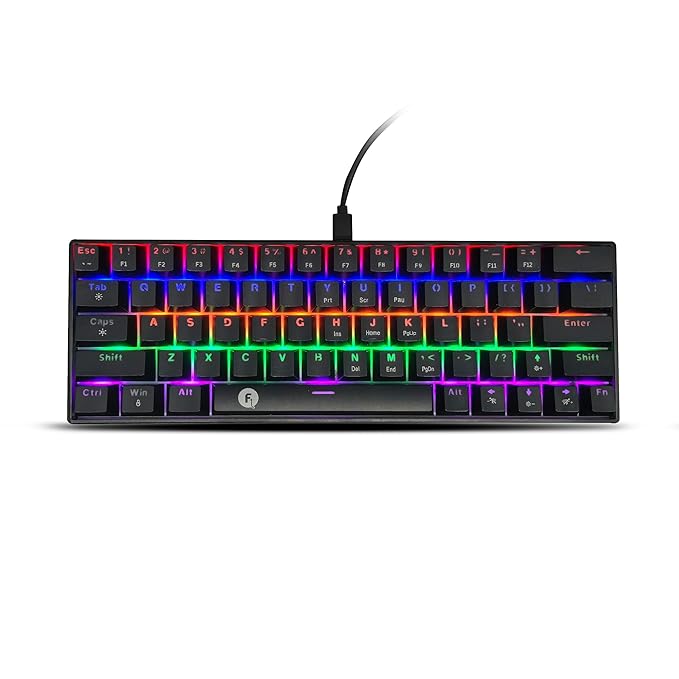
The Frontech KB-0010P costs around Rs 1,300 and is a 60% keyboard with 63 keys and a detachable USB-C cable. It is the most compact option here. Going 60% means no numpad, no function row, and no dedicated arrow keys. Everything beyond the core alphanumeric block requires pressing the Fn key plus another key. This sounds like a problem until you sit down with it and realise that competitive FPS players rarely use arrow keys, the function row, or the numpad during gameplay.

The freed desk space from a 60% layout is substantial. A standard full-size keyboard takes up roughly 45 cm of desk width. The Frontech KB-0010P takes up around 29 cm. That extra 16 cm goes to mouse space. For anyone playing at 400 to 800 DPI in Valorant, CS2, or BGMI, that space is where wide tracking and flick shots happen.

Outemu Blue switches here are the same quality as in the more expensive keyboards on this list. The detachable cable sets this apart from cheaper competition at the same price, because 60% keyboards with fixed cables become single-use items when the cable connector wears out.

What is not great: Frontech has limited offline service options outside major metros. The RGB on this keyboard is single-colour per preset, not per-key. The 60% layout takes adjustment time, especially if you switch between this keyboard and a full-size keyboard at an office or college.

Verdict: The right pick for competitive gamers with small desks who want maximum mouse space and do not care about arrow keys or a numpad.

5. EvoFox Fireblade TKL: Best for BGMI and Casual FPS

EvoFox Fireblade TKL
BGMI Pick

EvoFox Fireblade TKL

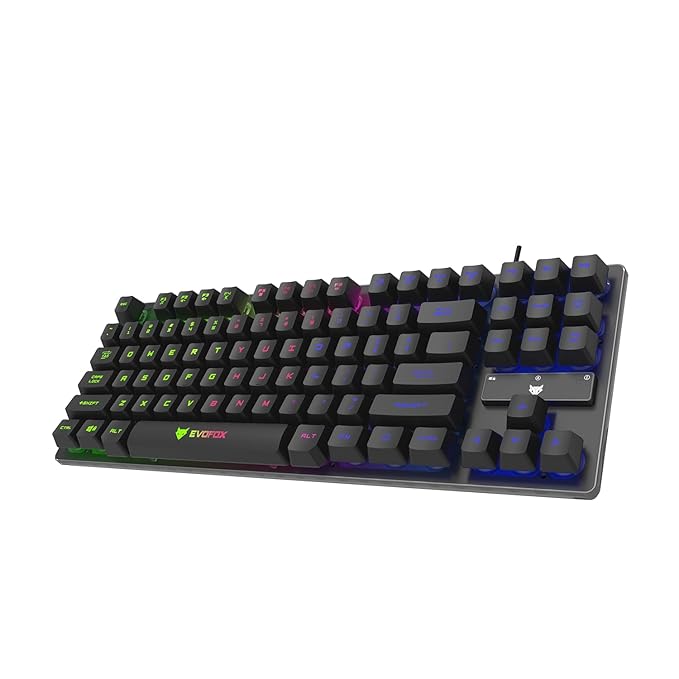
The EvoFox Fireblade TKL costs around Rs 1,200 and targets the mobile gaming crossover audience: players who shifted from BGMI on phone to BGMI on emulator and are now transitioning to PC gaming setups. The TKL layout is familiar for most gamers who have used standard keyboards, while the mechanical switches provide a clear upgrade over the membrane and rubber-dome keyboards that most casual setups use.

EvoFox uses its own branded mechanical switches in some variants and Outemu switches in others. Both are rated for 50 million keystrokes. The Fireblade TKL supports 26-key anti-ghosting, which is enough for all gaming combinations. RGB backlight is present with preset mode cycling through a function key shortcut.

The build is plastic throughout. It is lighter than the Redragon K552 Kumara, which some buyers prefer for portability. If you carry your keyboard to a friend’s place for LAN sessions, lighter matters. The KB also includes a dust cover in some bundles, which is a nice addition for Indian conditions where dust on open keycaps is a real problem.

What is not great: EvoFox is a Flipkart-exclusive brand, so Amazon availability is inconsistent. Pricing fluctuates. The plastic build does not feel as premium as the Redragon K552 at the same price, and warranty support has been mixed based on user reports in Indian gaming communities.

Verdict: Good second choice if the Redragon K552 Kumara is out of stock. Check Flipkart first for this one since that is where EvoFox primarily sells.

6. Redragon K617 Fizz: If You Want the Smallest Possible Keyboard

Redragon K617 Fizz
Smallest

Redragon K617 Fizz

The Redragon K617 Fizz at around Rs 1,400 is a 60% keyboard from the same brand as the K552 Kumara. It has 61 keys, per-key RGB, and Outemu switches in Red or Blue variants. The reason it sits below the K552 on this list is that the 60% form factor is a specific choice, not a general recommendation. Most gamers switching from a full-size or TKL keyboard will find the 60% layout disorienting for the first two to three weeks. Arrow keys are gone. The Fn layer covers everything. Some games require remapping.

If you already know you want a 60% keyboard, the K617 Fizz is the best option at Rs 1500. The per-key RGB is better than the Frontech KB-0010P. The Redragon build quality is better than the EvoFox Fireblade. And it undercuts the Frontech at the same compact size.

Switch recommendation: Red for gaming. Blue for typing. Simple as that.

7. Zebronics Zeb-Max Plus: Cheapest Mechanical With Full-Size

Zebronics Zeb-Max Plus
Cheapest Mechanical

Zebronics Zeb-Max Plus

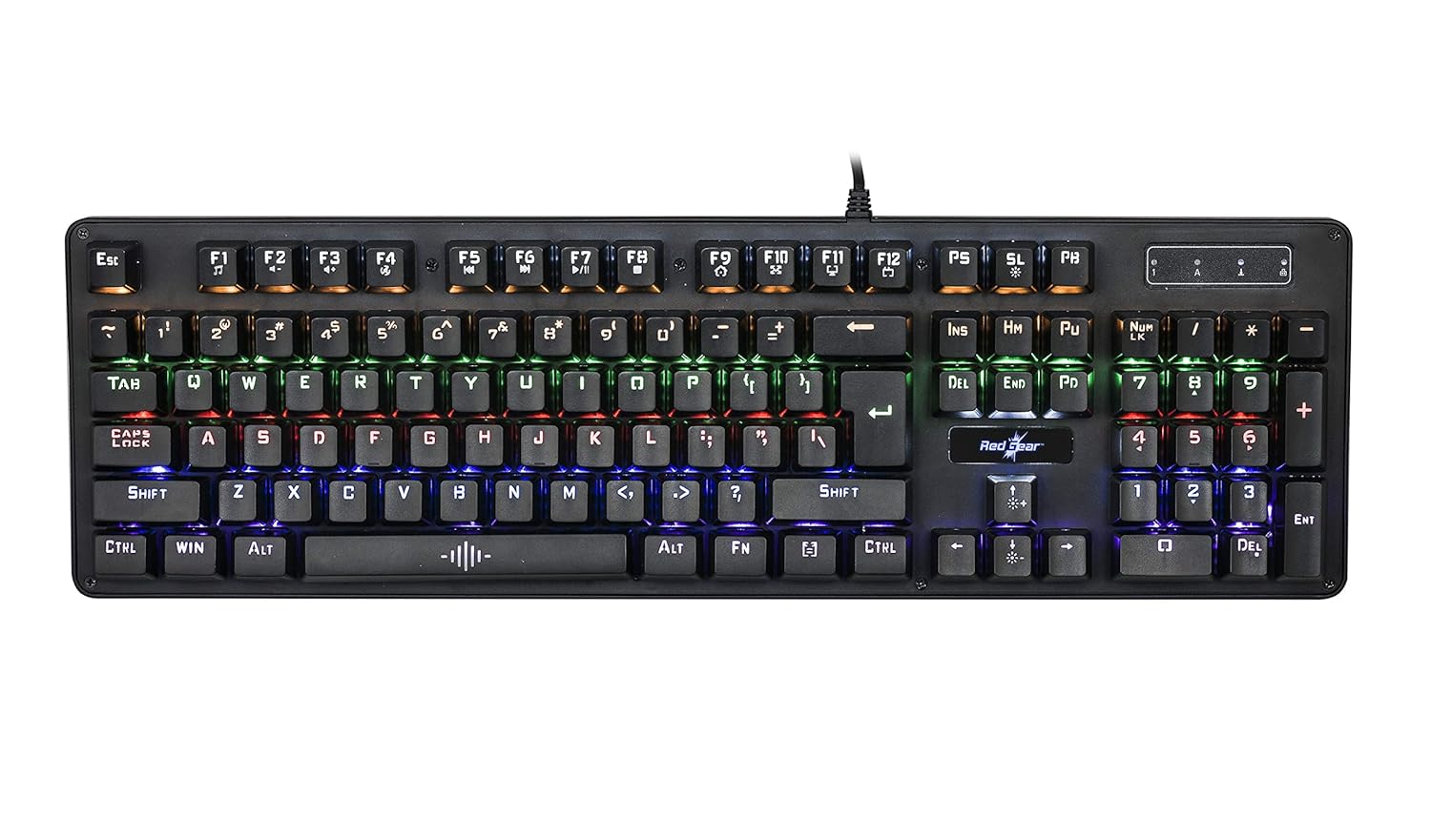
The Zebronics Zeb-Max Plus comes in at under Rs 1,200 and offers 104 keys with mechanical switches at the absolute floor of this market. Zebronics has a wide service network across India, which is its main advantage. Tier 2 and Tier 3 city buyers who need post-purchase support benefit from Zebronics’ reach into markets where Redragon and Ant Esports service centres do not exist.

The switches here are Zebronics-branded mechanical switches. Actuation feel is acceptable for gaming. The build is fully plastic and lightweight, which some buyers prefer for portability. RGB is present in preset modes. The USB cable is fixed (non-detachable), which is a concern for longevity.

This keyboard is best described as serviceable. It works. The switches are mechanical and better than membrane. But the build finish and key cap quality are clearly below Redragon and Ant Esports at similar prices. Buy it specifically if Zebronics service availability in your city is important or if this is a first keyboard for someone trying mechanical switches before spending more.

8. Ant Esports MK1000: Budget Pick for First-Time Mechanical Buyers

Ant Esports MK1000
Budget Pick

Ant Esports MK1000

The Ant Esports MK1000 at around Rs 1,000 to 1,100 is technically under the Rs 1500 ceiling, but worth mentioning separately for first-time mechanical keyboard buyers in India who are not sure they will prefer mechanical switches over membrane. It uses Outemu Blue switches in a full-size 104-key layout, has a fixed USB cable, and no RGB. This is the stripped-down mechanical experience: no lighting, no extra features, just the switch feel and anti-ghosting.

If you have never typed on a mechanical keyboard and are spending Rs 1,200 to 1,400 feels like a lot to experiment with, the MK1000 lets you try Outemu Blue switches for Rs 1,000. If you hate the clicky feel, you spent Rs 1,000 to find that out rather than Rs 1,400. If you love it, step up to the MK3400 or the Redragon K552. For a tighter budget, see our tighter Rs 2,500 keyboard list.

Full Size vs TKL vs 60%: Which Layout for Indian Gamers

This question comes up constantly on Indian gaming subreddits and in Discord servers. The answer depends on three things: what games you play, how big your desk is, and whether you also use the keyboard for work or study.

Full-Size (104-key): For Work-Plus-Gaming Setups

Full-size keyboards make sense when you use the numpad. That sounds obvious, but many buyers choose full-size out of habit rather than actual numpad use. If you do accounting, use CAD software, enter numerical data in spreadsheets, or play games that use numpad controls (older RPGs, flight sims), full size is correct. For pure gaming with no work use, full-size takes up desk space that your mouse needs.

In India, most gaming setups are in bedrooms with study desks rather than dedicated gaming rooms. A standard study desk that is 90 to 100 cm wide fits a full-size keyboard plus a medium mouse pad, but the mouse ends up positioned far to the right. Playing Valorant or CS2 at 800 DPI on a 1080p monitor requires some lateral mouse range. With a full-size keyboard, that range is partially blocked by the desk edge on one side.

TKL (87-key): The Best Balance for Most Indian Gamers

TKL removes the numpad. That is it. The function row, number row, and all standard typing keys are intact. Arrow keys are where you expect them. Nothing requires relearning. The keyboard is about 12 cm shorter than full-size, which moves the mouse 12 cm closer to centre and gives you that much more rightward range for mouse movement.

For Indian gamers on standard bedroom desks, TKL is almost always the right layout choice. You lose the numpad. You gain desk space and a better mouse position. The trade-off is obvious and the gain is immediate. The Redragon K552 Kumara and EvoFox Fireblade TKL are both TKL keyboards under Rs 1500.

60% (61-key): For Competitive Players Who Have Adapted

The 60% layout is for players who have already adapted to compact keyboards and specifically want maximum desk space. Arrow keys, the function row, the numpad, and the navigation cluster (Insert, Home, End, Delete, Page Up, Page Down) are all removed. Everything is accessed through Fn layer shortcuts.

Most Indian gamers who switch to 60% from a full-size keyboard go through two to three weeks of frustration before the Fn-layer shortcuts become muscle memory. After that, many of them say they would never go back. The adjustment period is real, though. If you are in school or college and use the same keyboard for typing assignments, the 60% layout will slow you down on word processors until you have fully adjusted.

The Frontech KB-0010P and Redragon K617 Fizz are both 60% keyboards under Rs 1500 that are worth considering if you have made the decision to go compact.

Quick Layout Recommendation

Your SituationRecommended Layout
Pure gaming, no numpad use, standard deskTKL
Gaming plus study, spreadsheets, data entryFull-size
Competitive FPS, small desk, willing to adapt60%
Carry keyboard to friends or LAN parties60%
First keyboard upgrade, not sure what you preferTKL

Hot-Swappable at Rs 1,500: Is It Possible?

Hot-swappable keyboards let you pull out individual switches and replace them without soldering. You damage a switch, yank it out, press a new one in. Your keyboard lasts years longer than a non-swappable one. The Cosmic Byte Firefly was briefly available at Rs 1,300 with hot-swap sockets during a sale period in 2025. At the time of updating this article in April 2026, the Firefly’s consistent market price in India is around Rs 1,799.

Below Rs 1500, genuine hot-swappable keyboards are not reliably available in India. You might find one during a flash sale at Rs 1,200 to 1,400, but counting on that for a buying recommendation is not realistic.

The keyboards on this list all have soldered switches. That means when a switch fails, you have three options: use the keyboard with that one broken key, learn to desolder and solder (which requires equipment and practice), or replace the entire keyboard. Budget keyboards are designed to be replaced rather than repaired at this price tier.

This is a genuine limitation. The honest answer to “can I get hot-swap at Rs 1500 in India” is: not reliably, not in 2026. If hot-swap is the priority, save for the Rs 1,800 to 2,000 range and check the Cosmic Byte Firefly specifically. That keyboard covers hot-swap, per-key RGB, and Outemu Red switches. At Rs 1,500, you are choosing between better build quality and more features, not between swappable and non-swappable switches.

If you want to understand what hot-swap enables, here is the practical picture: Outemu switches in linear (Red), tactile (Brown), and clicky (Blue) versions cost Rs 40 to 80 per switch on Amazon India. For a TKL keyboard that starts failing on a few frequently-used keys after two years, replacing those 10 to 15 switches costs Rs 500 to 800 instead of Rs 1,200 for a new keyboard. The math works out in favour of hot-swap over a 3-year ownership period. Just not at Rs 1,500.

Switch Guide: Which Outemu Switch Type for Your Games

Switch TypeFeelNoise LevelBest ForAvoid If
Outemu RedLinear, smooth, lightQuiet (just the click on bottoming out)FPS, fast gaming, late-night sessionsYou type a lot and want tactile feedback
Outemu BlueClicky, tactile bump + audible clickLoud, very loudTyping, hybrid work-gaming setupsShared rooms, night gaming, microphone nearby
Outemu BrownTactile bump, no click soundMediumTyping-heavy users who also gameCompetitive FPS players who want pure speed

Most keyboards under Rs 1500 in India come in Blue switch variants by default because Blue switches sell better at retail. The clicky sound is satisfying in store demos and product videos. For actual gaming, Red is better in almost every case. If the keyboard you want only comes in Blue at this price, that is still fine. Blue switches are perfectly functional for gaming. Red is just faster and quieter.

What to Avoid Under Rs 1500

Keyboards marketed as “mechanical feel” or “hybrid mechanical”: This is marketing language for membrane keyboards with a spring mechanism added to mimic a click. The actuation is still membrane-dome based. You do not get the 50 million keystroke rating or the distinct actuation point of genuine mechanical switches. Avoid anything that does not specify Outemu, Cherry MX, Gateron, or Kailh switches by name.

Unknown brand RGB keyboards with no switch spec: Every week a new keyboard brand appears on Amazon.in with “104-key RGB mechanical gaming keyboard” in the title at Rs 800 to 1,100. The product listing has no switch specification, no brand mention for the switches, and reviews that are clearly incentivised. These keyboards fail at 6 to 12 months. The savings over a Redragon K552 are not worth replacing it in a year.

Fixed rubber cables with no strain relief: A thick, fixed rubber cable on a budget keyboard is a failure point. The cable wears at the keyboard connector first, causing intermittent disconnections. Keyboards with detachable USB-C cables (Ant Esports MK3400, Frontech KB-0010P) are meaningfully better for longevity.

Full-size keyboards for competitive FPS if desk space is limited: This is a setup mistake rather than a product mistake. A good full-size keyboard in a cramped desk position is worse for competitive gaming than a mediocre TKL keyboard with proper mouse space. If your desk is under 100 cm wide, go TKL or 60%.

The Verdict

The Redragon K552 Kumara wins at Rs 1,200. The metal top plate and N-key rollover set it apart from everything else at this price. Get Red switches for gaming and Blue switches if you type more than you game.

If desk space is tight and you want the best RGB at this budget, the Cosmic Byte Firefly at Rs 1,300 is the right pick. If you need a numpad for work, the Ant Esports MK3400 at Rs 1,400 is the only full-size mechanical option worth buying at Rs 1,500 or less.

Skip anything labelled “mechanical feel” or “hybrid” without a named switch type. Skip keyboards where RGB is the main selling point and switch quality is an afterthought. At Rs 1,500, you have enough to buy a proper mechanical keyboard. No reason to settle for less.

Next step after the keyboard: check our gaming mouse under Rs 1500 guide for the rest of the input setup, or see the full peripherals tier at our gaming keyboard under Rs 2000 guide if your budget has a bit more room.

Advertisement
Share This Article
Follow:
Harsh Talreja edits Gaming Nation from a Mumbai bedroom desk and a Bangalore hotel desk on alternate months. He has been writing about PC hardware, gaming peripherals and Indian gaming cafes for 6 years, with hands-on time on every major PC component category sold in India under Rs 2,00,000 (RTX 3050 to RTX 4070 Super, Ryzen 5 5600 to Ryzen 7 7700X, every B550 and B650 mainstream board, 144Hz IPS to 240Hz OLED, Razer DeathAdder to Logitech G502 Hero). He has visited and benchmarked over 18 gaming cafes across Mumbai, Bangalore, Pune, Delhi, Hyderabad, Chennai, Kolkata and Amritsar. Plays BGMI at Crown tier, Valorant at Diamond, daily-drives a 5800X3D plus RX 7600 build at home. Outside Gaming Nation, Harsh works as an SEO partner for Indian startups (he can be reached on LinkedIn for that work). All Indian retail prices on this site are checked monthly against Amazon.in and Flipkart, all hardware claims are checked against RTINGS, Tom's Hardware, NotebookCheck, and Hardware Unboxed where applicable.