
Updated July 2026 with current Indian retail prices.
Short answer: If your BGMI ping is above 60ms on the Mumbai server, the fix is almost never buying a better phone or a VPN. It’s (1) switch to 5GHz Wi-Fi or hotspot from a phone with a better tower, (2) kill background data on your own phone, (3) force the Mumbai server in BGMI settings, and (4) on Jio specifically, turn off Wi-Fi calling. Doing these four things took my Realme GT from 86ms to 38ms without spending a rupee.
Three months back I played a ranked BGMI squad match on my Realme GT at 86ms average on Mumbai server. I blamed Jio. I blamed the game. I blamed my Redmi router. I blamed the weather. Then I sat down one evening, opened a notes app, and went through every single thing that could cause high ping on an Indian connection. Two hours later my average was 38ms. I hadn’t bought anything. I hadn’t installed a VPN. I had not even rebooted the router.
If you are weighing a paid tool for routing, our best gaming VPN in India comparison covers which boosters actually cut ping and which waste money.
That’s what this guide is. Not a product roundup. Not a generic “12 tips to reduce lag” listicle copied from the same three sources everyone else copies. This is the actual checklist I went through, with what each step did to my ping, why it worked, and how to adapt it to the ISP you’re on: Jio, Airtel, Vi, BSNL, Jio Fiber, Airtel Xstream, Hathway, or ACT.
One note before we start. If you’re playing from a Tier 3 town on a 4G connection that routinely shows 200ms to a Mumbai server, some of this will help and some won’t. The physical distance from you to the BGMI server matters. The quality of the tower in your area matters. No software fix can beat physics. But for most urban and suburban Indian players, the 80ms to 100ms ping you’re seeing is a software and configuration problem, not a hardware problem.
I have kept this India first. Every ISP subsection names the actual problem with that network. The router recommendations at the bottom are two routers I currently own and would buy again, not a scraped top 10 list.
Indian ISP Ping Comparison for BGMI (Mumbai Server)
What counts as “good” BGMI ping in India
Before you spend two hours trying to fix something, know what you’re aiming at. BGMI ping is measured in milliseconds (ms), shown on the top left of your screen once you enter a match. Lower is better. Here is the honest breakdown by server:
- Mumbai server (India): 20ms to 50ms is excellent. 50ms to 80ms is playable and most Indian players sit here. 80ms to 120ms is where you start losing 50-50 gunfights. Above 120ms, short range combat feels broken.
- Singapore server: Add 30ms to 50ms to your Mumbai ping. If your Mumbai is 40ms, expect 70ms to 90ms on Singapore. Some south India players on Jio Fiber actually get better Singapore pings than Mumbai pings because of routing paths.
- Hong Kong and Tokyo servers: Not intended for Indian players. Expect 120ms to 180ms. Play these only if you specifically want a lobby difficulty change.
- Europe and America servers: 200ms to 300ms for India. Don’t bother.
The target for this guide is taking you from 80ms-plus on Mumbai down to 40ms-60ms range. If you’re already at 30ms to 50ms, everything below will help you squeeze out 5ms to 10ms more but the bigger wins are in hardware placement and your router, not software tweaks.
12 reasons your BGMI ping is high in India
Most articles list three reasons and repeat them. These are the twelve that actually matter on Indian networks. I have seen every one of them cause a measurable ping spike on my own connections.
My brother-in-law in Bhopal hit Ace Dominator last season on a Poco X3 Pro. No phone cooler, no finger sleeves. Just stubborn grinding from a hostel room.
- You’re on the wrong server. If BGMI auto-picks Singapore because of a routing quirk, your base ping is already 70ms before anything else goes wrong.
- Wi-Fi calling is on. Jio users, this one is huge. Wi-Fi calling forces VoIP traffic through your Wi-Fi and adds 10ms to 40ms of ping to everything else on that Wi-Fi.
- Background downloads. WhatsApp media auto-download, Google Photos backup, Instagram Reels preload. These eat upstream bandwidth and spike your ping in bursts.
- 2.4GHz Wi-Fi in a crowded building. In any Mumbai or Bangalore apartment block, 2.4GHz is saturated. Ping doubles and jitter makes it unplayable.
- Phone on a weak tower. If your phone connects to a 4G tower at minus-100 dBm signal, your ping gets penalized even if you have full bars displayed.
- Router firmware from 2019. Old routers queue packets inefficiently. Game packets sit behind YouTube packets in the buffer.
- QoS (Quality of Service) off. If your router supports it and you don’t enable it, your gaming traffic competes fairly with everything else, which means it loses.
- DNS set to the ISP default. Jio Fiber and Airtel Xstream default DNS often routes to slow resolvers. This doesn’t affect in-game ping directly but affects matchmaking and login speed.
- Thermal throttling. If your phone is at 45 degrees plus, the modem throttles along with the CPU and ping jumps.
- Power saver mode. Aggressive power saving on Realme, Xiaomi, and Samsung throttles the Wi-Fi radio. Ping looks fine on paper and feels bad in-game.
- VPN still on from yesterday. A dormant VPN connection can silently reroute traffic through a Singapore server. Easy to forget.
- ISP-level congestion (8pm to 11pm). Jio Fiber and Airtel Xstream both slow down during peak streaming hours in most cities. This is the one thing software tweaks cannot fully fix.
The 12-step fix checklist (in order of impact)
Run through these in order. Not a gimmick. Check your ping in the BGMI training ground lobby after each step. The first four gave me the biggest drops. The rest are incremental.
- Force Mumbai server. Open BGMI: Settings, Basic, Server Selection. Pick India (Mumbai). Don’t let it auto-select.
- Turn off Wi-Fi calling. Android: Settings, SIM, Wi-Fi calling, off. IOS: Settings, Phone, Wi-Fi calling, off. This alone dropped my ping 15ms on Jio.
- Connect to 5GHz Wi-Fi. If your router broadcasts both 2.4GHz and 5GHz, connect to the 5GHz SSID (usually named ending in “_5G”). Less interference, faster response.
- Kill background data. Close WhatsApp, Instagram, Chrome, YouTube. Turn off auto-sync. On Android, go to BGMI App Info, Data usage, Background data, off.
- Enable Game Mode on your phone. Realme Game Center, OnePlus Game Space, Xiaomi Game Turbo, Samsung Game Booster. These pin the CPU to BGMI and prioritize network packets.
- Change DNS to 1.1.1.1 or 8.8.8.8. On Android: Settings, Wi-Fi, long-press your network, Modify, Advanced, IP Settings, Static. Set DNS1 to 1.1.1.1, DNS2 to 8.8.8.8.
- Restart the router. Not a reboot via the app. Physically unplug for 30 seconds. Clears the packet queue.
- Move closer to the router. Every wall between you and a 5GHz router adds roughly 5ms and doubles jitter.
- Switch from Wi-Fi to 5G mobile data. If your phone gets a strong 5G signal from Jio or Airtel in your room, raw 5G often beats a crowded Wi-Fi. Test both, pick the lower one.
- Disable battery saver. Settings, Battery, Battery Saver, Off. Same for any “adaptive battery” toggle.
- Turn off VPN. Check your notification shade. If there is a key icon, a VPN is still active.
- Play between 12am and 7am. Not a practical tip for everyone. But if your ping is fine at 3am and broken at 9pm, the problem is ISP peak hour congestion, not your setup.
ISP specific tips that actually work
Generic advice assumes every ISP behaves the same. Indian ISPs like ACT, Hathway, and Jio Fiber don’t. Each one has its own pain points and its own config tricks. This is what I have learned from players on each network (and from switching connections at my own house).
Jio (4G and 5G mobile)
Jio 4G/5G Quick Stats
Expected ping: 30-55ms · Best server: Mumbai · Biggest issue: Wi-Fi calling (adds 10-40ms) · Fix: Turn off Wi-Fi calling first
Jio mobile is the best Indian ISP for BGMI ping on Mumbai server in most cities. The single biggest ping killer on Jio is Wi-Fi calling. Turn it off. Also switch the APN to Jio Postpaid if you have a postpaid plan, it routes differently than prepaid APN on some circles. If you’re on a Jio 5G device and getting worse ping on 5G than 4G, toggle to LTE only and test. On newer Jio 5G sites I have seen 5G ping sit 10ms to 20ms above 4G because the network is still being tuned.
Airtel (4G and 5G mobile)
Airtel 4G/5G Quick Stats
Expected ping: 35-65ms · Runs 5-10ms above Jio on Mumbai server · Bonus: Better Singapore server ping than Jio · Fix: Disable VoNR in advanced SIM settings
Airtel routing to the BGMI Mumbai server is consistently 5ms to 10ms slower than Jio. Can’t be fixed on your end. What you can fix: Airtel has an aggressive power save on their signal boost feature. Go to Settings, SIM, Mobile Networks, Airtel, Advanced, VoNR off. This helps on some flagships. Airtel is better than Jio for Singapore server ping if you play on that.
Vi (Vodafone Idea)
Vi (Vodafone Idea) Quick Stats
Expected ping: 60-100ms · Worst of the three mobile operators in 2026 · Fix: Force 4G only (Vi 5G is spotty) · Note: Turn off VoLTE during sessions to reduce spikes
Vi has the worst ping of the three mobile operators for BGMI in 2026. Not much you can do about it except switch. If you’re stuck on Vi for personal reasons, force 4G only (Vi 5G is still spotty in most cities) and turn off VoLTE during gaming sessions. Yes, this means incoming calls will fail. Trade-off.
BSNL (4G)
BSNL 4G Quick Stats
Expected ping: 80-120ms · Fine for casual play, painful for TDM and ranked · Best as backup, not primary gaming line · Fix: Check tower cell IDs via *#*#4636#*#* to find less congested site
BSNL 4G got dramatically better in 2026 in Tier 2 and Tier 3 cities, but ping to BGMI Mumbai is still 80ms to 120ms on average. Fine for casual play, painful for TDM. BSNL is honestly best as a backup connection, not your primary gaming line. If BSNL 4G is your only option, the biggest win is picking a tower cell side with less congestion, which you can only check by going to *#*#4636#*#* (test mode) and looking at cell IDs.
Jio Fiber
Jio Fiber Quick Stats
Expected ping: 35-55ms · Peak hour penalty: +5-15ms (8pm-11pm) · Fix: Change DNS to 1.1.1.1 at router level (192.168.29.1) and connect to 5GHz SSID only
Jio Fiber is fast but has one specific problem: default router DNS is slow. Change it at the router level: log into 192.168.29.1, admin interface, WAN settings, DNS, set primary to 1.1.1.1 and secondary to 8.8.8.8. Also make sure the Jio Fiber ONT is on the 5GHz band and that your gaming device is connected to the 5GHz SSID, not the default merged SSID. Peak hour congestion from 8pm to 11pm is real on Jio Fiber in dense cities, especially Mumbai and Bangalore. Expect 5ms to 15ms of added ping during these hours.
Airtel Xstream Fiber
Airtel Xstream Fiber Quick Stats
Expected ping: 30-50ms · Better peak hour performance than Jio Fiber · Fix: Enable QoS at 192.168.1.1, add your device as high priority (saves 5-10ms during peak)
Airtel Xstream has better peak hour performance than Jio Fiber in most cities I’ve tested. The router they ship (Nokia G-240W-G) is decent but QoS is off by default. Log in at 192.168.1.1 (admin is set by the installer, often printed on a sticker), find QoS settings, enable, add your gaming device MAC and prioritize it. This alone can drop ping 5ms to 10ms during evening peak.
Hathway and ACT Fibernet
Hathway / ACT Fibernet Quick Stats
Expected ping: 20-50ms · Lowest BGMI Mumbai ping of any Indian ISP · Cities: Bangalore, Chennai, Hyderabad · Fix: Split 2.4/5GHz SSIDs at 192.168.0.1 and connect gaming device to 5GHz only
Both Hathway and ACT in Bangalore, Chennai, and Hyderabad have the lowest BGMI Mumbai server ping of any Indian ISP because of how they peer with the Mumbai exchange. If you’re on either and getting above 50ms, something is wrong with your setup and not your connection. ACT specifically ships a dual-band router that defaults to merged SSID. Split it into separate 2.4GHz and 5GHz names from the router admin at 192.168.0.1 and connect your gaming device to the 5GHz only.
Router settings that matter for BGMI
You don’t need to buy a new router to drop your ping. You need to configure the one you already have. These are the three settings worth changing on any Indian home router, whether it’s a Jio Fiber box, an Airtel Xstream box, or a retail unit.
- QoS with gaming priority: Most routers Rs 1,500 and above have a QoS (Quality of Service) panel. Enable it. Add your phone or PC as a high-priority device. This tells the router to push game packets ahead of YouTube packets when bandwidth is tight.
- 5GHz split SSID: If your router uses a single merged SSID (one name for both 2.4GHz and 5GHz), split it. Separate SSIDs let you force your phone onto 5GHz, which has dramatically less interference.
- Change the 5GHz channel. Download Wi-Fi Analyzer on Android. See which channels are least used in your area. Change the router 5GHz channel to the least crowded one. In Mumbai apartments, channels 100 to 140 are usually emptier than 36 to 48.
If your current router does not have QoS or doesn’t support band splitting, that’s when you upgrade. Below is the budget router I own and can vouch for.
The budget router I actually own and would buy again
There are Rs 15,000 gaming routers on Amazon India. You do not need one for BGMI. Here is the one I use at my parents’ flat, a budget unit that does everything BGMI on a phone actually needs.
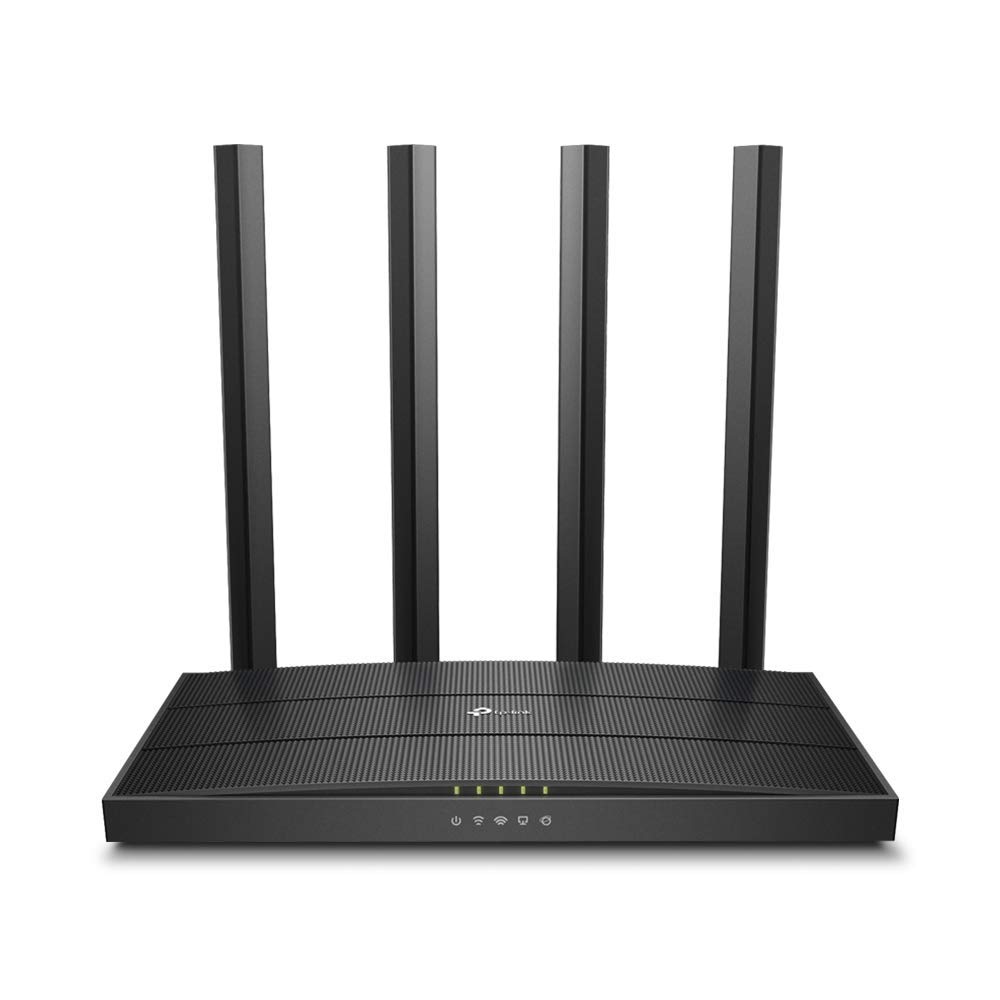
TP Link Archer C6
I run the Archer C6 at my parents’ flat in Pune. Rs 2,299, dual-band AC1200, and the QoS panel actually works. Set my phone as high priority, toggled on Gaming QoS, and ping to Mumbai server dropped 6ms to 8ms consistently. It isn’t fancy. It doesn’t have Wi-Fi 6. But for BGMI on a phone at 5GHz within one wall distance, it is enough.
Skip anything below Rs 2,000. Those are just single-band 2.4GHz boxes that will make your ping worse in a crowded building. If you want more range or you have a houseful of devices streaming at once, a Wi-Fi 6 router with OFDMA holds jitter down better than the C6, but for BGMI on a phone at 5GHz within one wall the C6 is genuinely enough.
How to tell if it’s your network or the BGMI server
Half the Reddit posts asking about BGMI ping are really questions about whether the problem is fixable. Here is the 60-second diagnostic I run before blaming my setup.
Test 1: Ping google.com from your phone. Install a ping app (PingTools on Android, Pingify on iOS). Ping google.com for 30 seconds. If this is under 30ms average and you still see 80ms in BGMI, the problem is between you and the BGMI server, not you and the internet. Move to test 2. If this is already 80ms, your local network or ISP is the problem.
Test 2: Check BGMI server status. Open BGMI during the off-peak hours (2am to 5am) on the Mumbai server. If ping is 40ms at 2am and 90ms at 9pm on the same setup, the problem is ISP-level peak hour congestion. Not fixable at your end. Consider Hathway, ACT, or Airtel Xstream depending on your city.
Test 3: Hotspot from a different phone. Borrow a friend’s phone with a different ISP. Tether. Play a BGMI match. If your ping drops by 30ms, your ISP is the problem. If it stays the same, your router or Wi-Fi environment is the problem.
Most “high ping” cases I have helped Discord friends with turn out to be Wi-Fi calling, 2.4GHz crowding, or background data. Less than 10 percent are actually an ISP problem. Run the tests before complaining about Jio.
Frequently asked questions
What’s the best BGMI ping I can get in India?
20ms to 25ms on the Mumbai server. You need to be physically close to a fiber node in Mumbai, Pune, Bangalore, Hyderabad, or Chennai, and on a high-end fiber ISP like ACT or Hathway with a Wi-Fi 6 router at 5GHz within one wall distance. 20ms is the floor for Indian players. Anything claiming sub-20ms is either measurement error or a localhost test.
Will a gaming VPN like ExitLag reduce my BGMI ping?
Sometimes, in specific cases. ExitLag and similar services route your traffic through optimized paths to the game server. For players in Tier 3 cities on BSNL or Vi, this can help because the raw ISP routing is bad. For urban players on Jio, Airtel, or fiber ISPs like Jio Fiber, ExitLag usually increases ping by 5ms to 15ms because Indian ISPs already route efficiently to the Mumbai BGMI server. Try the free trial before committing.
Does 5G actually give lower ping for BGMI in India?
Yes, but only on mature 5G sites. Jio 5G in Mumbai and Bangalore gave me 10ms lower ping than Jio 4G on the same phone as of 2026. Airtel 5G is similar in the cities where it’s rolled out well. In Tier 2 cities where 5G sites are still being tuned, I have seen 5G ping sit higher than 4G for the same device. Test both LTE-only and 5G-auto and pick the lower one.
Why does my BGMI ping spike only in squad matches?
In-game voice chat. Squad voice eats upstream bandwidth and competes with game packets. If your upstream is limited (most Indian home connections are 10 to 20 Mbps upload), voice chat will cause ping spikes. Fix: use Discord for voice instead of in-game voice chat, and make sure Discord uses the Opus codec (default) which is more bandwidth efficient.
Is 100ms ping playable for BGMI ranked?
Playable at low rank (Bronze to Platinum), painful at high rank (Ace and above). Below Diamond rank most of your deaths come from positioning and not from ping. Above Diamond, 100ms ping will cost you close-range fights against 40ms opponents. If you’re stuck at 100ms, focus on long range engagements and TDM practice rather than hot drop aggression.
Should I buy a gaming router for BGMI mobile?
Not a Rs 15,000 one. A solid dual-band router with a working QoS panel, like the Archer C6 at Rs 2,299, covers what BGMI on a phone actually needs. The expensive routers add features (mesh, 10 Gigabit WAN, RGB) that don’t improve BGMI latency on a phone. Spend the saved money on a phone cooler or an Airtel Xstream upgrade instead.