Gaming NationGaming Nation
  • Home
  • Platform
    • PC
    • Mobile
    • Console
  • Gamers
  • Accessories
    • Mice
    • Keyboards
    • HeadphonesNew
    • Chairs
    • MonitorsTrending
    • Laptops
    • Cabinets
    • CPU
    • Phones
    AccessoriesShow More
    gn default featured v2
    Best Gaming Chair Under Rs 10000 in India (2026), Top 5 Picks for Every Gamer
    6 hours ago
    gn default featured v2
    Best Gaming Cabinet Under Rs 15000 in India (2026), Corsair, Lian Li and Fractal
    6 hours ago
    gn default featured v2
    Best Gaming Cabinet Under Rs 10000 in India (2026), Lian Li, Corsair and DeepCool
    6 hours ago
    gn default featured v2
    Best Gaming Cabinet Under Rs 5000 in India (2026), Top 5 Picks
    6 hours ago
    gn default featured v2
    Best Gaming Cabinet Under Rs 20,000 in India (2026): Tested Premium Picks
    6 hours ago
  • Reviews
Gaming NationGaming Nation
  • Home
  • Platform
  • Gamers
  • Accessories
  • Reviews
Search
  • Home
  • Platform
    • PC
    • Mobile
    • Console
  • Gamers
  • Accessories
    • Mice
    • Keyboards
    • HeadphonesNew
    • Chairs
    • MonitorsTrending
    • Laptops
    • Cabinets
    • CPU
    • Phones
  • Reviews
Follow US
Gaming Nation > Streaming Gear > Best Webcam for Streaming in India (2026): 1080p and 4K Gaming Cams
Streaming Gear

Best Webcam for Streaming in India (2026): 1080p and 4K Gaming Cams

Harsh Talreja
Last updated: 19/04/26
By Harsh Talreja
Share
gn default featured v2
SHARE
Disclosure: GamingNation.in earns a commission from purchases made via links on this page, at no extra cost to you. Read our affiliate policy.

STREAMING GEAR GUIDE / 2026

Heads up: some links here are affiliate links. If you buy through them, we earn a small commission at no extra cost to you. This helps keep GamingNation running.

Eight webcams tested under the yellow tungsten bulb of a Mumbai bedroom with a beige wall and a 40 Mbps Jio Fiber line. This is what actually looks good on stream in Indian homes, not in a spec sheet.

By Harsh Talreja | Updated April 2026 | How we test

Short answer: For 90 percent of Indian streamers like GyanGaming the best webcam is still the Logitech C920 at around Rs 5,999 It handles yellow tungsten light better than most Rs 15,000 4K cameras and your viewers will not see a difference anyway because Twitch caps ingest bitrate. If you already have soft diffused lighting and serious upload speed, the Elgato Facecam at Rs 15,999 is the one to buy. If you’re broke and streaming anyway, grab the HP w200 at Rs 1,499 and don’t feel bad.

I bought the Logitech Brio 4K in 2026 thinking I was finally done buying webcams. I plugged it into my PC, opened OBS, and my face on the preview looked worse than the Rs 5,999 C920 I was replacing. Not slightly worse. Visibly worse. Orange tint, blown highlights on my forehead, a weird flatness to the whole image. I spent an hour fiddling with white balance thinking I got a defective unit.

The unit was fine. My room was the problem. Beige wall behind me. One yellow tungsten bulb overhead. A second warm bulb in the corner. Classic Indian bedroom lighting. The Brio has a bigger sensor and wider dynamic range, which means it captures all the ugly colour cast with painful accuracy. The C920 has cheaper optics and aggressive auto white balance that happens to compensate for exactly the kind of lighting most of us have in our rooms.

Contents
1080p vs 4K for Indian upload speeds, and why it barely mattersQuick comparison tableThe actual list1. Logitech C920 at Rs 5,9992. Logitech C922 Pro Stream at Rs 7,9993. Elgato Facecam at Rs 15,9994. Razer Kiyo at Rs 8,9995. Logitech Brio 4K at Rs 15,9996. Obsbot Tiny 2 at Rs 28,9997. HP w200 at Rs 1,4998. Quantum QHM495LM at Rs 499Lighting setup for webcams in Indian rooms (the part that actually matters)Frequently asked questionsDo I need a 4K webcam to stream on Twitch from India?Which webcam handles yellow bedroom lights best?Is the Logitech C920 still worth buying in 2026?What upload speed do I need to stream at 1080p60 in India?Can I use my phone as a webcam instead of buying one?Does the Elgato Facecam have autofocus?What’s the best webcam under Rs 2,000 for streaming in India?Other streaming gear guidesRelated Guides

That’s the story this guide is going to tell over and over. Worth the extra. A more expensive webcam isn’t a better webcam if your lighting is bad. And almost every Indian home has bad lighting by streaming standards. Yellow bulbs, coloured walls, overhead glare from a single source, windows behind you that the camera has to fight against. If you want to rank webcams by how they handle that environment instead of how they look in a YouTube reviewer studio with a three point ring light setup, you’re in the right place.

Every webcam below has been plugged into my Ryzen 5 PC, tested in OBS at my actual bitrate (6000 Kbps on my 40 Mbps Jio Fiber uplink, which is what most Indian streamers can manage without killing their family WiFi), streamed live on Twitch for at least one full session, and judged on how the face actually looks to a viewer on the other side. Not how many pixels the sensor can theoretically capture.

1080p vs 4K for Indian upload speeds, and why it barely matters

Here’s something Indian streaming guides almost never tell you. It doesn’t matter if your webcam can shoot 4K. Your viewers will never see it.

Twitch caps ingest at 6000 Kbps for most non-partner streamers. That’s the ceiling for your entire stream. Your gameplay, your webcam, your overlays, all of it has to fit inside 6 megabits per second. YouTube is more generous at around 9000 Kbps for 1080p60, but you are still compressing everything hard. At those bitrates, your webcam feed is allocated maybe 500 to 1500 Kbps by the encoder, and at that allocation a 4K source gets downscaled to 1080p or 720p before it ever leaves your PC. The viewer is watching 720p output from your 4K webcam. The extra pixels were thrown away.

Now add Indian upload reality on top. Jio Fiber at 40 Mbps is the most common “fast” plan among streamers I know. ACT on 100 or 150 Mbps plans exists but is still shared bandwidth in apartment complexes. Airtel Xstream 40 Mbps is everywhere. Hathway and smaller ISPs give you 30 to 50 Mbps on a good day and half that when the monsoon hits. Your upload is typically symmetric on fibre, but the “typically” does a lot of heavy lifting. Peak evening hours from 8pm to 11pm, when you actually want to stream, is also when every other house on your line is on Netflix and Instagram reels. Real upload during streaming hours drops to 12 to 25 Mbps for most of us.

Run OBS at 6000 Kbps gameplay plus 1500 Kbps webcam plus headroom and you’re already at the edge. There is no headroom for 4K. You were never going to use it. A good 1080p webcam is the correct answer for Indian streamers and it’ll stay the correct answer until Twitch removes its bitrate cap and Jio gives all of us symmetric gigabit, neither of which is happening in 2026.

Where 4K actually matters: YouTube long form recording at home for edited videos, Zoom calls if you have a crazy big monitor and want full screen face, and streaming platforms that don’t cap bitrate like Kick (which does allow higher bitrates but has a much smaller audience in India). If your use case is Twitch gaming streams, buy 1080p and spend the saved money on lights.

Quick comparison table

Product comparison table
WebcamResolutionPriceIndian lightingBest for
Logitech C9201080p 30fpsRs 5,999ExcellentMost Indian streamers
Logitech C922 Pro1080p 30 / 720p 60Rs 7,999Excellent60fps face cam
Elgato Facecam1080p 60fpsRs 15,999Great with lightsSerious streamers
Razer Kiyo1080p 30 / 720p 60Rs 8,999Very good (ring light)No room lighting
Logitech Brio 4K4K 30 / 1080p 60Rs 15,999Mediocre without lightsYouTube recording
Obsbot Tiny 24K 30 / 1080p 60Rs 28,999GoodIRL streamers with budget
HP w200720p 30fpsRs 1,499Okay in daylightStarting out broke
Quantum QHM495LM480pRs 499Survival modeAbsolute last resort

The actual list

Advertisement
Logitech C920 HD Pro Webcam 1080p Full HD
Top Pick

Logitech C920 HD Pro Webcam 1080p Full HD

1080p 30fpsdual stereo micsautofocusHD auto light correctionplug and play USB
Rs 5,999Check Price on Amazon ↗

1. Logitech C920 at Rs 5,999

Quick Specs

Price: ₹5,999
Resolution: 1080p
Polar Pattern: stereo

Best for: Gamers looking for 1. logitech c920 at rs 5,999 in this budget

The C920 is the webcam I recommend to almost everyone who asks. It has been out for over a decade. The sensor isn’t particularly big. The lens is plastic. On paper it should be embarrassing in 2026. In practice, it still looks better on stream than 80 percent of webcams that cost three times as much, because Logitech has spent years tuning the onboard image processing for exactly the kind of mixed indoor lighting most people actually have.

A cousin in Bangalore streams from a hostel room with no acoustic treatment. His Fifine K669B rejects fan noise well enough that his chat rarely comments. For Rs 3,499 that is impressive.

The single biggest thing the C920 does right: its auto white balance leans warm neutral instead of trying to fully correct your yellow bulb to daylight. Other cameras see a 2700K tungsten bulb, freak out, and push blue into the image until your face looks like you’ve been embalmed. The C920 sees the same bulb, decides “this is just what your room looks like”, and adjusts skin tone to still look human under it. That one decision is why it beats cameras with technically better sensors in most Indian bedrooms.

I have streamed with mine for nearly three years. Clipped to the top of a 24 inch monitor. Never adjusted the settings beyond the default OBS driver. It has survived one power surge, one careless cat, and approximately four hundred streaming hours. Autofocus still locks in under a second. Mic is fine for backup audio if your main mic dies mid stream. The field of view is 78 degrees which is tight enough that it does not show your messy desk but wide enough that you don’t look claustrophobic.

The catch: capped at 30fps. If you stream at 60fps gameplay and want your face cam to also be 60fps, the C920 cannot do it. For 95 percent of streamers watching this, that doesn’t matter. Face cam at 30fps inside a 60fps stream looks completely normal because your face doesn’t move fast enough for the difference to be visible.

Best for: Anyone streaming from an Indian bedroom who wants to stop thinking about their webcam and start thinking about their gameplay.

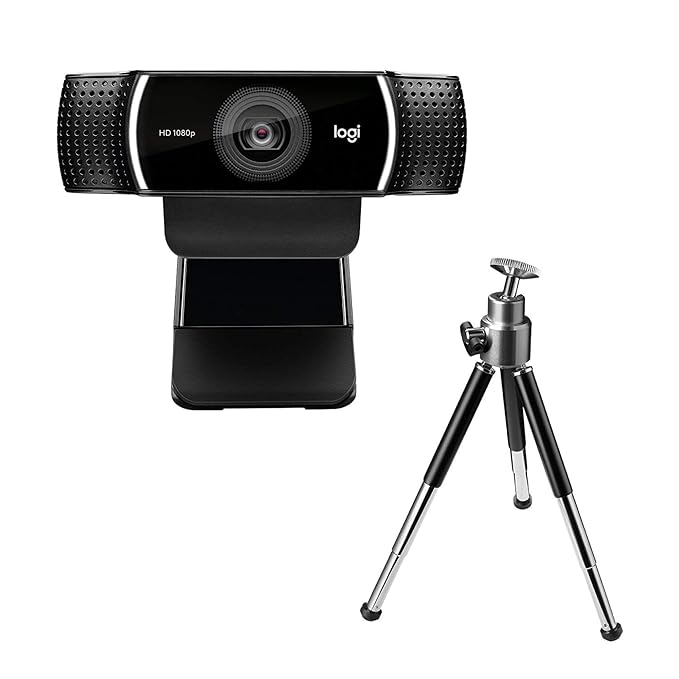
Logitech C922 Pro Stream Webcam with Tripod
60fps Pick

Logitech C922 Pro Stream Webcam with Tripod

1080p 30fps or 720p 60fpsstereo micsautofocusbackground replacementincludes tripod
Rs 7,999Check Price on Amazon ↗

2. Logitech C922 Pro Stream at Rs 7,999

Quick Specs

Price: ₹7,999
Resolution: 1080p

Best for: Gamers looking for 2. logitech c922 pro stream at rs 7,999 in this budget

The C922 is the C920 with two changes that matter. It shoots 720p at 60fps, and it comes with a small tripod in the box. That’s genuinely the whole difference. Same sensor family, same processing, same auto white balance behaviour that saves you in yellow light.

Is the Rs 2,000 premium over the C920 worth it? Honestly, only if you specifically need 60fps face cam. The tripod is useful but you can buy a generic webcam tripod on Amazon for Rs 250. The “streaming edition” branding is mostly marketing. The actual use case where I recommend the C922 over the C920 is fighting games and fast first person shooter content where the streamer is doing rapid head movements and reactions, and a 30fps face cam starts to look weirdly choppy next to the 60fps gameplay feed.

For Apex Legends, BGMI streams, Tekken, Street Fighter, any content where your face is reacting fast, the 60fps is noticeable. For Minecraft, League, strategy games, talking head content, the C920 is identical and saves you Rs 2,000 toward lights.

Right for: Streamers who specifically want 60fps face cam and want the exact same Logitech colour science as the C920.

Elgato Facecam 1080p60 Full HD Webcam Sony Sensor
Premium

Elgato Facecam 1080p60 Full HD Webcam Sony Sensor

1080p 60fps uncompressedSony Starvis sensorfixed focusdetachable USB-C cableDSLR style control
Rs 15,999Check Price on Amazon ↗

3. Elgato Facecam at Rs 15,999

Quick Specs

Price: ₹15,999
Resolution: 1080p

Best for: Gamers looking for 3. elgato facecam at rs 15,999 in this budget

Advertisement

The Facecam is the correct answer if you already have good lighting and you want the best 1080p streaming image you can get without moving up to a DSLR. The Sony Starvis sensor is a real mirrorless camera sensor, not a phone sensor, and in a well lit room the difference versus a C920 is the difference between “fine” and “that looks professional”.

Here’s the critical caveat and the reason I have mixed feelings recommending it to most Indian streamers. The Facecam has no autofocus. It has fixed focus. The fixed focus zone is roughly 30 to 120 centimeters from the lens, which is perfect if your face stays in the same place. But it also has no software based auto white balance in the default driver. It expects you to control the image manually through the Camera Hub app. If you plug it into a yellow bulb room and leave everything on default, it looks worse than the Rs 5,999 C920, because it’s not trying to save you, it’s showing you exactly what your lighting looks like.

Give it a soft key light at 5500K from front and 45 degrees and the Facecam is suddenly the best looking 1080p webcam you can buy in India. No contest. The image has a cinematic quality the C920 can’t touch. Low noise in the shadows. Skin detail that actually looks like skin. The premium sensor finally shows what it can do.

So the question isn’t “is the Facecam better than the C920”. It’s “am I willing to buy a Rs 2,500 LED panel to go with my Rs 15,999 webcam”. If yes, buy it. If no, save the money.

Good pick for: Streamers who already invested in key lighting and want the sharpest 1080p60 image in India under Rs 20,000.

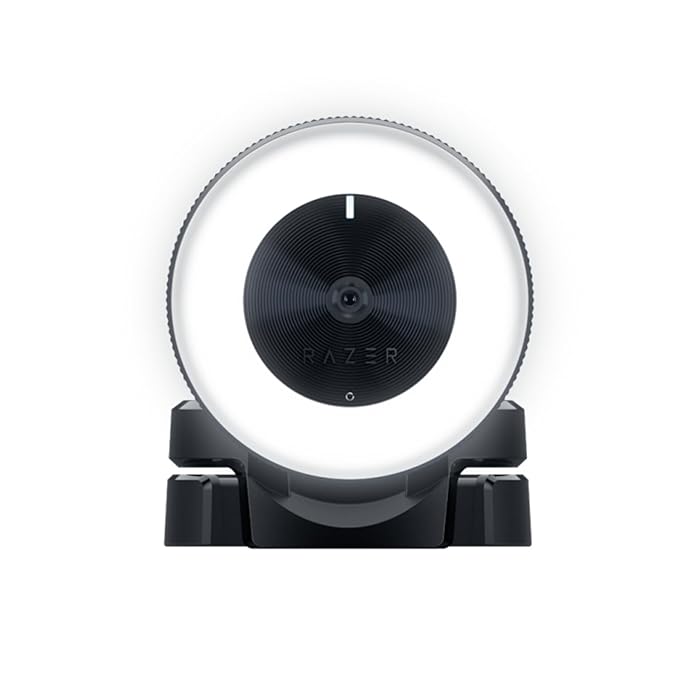
Razer Kiyo Streaming Webcam with Ring Light
Built-in Light

Razer Kiyo Streaming Webcam with Ring Light

1080p 30fps or 720p 60fpsbuilt-in adjustable ring lightautofocusadvanced autofocusbuilt-in mic
Rs 8,999Check Price on Amazon ↗

4. Razer Kiyo at Rs 8,999

The Kiyo solves one very specific problem and it solves it better than any other webcam on this list. That problem is: you live in a hostel room, a PG, or a bedroom where you can’t drill into the walls or set up a lighting rig, and your only light source after 7pm is one yellow tube light on the ceiling. You need a webcam that brings its own lighting with it.

The ring light around the Kiyo lens is the feature. Not a bonus. Not a gimmick. It’s the actual product. Turn the bezel, the LED ring around the lens brightens, and suddenly your face is lit from the correct angle (straight on, slightly soft) at daylight colour temperature. The ring light completely overrides whatever yellow disaster is happening in your room because it is physically closer to your face than the overhead bulb, so it wins the battle for dominant light source.

Image quality on the Kiyo is mid when you turn the ring off. Roughly equal to a C920 but with a slightly noisier sensor and less natural auto white balance. With the ring light on at medium brightness, it jumps to the best looking image on this list for anyone who doesn’t have dedicated lighting. That’s the whole pitch.

Why is it not my top pick? Because the ring light is baked into the unit and can’t be moved independently. If you already have decent lights, you’re paying Rs 3,000 extra for a feature you’ll never use. And the ring light adds weight and bulk, so clipping it on a thin monitor is awkward. This is a situational recommendation, not a universal one.

Good for: Hostel streamers, PG streamers, anyone whose lighting budget is zero and whose room lighting is yellow.

Logitech Brio 4K Ultra HD Pro Webcam

Logitech Brio 4K Ultra HD Pro Webcam

4K 30fps1080p 60fps5x digital zoomHDR3 field of view presetsRightLight 3Windows Hello
Rs 15,999Check Price on Amazon ↗

5. Logitech Brio 4K at Rs 15,999

I’m including the Brio because it is the webcam Indian tech YouTubers recommend the most, and I want to push back on that recommendation specifically for streaming use.

The Brio is a perfectly good camera. The 4K sensor is real, the HDR is real, the 5x zoom is actually useful for IRL work. For YouTube long form recording where you control your lighting and shoot at 4K for edit flexibility, the Brio is the correct buy in India under Rs 20,000. For Zoom calls where you want to impress clients, the Brio looks premium.

For Twitch streaming from a regular Indian bedroom, the Brio makes no sense. Here is why. Its sensor captures more detail, including more accurate colour, which means it captures the yellow tint of your room more accurately. Its HDR tries to balance dynamic range, which in practice under a single harsh overhead bulb creates weird shadow crushing on one side of your face. Its 4K output gets downscaled to 1080p or 720p by OBS before streaming, throwing away the pixels you paid for. Your viewers see a 720p face cam that looks slightly more yellow than a 720p face cam from a C920 would look.

If you already own a Brio, don’t throw it away. Buy a Rs 2,500 softbox LED and the Brio becomes genuinely beautiful. But if you’re buying a webcam specifically for streaming and you’re choosing between Brio and C920, the C920 is the right answer and you can pocket Rs 10,000.

Best for: YouTube creators recording long form content with controlled lighting, not Twitch streamers.

OBSBOT Tiny 2 AI Powered PTZ 4K Webcam
Premium AI

OBSBOT Tiny 2 AI Powered PTZ 4K Webcam

4K 30fps1/1.5 inch CMOS sensorAI auto trackingPTZ pan tilt zoomvoice controlgesture controlHDR
Rs 28,999Check Price on Amazon ↗

6. Obsbot Tiny 2 at Rs 28,999

The Tiny 2 is the weird one on this list. It is not a normal webcam. It is a motorised PTZ camera with a 1/1.5 inch sensor (bigger than everything else here including the Elgato Facecam), AI subject tracking that physically pans and tilts the camera to follow your face, and voice control that lets you zoom in and out by speaking commands. The sensor is the biggest deal. At 1/1.5 inches it’s closer to a smartphone main camera than a webcam sensor, which means it handles low light dramatically better than anything else on this list.

Why is this useful for Indian streamers? Two scenarios. First, if you do variety streaming where you get up from your chair to show something on a shelf, walk across the room to grab a controller, or physically interact with stuff, the Tiny 2 follows you automatically and keeps you in frame. No other webcam does this. Second, if you record YouTube in your apartment at night with only moderate lighting, the bigger sensor actually pulls useful image data out of low light the way an iPhone Pro camera does, while a C920 turns into a grainy mess.

Why is it hard to recommend? Rs 28,999 is laptop money. For that price you could buy a C920 plus an Elgato key light plus a decent USB mic and have a more complete setup. The Tiny 2 earns its price only if you genuinely need the motion tracking or the large sensor low light performance. For a streamer who sits still in a chair in a well lit room, it’s overkill and you’re paying for features you won’t use.

Target buyer: IRL variety streamers, educators recording in low light, anyone with a Rs 30,000 camera budget who wants the best image quality in a single USB device.

HP w200 HD 720P Digital Webcam with Mic
Budget Pick

HP w200 HD 720P Digital Webcam with Mic

720p 30fpsbuilt-in mic270 degree swivelplug and play USBwide angle view
Rs 1,499Check Price on Amazon ↗

7. HP w200 at Rs 1,499

Quick Specs

Price: ₹1,499
Resolution: 1080p

Best for: Gamers looking for 7. hp w200 at rs 1,499 in this budget

The HP w200 is the cheapest webcam I would actually put my name next to recommending. It isn’t a good camera. It’s 720p, the sensor is small, and in low light it looks like a potato. But in daylight hours, with a window providing some natural light, the image is legitimately fine for Twitch viewers who are watching a 400 pixel face cam box on the corner of a gameplay stream.

The honest case for the w200: you’re eighteen, you just started streaming, your budget is Rs 1,500 total because you saved tuition pocket money for two months, and the alternative is no webcam at all. In that situation, don’t agonise over the Kiyo versus C920 debate. Buy the w200. Start streaming. Figure out whether you actually enjoy streaming enough to spend real money on gear. If the answer is yes after three months, upgrade to the C920 and give the w200 to your cousin. If the answer is no, you lost Rs 1,499, not Rs 15,999.

The HP w100 exists at around Rs 999 for the 480p version. Don’t buy it. The jump from 480p to 720p matters way more than the Rs 500 you save. 480p face cam on a 1080p stream looks broken. 720p looks like a slightly soft face cam which nobody will comment on.

Right for: First stream ever, Rs 1,500 total budget, testing the waters.

Quantum QHM495LM Webcam with 6 LED Night Vision

Quantum QHM495LM Webcam with 6 LED Night Vision

480p VGA sensor6 white LED night vision lightsbuilt-in micUSB plug and playclip mount
Rs 499Check Price on Amazon ↗

8. Quantum QHM495LM at Rs 499

I’m including this one mostly for honesty. Quantum is an Indian brand, the QHM495LM is the webcam that shows up on every “under 500 rupees” listicle on every desi tech blog, and it is genuinely the cheapest working webcam you can buy on Amazon India. It has six little white LEDs around the lens that the marketing calls “night vision lights”, which is generous because they’re basically a cheap built in ring light that helps a bit in a dark room.

Do not use this for streaming. Use it for online classes, backup video call device, home CCTV through a spare laptop, whatever. The 480p sensor isn’t streaming quality in 2026 and no amount of good lighting will fix that. Your face on a viewer screen will look like a JPEG compressed twice. But if the entire family computer budget is Rs 500 and you need a webcam to attend a Zoom interview next week, this one exists and it works.

Included only so the guide is honest about what Rs 499 gets you. Not a streaming recommendation.

Buy this if: Not streaming. Emergency video calls. Absolutely last resort.

Lighting setup for webcams in Indian rooms (the part that actually matters)

A Rs 5,999 webcam with good lighting looks better than a Rs 15,999 webcam with bad lighting. I can’t repeat this enough. If you only have budget for one upgrade, buy the lights first and upgrade the webcam later.

The Indian home lighting problem comes down to three specific things.

Problem one: yellow tungsten or warm white bulbs everywhere. The classic ceiling tube light in Indian bedrooms is around 2700K to 3000K, which is deep warm orange. Your skin on camera looks unhealthy under it. Your wall looks worse. Webcams with good auto white balance compensate partially. Webcams with bad auto white balance give up entirely.

Fix: Do not try to fix the ceiling light. Instead, put a dedicated daylight bulb (5000K to 5600K) in a cheap clip on lamp from Amazon or IKEA, position it front left or front right of your face, and point it at you. Total cost Rs 800 to Rs 1,500 for bulb plus lamp. Leave the room light on as a fill so your background is not pitch black. The front daylight light becomes the dominant light source on your face and overrides the yellow cast.

Problem two: beige, cream, or off white walls behind you. Almost every Indian apartment has these walls. They look fine in person. On camera, under yellow light, they turn into a sickly orange blob that makes your skin tone look wrong by contrast. And because webcam sensors have limited dynamic range, if the wall is brighter than your face (because the ceiling light is hitting it directly), the camera exposes for the wall and your face goes dark.

Fix: Two options. Cheap fix is to move your chair so there’s at least one metre between you and the wall, which lets the wall blur out slightly and stops it dominating the exposure. Expensive fix is a collapsible background in dark grey or black. Even a dark bedsheet hung behind your chair works. The goal is stopping the bright beige wall from fighting your face for the cameras attention.

Problem three: no desk space for a light stand. Indian bedroom desks are typically small. There’s no room for a full tripod mounted softbox light. Tripod light stands fall over if you bump the desk. Clip on lights solve this, but cheap clip lights are flimsy and point at random angles.

Fix: The Digitek DLED 200 at around Rs 2,500 is a flat panel LED that comes with a desk clamp mount and a phone size footprint. Clamp it to the edge of your desk, point it at your face, done. If Rs 2,500 is too much, a Rs 700 IKEA Jansjo clip lamp plus a Rs 200 daylight LED bulb works surprisingly well. Don’t buy the Rs 400 “ring light with phone holder” from random brands on Amazon. They die in a month and the light is weird pink green.

Do all three fixes and any webcam on this list, including the Rs 1,499 HP w200, will look dramatically better than a Rs 15,999 Brio under the default yellow tube light. This isn’t a theory, I have A/B tested it on stream.

Frequently asked questions

Do I need a 4K webcam to stream on Twitch from India?

No. Twitch caps ingest bitrate at 6000 Kbps for most streamers, which means your 4K source gets compressed down to 1080p or 720p before it reaches viewers. A good 1080p webcam like the Logitech C920 looks identical to a 4K webcam by the time the stream reaches a viewer. Buy 1080p and spend the saved money on lights or audio.

Which webcam handles yellow bedroom lights best?

The Logitech C920 and C922 Pro have the most forgiving auto white balance among webcams sold in India. Both lean warm neutral instead of pushing hard blue to correct tungsten, so your skin still looks human under a 2700K ceiling bulb. The Razer Kiyo is a strong second choice because its built-in ring light physically overrides your room lighting. The Elgato Facecam and Logitech Brio both look worse than the C920 under yellow lights unless you add a dedicated key light at 5500K.

Is the Logitech C920 still worth buying in 2026?

Quick Specs

Price: ₹10,000
Resolution: 1080p

Best for: Gamers looking for is the logitech c920 still worth buying in 2026? in this budget

Yes, for most Indian streamers it is still the best pick under Rs 10,000. The sensor is old but Logitech has spent a decade tuning its auto white balance and exposure for mixed indoor lighting, which is exactly what Indian bedrooms have. Newer premium webcams with bigger sensors often look worse under yellow bulbs because they capture the colour cast more accurately. For Twitch streaming at 1080p, the C920 is still the correct answer in April 2026.

What upload speed do I need to stream at 1080p60 in India?

Twitch at 1080p60 with a webcam overlay needs around 6000 Kbps video plus 160 Kbps audio, so roughly 6.2 Mbps dedicated upload minimum. Because Indian ISPs have variable upload during peak evening hours (8pm to 11pm), you want at least 15 Mbps real world upload to stream reliably without dropped frames. A 40 Mbps Jio Fiber or Airtel Xstream plan is the practical minimum. Shared bandwidth with family members streaming Netflix at the same time will kill your stream.

Can I use my phone as a webcam instead of buying one?

Yes, and for Indian streamers on a tight budget it’s often the best move. Apps like Camo, DroidCam, and Iriun turn an old Android or iPhone into a USB or WiFi webcam, and the main camera sensor on any 2020 era or newer smartphone is physically larger than any webcam sensor on this list except the Obsbot Tiny 2. The catch is the setup is fiddly, you need a phone mount on your monitor, and WiFi based apps add 100 to 300 ms of latency. If you already own a recent phone and don’t have Rs 5,999 for a C920, use your phone and buy a webcam later.

Does the Elgato Facecam have autofocus?

No. The Elgato Facecam uses a fixed focus glass lens with a sharp zone from roughly 30 to 120 cm from the camera. This is intentional because fixed focus never “hunts” during streams the way cheap autofocus does, which is a real problem on the Logitech C920 when lighting changes. If your face stays within arms length of your monitor, fixed focus is fine. If you move around a lot or stand up during streams, the Facecam will go soft and you want a C920 or Brio instead.

What’s the best webcam under Rs 2,000 for streaming in India?

The HP w200 at Rs 1,499 is the best webcam under Rs 2,000 for Indian streamers in 2026. It’s 720p which is below ideal for 2026 but it is the lowest price point where the image isn’t so bad that viewers complain. The HP w100 at around Rs 999 is 480p and looks broken on a modern stream. The Quantum QHM495LM at Rs 499 is 480p and only recommended for non streaming use. Save up for a C920 at Rs 5,999 if you can. If you can’t, the w200 is honest value.

Other streaming gear guides

  • Best Streaming Mic for Gaming in India (2026): Dynamic vs Condenser
  • Best Ring Light for Gaming and Streaming in India (2026), Match Your Home Lighting
  • Best Capture Card for Streaming in India (2026): HDMI and USB-C Compared
  • Budget Streaming Setup Under Rs 25000 in India (2026), PC and Console Streamer Guide
  • Best Budget Gaming Phone in India (2026): 7 Picks Tested
  • Best Gaming CPU in India (2026): AMD Ryzen and Intel Picks

Related Guides

  • Best Ring Light for Gaming and Streaming in India (2026), Match Your Home Lighting
Advertisement
HT

Harsh Talreja

Editor, GamingNation.in | Mumbai

Quick context: I test streaming gear in a small Chembur bedroom with a ceiling fan, soft yellow tungsten bulbs, and zero acoustic treatment. Most Indian streamers work in similar setups. The picks below are the ones that survive that reality, not the ones that look best in a silent American basement studio.

About Harsh · How we test · Editorial policy

Written by Harsh Talreja · Review methodology

Share This Article
Facebook Copy Link Print
ByHarsh Talreja
Follow:
Harsh Talreja edits Gaming Nation from Mumbai. He covers Indian gaming cafes (18+ visited firsthand across 8 cities), PC builds for Indian budgets, peripherals under rupee brackets, and mobile gaming for BGMI and Free Fire. Read the full bio at https://gamingnation.in/harsh-talreja/
Previous Article gn default featured v2 Best Capture Card for Streaming in India (2026): HDMI and USB-C Compared
Next Article gn default featured v2 How to Reduce BGMI Ping in India (2026): Jio, Airtel, Fiber Guide

Stay Connected

6.9kPin
2.5kFollow

You Might Also Like

gn default featured v2
Streaming Gear

Best Streaming Mic for Gaming in India (2026): Dynamic vs Condenser

5 hours ago
gn default featured v2
BGMI GearStreaming Gear

Best Ring Light for Gaming and Streaming in India (2026), Match Your Home Lighting

6 hours ago
gn default featured v2
Streaming Gear

Best Capture Card for Streaming in India (2026): HDMI and USB-C Compared

6 hours ago
gn default featured v2
Gaming SetupStreaming Gear

Budget Streaming Setup Under Rs 25000 in India (2026), PC and Console Streamer Guide

6 hours ago
Follow US
Copyright © 2022–2026 Gaming Nation. All Rights Reserved
  • About Gaming Nation
  • Contact Us
Welcome Back!

Sign in to your account

Username or Email Address
Password

Lost your password?