
Updated October 2026 with current Indian retail prices.
Best overall: Lenovo Legion 24-10 at ₹10,299 (24 inch FHD IPS 240Hz). Best value: Samsung Odyssey G4 at ₹17,499 (27 inch, 300Hz). Best 1440p: ViewSonic VX2758A-2K at ₹19,490. Best OLED: Samsung Odyssey QD-OLED G6 at ₹48,799. The truth first: 240Hz is worth it only if your GPU can actually push 240fps.
Key facts
- 240Hz only helps if your GPU can hit 240fps. The monitor does not create frames, your graphics card does. An RTX 4060-class GPU hits 240fps in light esports games (Valorant, BGMI, CS2) at 1080p, but not in demanding AAA titles. Match the monitor to what your GPU can feed.
- 240Hz is now the baseline for competitive play, not the ceiling. The pro standard has moved to 360Hz, but for the vast majority of Indian gamers 240Hz is the sweet spot. Going from 144Hz to 240Hz is a real but evolutionary upgrade, not the huge jump that 60Hz to 144Hz was.
- Buy 1080p for pure esports, 1440p if you also play AAA. Pros run 1080p because frames beat pixels and it is far easier to hit 240fps. 1440p 240Hz is the do-both compromise, but it needs a much stronger GPU to actually reach 240fps in demanding games.
- Fast IPS is the right panel for most. Fast IPS has closed the old speed gap with TN, so it is the best all-round default. TN (like the Zowie) has a marginal motion edge for pure esports, and QD-OLED has the best image and near-instant response but costs more.
- Budget 240Hz has fallen below Rs 11,000. A genuine 24 inch FHD IPS 240Hz monitor now starts around ₹10,299, which was unthinkable a year ago. You no longer need a big budget to get into high-refresh gaming.
- OLED burn-in is not a practical worry in 2026. Current QD-OLED panels use pixel-shift, logo detection and burn-in warranties, so for normal gaming and mixed use it is a non-issue.
The best 240Hz gaming monitor for most people in India in 2026 is the Lenovo Legion 24-10 at ₹10,299, a genuine 24 inch FHD IPS 240Hz panel that costs less than many 144Hz monitors did a year ago. But before you buy any 240Hz monitor, understand the one thing that decides whether it is worth it: the monitor does not create frames, your graphics card does. A 240Hz screen only helps if your GPU can actually push 240 frames per second, which happens in light esports games at 1080p but not in demanding AAA titles on a mid-range card. So this guide first answers the real questions, is 240Hz worth it for you, what GPU you need, and whether to buy 1080p or 1440p, then gives verified 240Hz monitors in stock on Amazon.in for every budget. Every refresh rate and price was checked live in July 2026, and we rejected several monitors that were advertised as 240Hz but actually run slower.
Quick comparison table
Prices & refresh rates verified on Amazon.in, July 2026. Prices move, always check the live link. Remember, you need a GPU that can push 240fps to use a 240Hz screen.
| Pick | Monitor | Price | Panel / Res | Best for | Buy |
|---|---|---|---|---|---|
| Best Overall | Lenovo Legion 24-10 | ₹10,299 | 24in FHD IPS | Most gamers | Amazon |
| Best Value | Samsung Odyssey G4 | ₹17,499 | 27in FHD IPS 300Hz | Big + fast | Amazon |
| Best 1440p | ViewSonic VX2758A-2K | ₹19,490 | 27in QHD IPS | Esports + AAA | Amazon |
| Best Features | BenQ MOBIUZ EX270M | ₹24,195 | 27in FHD IPS HDR | Mixed use | Amazon |
| Best Esports | BenQ Zowie XL2546X | ₹42,990 | 24.5in Fast TN | Serious competitive | Amazon |
| Best OLED | Samsung Odyssey QD-OLED G6 | ₹48,799 | 27in QD-OLED | Best image + speed | Amazon |
Best 240Hz monitor overall: Lenovo Legion 24-10
The Lenovo Legion 24-10 at ₹10,299 is the top pick for most Indian gamers getting into 240Hz, and it is a genuine bargain. You get a 24 inch FHD IPS panel at a real 240Hz with a fast 0.5ms response and both adaptive-sync standards (FreeSync Premium and G-Sync). The FHD 1080p resolution is exactly right for this refresh rate, because it is easy for a mid-range GPU to actually push 240fps at 1080p, which is the whole point of the monitor. It is sold by Amazon-fulfilled Clicktech, so buying is clean. Budget 240Hz has genuinely fallen below ₹11,000, and this is the one to buy. For the price of a basic 144Hz monitor a year ago, you now get a proper esports-grade 240Hz screen.

Lenovo Legion 24-10, 24 inch FHD IPS 240Hz
Price checked July 2026Amazon fulfilledCheapest genuine 240Hz
Best value, even faster: Samsung Odyssey G4 (300Hz)
The Samsung Odyssey G4 over-delivers at ₹17,499 by running a full 300Hz, not just 240Hz, on a 27 inch FHD IPS panel. If your GPU can feed it, that extra refresh gives even smoother motion for competitive play, and Samsung build quality plus both adaptive-sync standards round it out. One honest trade-off: a 27 inch screen at 1080p is a little less sharp than a 24 inch at the same resolution, because the pixels are spread over a bigger area, so if pixel density matters to you, the 24 inch Legion is crisper. But for a big, fast, well-built esports monitor with headroom beyond 240Hz, this is excellent value and sold clean by Amazon.
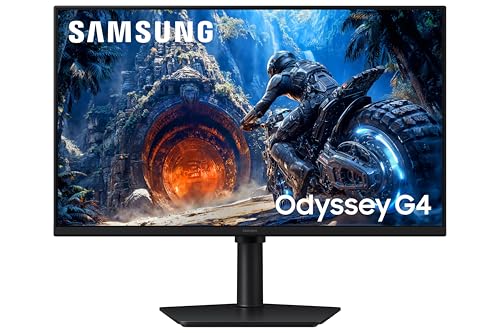
Samsung Odyssey G4, 27 inch FHD IPS 300Hz
Price checked July 2026Amazon fulfilled300Hz for the price
Best 1440p 240Hz: ViewSonic VX2758A-2K-PRO-3
A genuine QHD 1440p 240Hz IPS monitor for under ₹20,000 is exceptional, and the ViewSonic VX2758A-2K-PRO-3 at ₹19,490 is the do-both pick for people who play competitive games and also want AAA titles to look sharp. The higher 1440p resolution is noticeably crisper than the 1080p picks. Here is the important honest caveat: driving 1440p at 240fps needs a much stronger GPU than 1080p does, so a mid-range card will not actually reach 240fps here in demanding games, you will still enjoy a lovely sharp 1440p high-refresh screen, but do not expect 240fps in everything. Stock on this one is often thin (sometimes just one unit), so confirm availability before you count on the price. Sold clean by Amazon.

ViewSonic VX2758A-2K-PRO-3, 27 inch QHD IPS 240Hz
Price checked July 2026QHD 240Hz valueConfirm stock
Best features: BenQ MOBIUZ EX270M
The BenQ MOBIUZ EX270M at ₹24,195 is the features pick for someone who games competitively but also wants a nicer all-round monitor. It adds HDR, a built-in USB hub, good 99% sRGB colour and BenQ’s build and speaker quality to a 27 inch FHD IPS 240Hz panel. It stays at FHD 1080p, which keeps it easy to drive at 240fps, and gives you a more premium day-to-day experience than the bare-bones budget picks. Sold clean by Amazon-fulfilled Clicktech. Buy it if you want extras like HDR and connectivity alongside the high refresh rate, and you do not specifically need 1440p sharpness.

BenQ MOBIUZ EX270M, 27 inch FHD IPS 240Hz HDR
Price checked July 2026Amazon fulfilledHDR + USB hub
Best for esports: BenQ Zowie XL2546X
The BenQ Zowie XL2546X at ₹42,990 is the esports specialist, and it is the monitor you see at tournaments for a reason. Its Fast TN panel plus DyAc2 backlight-strobing technology delivers the clearest motion of anything here, which genuinely helps with tracking fast flicks and spray control in Valorant, CS2 and similar. The trade-off is deliberate: TN panels have weaker colour and viewing angles than IPS or OLED, so this is a pure competitive tool, not an all-rounder for media or AAA. Importantly, it is sold clean and first-party by Clicktech at a normal round price, avoid the inflated grey-market Zowie import listings you will see from third-party sellers. Buy it only if competitive edge is your goal and the price is justified. Stock can be thin.

BenQ Zowie XL2546X, 24.5 inch Fast TN 240Hz DyAc2
Price checked July 2026Tournament standardDyAc2 motion clarity
Best image and motion: Samsung Odyssey QD-OLED G6
The Samsung Odyssey QD-OLED G6 at ₹48,799 is the premium pick, and it gives you the best of both worlds: image quality and motion clarity. QD-OLED means perfect blacks, vivid colour and a near-instant 0.03ms pixel response, so motion is exceptionally clean while games also look stunning, ideal if you play both competitive and cinematic AAA titles. Burn-in, the old OLED worry, is not a practical concern on 2026 panels thanks to pixel-shift, logo detection and a burn-in warranty. Two honest notes: this is QHD 1440p at 240Hz, so you need a strong GPU to hit 240fps, and it is currently a Prime-exclusive launch listing (a Prime membership may be needed), so confirm availability. For the best-looking 240Hz experience money can reasonably buy here, this is it.

Samsung Odyssey QD-OLED G6, 27 inch QHD 240Hz
Price checked July 2026Best image qualityNear-instant response
Is a 240Hz monitor worth it? The honest answer
It depends entirely on one thing: whether your graphics card can push 240 frames per second. A 240Hz monitor can only show 240fps if your GPU actually produces them, otherwise you are paying for refresh rate you cannot use. So the honest verdict is in two parts. First, going from 144Hz to 240Hz is a real upgrade but an evolutionary one, the motion is smoother and inputs feel a touch snappier (each frame arrives about 2.8 milliseconds sooner), but it is nowhere near the transformative jump you felt going from 60Hz to 144Hz. Second, and more importantly, 240Hz is only worth it if you mainly play fast competitive games where your GPU can sustain very high frame rates. If you play at 240fps in Valorant, BGMI or CS2, a 240Hz monitor is genuinely worth it and you will feel the difference. If you mostly play graphically heavy AAA games where your GPU struggles to pass 100fps, a 240Hz monitor is wasted money, a 144Hz or 165Hz screen would serve you just as well for less. Buy 240Hz for the games and the GPU that can actually use it.
What GPU do you need to actually hit 240fps?
This is the question nobody answers, and it decides whether your money is well spent. The frames come from your graphics card, and how many you get depends on the game and the resolution. At 1080p in light competitive games (Valorant, BGMI, CS2, older Call of Duty), even a mid-range card like an RTX 4060 comfortably hits 240fps, so it pairs perfectly with a 1080p 240Hz monitor. Step up to a slightly stronger card (an RTX 4060 Ti or RX 7700 XT) for more headroom and to sustain 240fps in busier scenes. But in demanding AAA games, no mid-range card gets near 240fps at high settings, you will land somewhere between 60 and 120fps, which a 144Hz monitor already covers. And at 1440p, everything gets harder: driving 240fps at QHD needs a genuinely high-end GPU. So the rule is simple: if you own a 4060-class card and mainly play esports, buy a 1080p 240Hz monitor and you will use it fully; if your GPU is weaker or you mostly play AAA, a 240Hz monitor will spend most of its time showing far fewer frames than it can. Match the monitor to the frames your GPU can actually make.
1080p 240Hz or 1440p 240Hz: which should you buy?
This is the real decision once you have committed to 240Hz, and the answer depends on how you play. Buy 1080p 240Hz if you are a competitive or esports-first player. Pros run 1080p for a reason: frames beat pixels, it is far easier for your GPU to hit and hold 240fps at 1080p, and the lower resolution keeps input latency minimal. It is the competitively-correct choice, and it is cheaper. Buy 1440p 240Hz if you want to do both, play competitive games and also enjoy sharp, good-looking AAA titles on the same screen. QHD is noticeably crisper and more immersive, but it comes with a big catch: reaching 240fps at 1440p needs a genuinely powerful GPU, so on a mid-range card you will get a beautiful sharp image but not actually 240fps in demanding games. Do not let a shop sell you the 1440p sweet spot if you are a pure esports player on a mid GPU, you will pay more and hit fewer frames. Match the resolution to your priority: frames (1080p) or pixels (1440p).
Panel types at 240Hz: Fast IPS vs TN vs OLED
The panel decides your motion clarity and image quality, and the landscape has changed. Fast IPS is the right default for most people. Modern Fast IPS panels have closed the old speed gap with TN while keeping much better colour and viewing angles, so an IPS 240Hz monitor (like the Lenovo, Samsung and ViewSonic picks here) is the best all-round choice. TN panels (like the BenQ Zowie) still hold a marginal motion-clarity edge, especially with backlight-strobing tech like DyAc2, which is why pure-esports monitors still use them, but their weaker colour and viewing angles make them poor all-rounders. QD-OLED is the premium option: it has a near-instant pixel response (the cleanest motion of all) plus perfect blacks and stunning colour, so it is the best of both worlds if you can afford it, and burn-in is no longer a practical worry on current panels. The short version: buy Fast IPS unless you are a hardcore competitor (consider TN with DyAc2) or you want the best image and have the budget (QD-OLED).
Is 240Hz overkill for Valorant, BGMI and CS2?
No, and this is exactly where 240Hz makes the most sense in India. Those games are the reason to buy it. Valorant, BGMI, CS2 and similar competitive titles are deliberately light on graphics, which means even a mid-range GPU can push very high frame rates in them, often well past 240fps at 1080p. That is the rare, happy case where a 240Hz monitor is fully used on an affordable setup: the game produces the frames, and the monitor shows them, giving you smoother tracking and a genuine competitive feel. So if your main games are these esports titles, 240Hz is not overkill, it is the ideal match, and a 1080p 240Hz monitor on a 4060-class card is a superb esports setup. Where 240Hz becomes overkill is the opposite case, if you mainly play heavy single-player AAA games where your GPU cannot get near 240fps, then the extra refresh sits unused and a 144Hz monitor would have been the smarter buy.
240Hz vs 360Hz: do you need more?
You will see 360Hz and even 500Hz monitors advertised, so it is worth knowing where the sweet spot is. In 2026, 240Hz has become the baseline for serious competitive play, and it is the right target for the vast majority of gamers. The professional standard has moved up to 360Hz, with a frontier of 500Hz and beyond, but the returns diminish sharply: the jump from 144Hz to 240Hz is already evolutionary, and 240Hz to 360Hz is smaller still, a refinement that only truly dedicated competitors chasing every millisecond will notice, and only if their GPU can sustain those frame rates (360 and 500fps in even light games needs a very strong card). So unless you are a semi-pro grinding ranked for a competitive edge, 240Hz is the smart place to land: it is where prices have become affordable, where mid-range GPUs can keep up in esports, and where the experience is excellent. Treat 360Hz as the aspirational tier, not the one you need.
How we chose these monitors
We searched Amazon.in from an Indian address and confirmed the real refresh rate on each product page, which matters because this category is full of monitors advertised as 240Hz that actually run 165Hz, 180Hz or 200Hz, and we rejected several of those during research. We only included genuine 240Hz or faster monitors that are in stock, and we prioritised those sold by Amazon-fulfilled sellers, flagging the one premium pick that is a Prime-exclusive launch and steering clear of the inflated grey-market import listings that appear from third-party sellers. We deliberately structured this guide around use-case and the GPU you own rather than a price ladder, because a 240Hz monitor is only worth buying if your graphics card can feed it, so we cross-link our price-tier monitor guides for buyers who want a specific budget. Prices and stock were verified in July 2026 and change often, so always check the live listing. We did not lab-test each unit, picks are based on verified specifications, panel technology, refresh rate, seller trust and known performance.
Affiliate disclosure: links to Amazon are affiliate links. If you buy through them, GamingNation may earn a small commission at no extra cost to you. It does not affect our picks or the order above.
Decision time
Make sure your GPU can hit 240fps first, then pick 1080p for pure esports or 1440p if you also play AAA
Frequently Asked Questions
Is a 240Hz monitor worth it in India in 2026?
Yes, if your GPU can push 240fps in the games you play. It is worth it for competitive esports titles (Valorant, BGMI, CS2) where even a mid-range card hits 240fps at 1080p. It is not worth it if you mainly play heavy AAA games where your GPU cannot get near 240fps, a 144Hz monitor would serve you just as well for less. Budget 240Hz now starts around ₹10,299.
Do you need 240 fps to use a 240Hz monitor?
To get the full benefit, yes, your GPU needs to produce close to 240 frames per second. The monitor can only display the frames your graphics card makes. If your GPU only manages 120fps, a 240Hz monitor behaves largely like a 120Hz one. That is why 240Hz pairs best with light esports games at 1080p, where mid-range cards easily hit high frame rates.
What GPU do I need for a 240Hz monitor?
For 1080p esports games (Valorant, BGMI, CS2), an RTX 4060-class card comfortably reaches 240fps, so it is the ideal pairing. For more headroom, an RTX 4060 Ti or RX 7700 XT. For 1440p 240Hz you need a genuinely high-end GPU. In demanding AAA games no mid-range card gets near 240fps, so match the monitor to the games and the card you actually have.
Should I buy 1080p 240Hz or 1440p 240Hz?
1080p 240Hz for pure competitive and esports play, it is easier to drive at 240fps and it is what pros use (frames beat pixels). 1440p 240Hz if you also play AAA games and want sharper visuals, but it needs a much stronger GPU to actually hit 240fps. If you are on a mid-range card and play esports, choose 1080p.
Is Fast IPS good enough for 240Hz, or do I need TN?
Fast IPS is good enough for almost everyone and is the best all-round choice, it has closed the old speed gap with TN while keeping much better colour and viewing angles. TN panels (like the BenQ Zowie) hold a marginal motion-clarity edge for hardcore competitive play, especially with DyAc2 strobing, but their weaker colour makes them poor all-rounders. QD-OLED is the best of all if you can afford it.
Is 240Hz overkill for Valorant or BGMI?
No, those are exactly the games 240Hz is made for. Valorant, BGMI and CS2 are light enough that even a mid-range GPU can push well over 240fps at 1080p, so the monitor is fully used and you get smoother tracking. 240Hz only becomes overkill for heavy AAA games where your GPU cannot reach those frame rates.
Do OLED gaming monitors get burn-in?
Not in any practical way on 2026 panels. Modern QD-OLED monitors use pixel-shift, logo-dimming, panel-refresh routines and burn-in warranties, so for normal gaming and mixed daily use burn-in is a non-issue. It was a real concern on early OLEDs, but current panels have engineered around it.
Is 360Hz better than 240Hz for gaming?
Only marginally, and only if you can use it. 240Hz is the 2026 sweet spot for competitive play and where prices are affordable. 360Hz is the pro standard and offers a small refinement over 240Hz that only dedicated competitors notice, and it needs an even stronger GPU to sustain those frame rates. For most gamers, 240Hz is the smart target and 360Hz is aspirational.