

Updated October 2026 with current Indian retail prices.
A stutter that comes back every few seconds often points to something running on a timer: a tool polling your hardware, a mouse at 8,000 Hz, a network adapter, or an overlay recording in the background. First turn on Valorant’s frame time and network graphs, so you know whether it’s your PC or your connection. Then work down the list below, one change at a time.
Try these first
- See where it comes from: Settings > Video > Stats, set the frame time and network rows to a graph
- Close monitoring and RGB tools: they can read sensors on a timer
- 8,000 Hz mouse? Drop it to 2,000 or 1,000 Hz and test again
- Windows 11: install the 13 Oct 2026 update, which fixed mouse stutter in some games
- Don’t turn off Memory Integrity, TPM or Vanguard: Valorant needs them
Jump to
Your FPS counter says 300, yet the game freezes for a split second every few seconds, again and again. That pattern is different from low FPS, and most fix lists treat it the same way. This guide starts with how to find what’s causing it, then goes through the fixes that match a stutter on a timer, most likely first. It’s up to date for Valorant patch 13.08 and Windows 11 as of 21 Oct 2026. GamingNation hasn’t tested these fixes on its own PCs; each fix links to the Riot, Microsoft, NVIDIA, AMD, Intel or tool maker page behind it. Player reports are labelled, and where a step is our own suggestion, we say so.
First: is it your PC or your connection?
Riot’s own advice is to turn on the performance graphs and see what spikes (Riot). Open Settings > Video > Stats and set these rows to show a graph:
- Frame time rows (the total frame time and the CPU and GPU time rows). If these jump at the same moment as the hitch, the problem is on your PC.
- Network rows: Network RTT and Network RTT Jitter (Riot patch 4.10), plus Packets Received/Sent Rate. If these spike while the frame time stays flat, it’s your connection, not your PC.
Play a few minutes of Deathmatch with the graphs on and watch the moment it hitches. Since patch 12.07 the old General > Other settings are split into User Interface, Content Filtering and Network sections (Riot), so older guides that send you to General > Other for network indicators are out of date. If your connection is the problem, our guide to lowering Valorant ping and Valorant India server guide go deeper.

Stuttering every few seconds: what the timing tells you
Count the seconds between hitches and note what else happens at the same time. These are clues, not rules, but they narrow the list fast:

| What you notice | Look at first |
|---|---|
| A steady hitch every 1 to 10 seconds that carries on at the desktop | Background tools, BIOS and fTPM (community reported) |
| A spike every 30 or 60 seconds, only on Wi-Fi | Network adapter and Wi-Fi (community reported) |
| A hitch tied to one ability or round event | Game patch |
| Network graphs spike, frame time stays flat | Network adapter and Wi-Fi |
| A hitch every few seconds even sitting still, frame time spikes | Background tools, capture and overlays |
| Hitches mostly while you move the mouse | Mouse polling rate, Windows update |
| A crackle or buzz in your audio at the same moment | LatencyMon to find the driver |
| Only on a Ryzen PC, sometimes the whole PC pauses | BIOS and fTPM |
| Only on a laptop on battery, or after a few minutes | Power and heat |
| Only near 60 FPS on an Intel Arc GPU with a VRR screen | VRR near 60 FPS |
| Started right after a patch or driver update | Game patch, GPU driver |
Does it happen outside Valorant?
Before you change any game settings, close Valorant and drag a window around the desktop, or play a video for a few minutes. If the desktop hitches on the same rhythm, Valorant isn’t the cause: look at background tools, drivers and the BIOS first. If only Valorant stutters, keep going in order.
Fix 1: close tools that read your hardware on a timer
Hardware monitors, RGB suites and overclocking apps check sensors on a fixed timer, and some sensor reads can stall the PC long enough to show as a hitch. HWiNFO’s author says monitoring certain sensors “can cause this” and suggests turning sensors off one at a time, starting with Disk SMART, the ASUS EC sensor or the GPU sensors (HWiNFO forum, 2020). AMD’s own stability advice is to disable “hardware monitoring software or RGB software” and do a clean startup to rule them out (AMD). Riot says the same in general terms: close apps that compete with Valorant for resources (Riot).
- Close every monitoring, RGB, fan control and overclocking app, then play a Deathmatch.
- If the hitch is gone, turn them back on one at a time to find the one causing it.
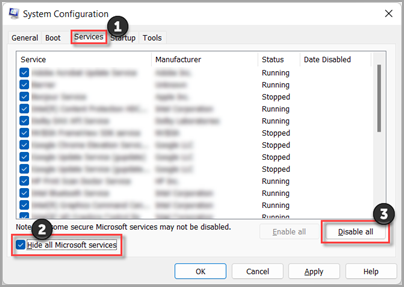
- Still there? Press Win + R, type msconfig, and on the Services tab tick Hide all Microsoft services, click Disable all, then restart. AMD recommends this kind of clean start to rule out start-up apps. Undo it the same way afterwards.
Fix 2: lower an 8,000 Hz or 4,000 Hz mouse
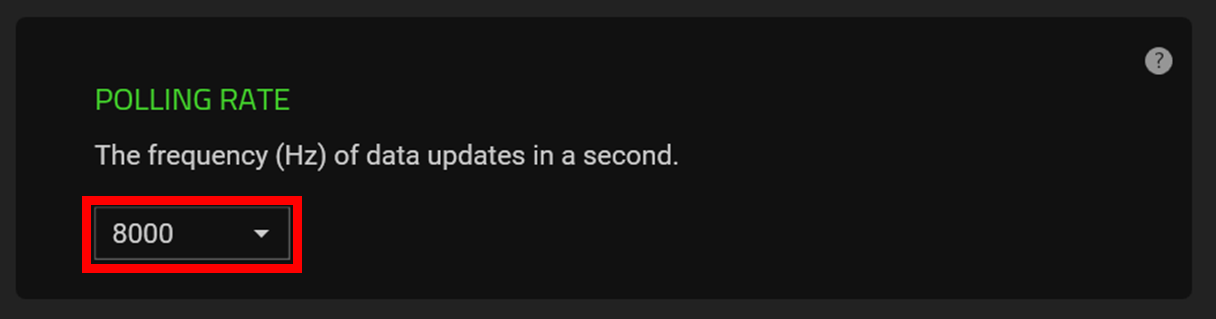
A high polling rate mouse sends thousands of reports a second, and the CPU has to process every one. Razer says some PCs aren’t powerful enough for 8,000 Hz and suggests 4,000 or 2,000 Hz instead (Razer). Corsair says higher polling rates “come with a higher CPU usage cost” and lists a 9th gen Intel Core i7 or a 2nd gen Ryzen 7 as the minimum for 8,000 Hz (Corsair). Corsair also recommends a USB port wired to the motherboard, not a hub.
Set the mouse to 1,000 Hz in its software and test. If the hitch goes away, try 2,000 Hz. Valorant’s old Raw Input Buffer setting is gone since patch 11.06 and is always on now (Riot), so guides that tell you to turn it on are out of date. Shopping for a mouse anyway? Our budget gaming mouse guide covers 1,000 Hz models.
Fix 3: install the October 2026 Windows update
Microsoft’s 13 Oct 2026 update for Windows 11 (KB5127648) “fixes an issue that could cause mouse input to stutter in some games” (Microsoft). Microsoft doesn’t name the games, so treat it as a likely suspect rather than a confirmed Valorant fix. Go to Settings > Windows Update and install everything waiting, then press Win + R and type winver: builds 26100.9711, 26200.9711 or 26300.9711 and later include the fix. Microsoft lists a known issue on the same page with some older USB audio devices (USB Audio Class 1.0), so if your USB headset misbehaves afterwards, check that page.
Fix 4: rule out the network adapter and Wi-Fi
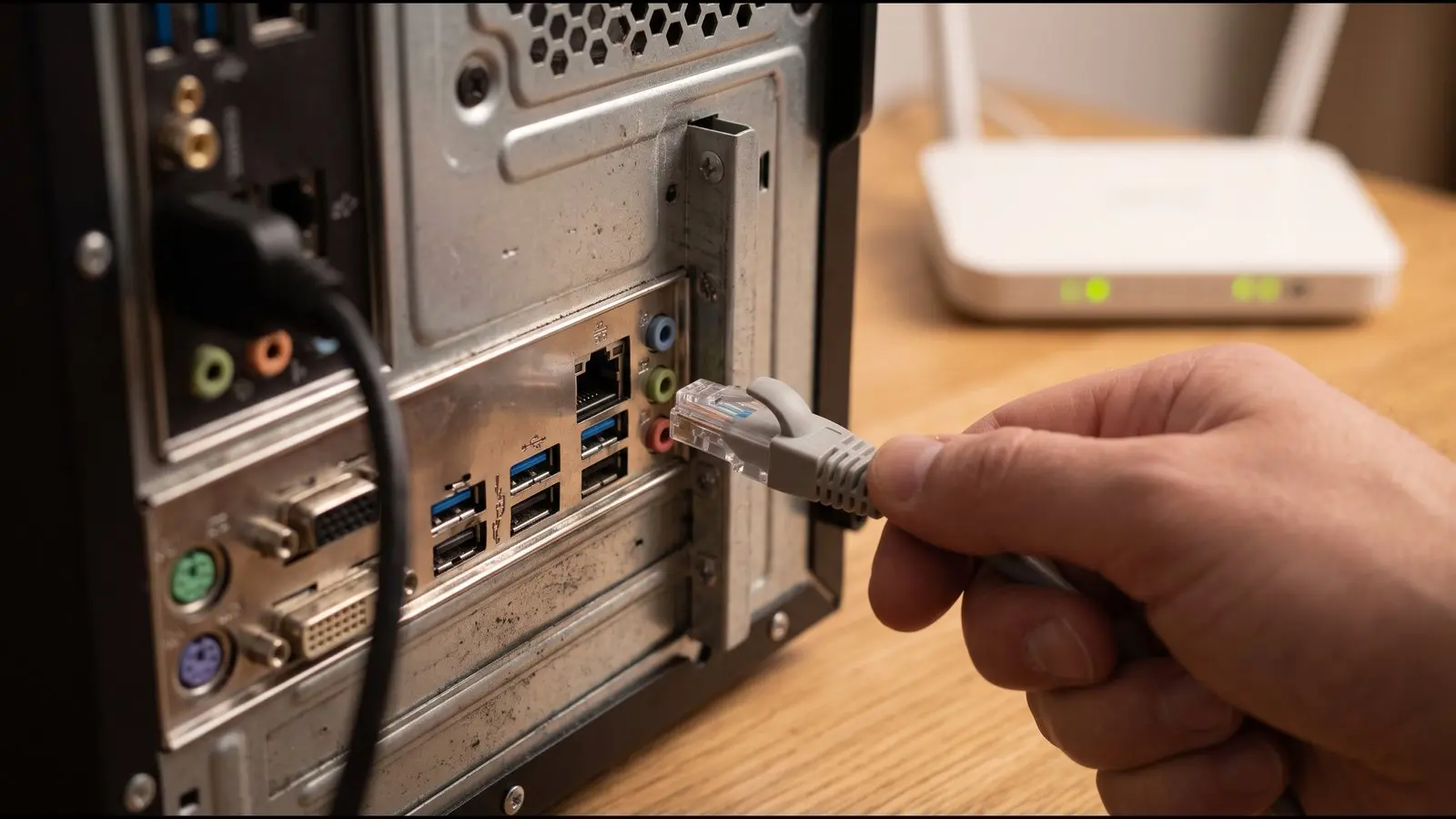
If the network graphs spike, the “stutter” is really your connection. Riot’s first questions are whether you’ve tried a wired connection, a public DNS and turning off any VPN (Riot). Intel has a support article for Valorant stutter on Arc graphics PCs that points at the Realtek Gaming 2.5GbE controller; its workaround is to disable that adapter and use another one (Intel).
- Use a cable if you can, and update the network adapter driver from your motherboard or laptop maker.
- On Wi-Fi, players have reported spikes on a fixed 30 or 60 second rhythm from background network scans (community reported, 2016 and 2024). A cable rules this out.
- If you have a network adapter you don’t use (many boards have a Realtek 2.5GbE port you never plug in), two players said disabling it in Device Manager fixed the hitch and three said it didn’t (community reported, Aug to Sep 2026). It’s quick to test and easy to undo.
- Need a better connection at home? See our budget gaming router guide.
Fix 5: update or reset the GPU driver
Riot’s advice is to install the most up to date driver from your GPU maker (Riot) and reset the GPU control panel to defaults, because custom profiles “can override application settings and sometimes interfere with VALORANT” (Riot). In NVIDIA Control Panel that’s Manage 3D Settings > Restore Defaults.
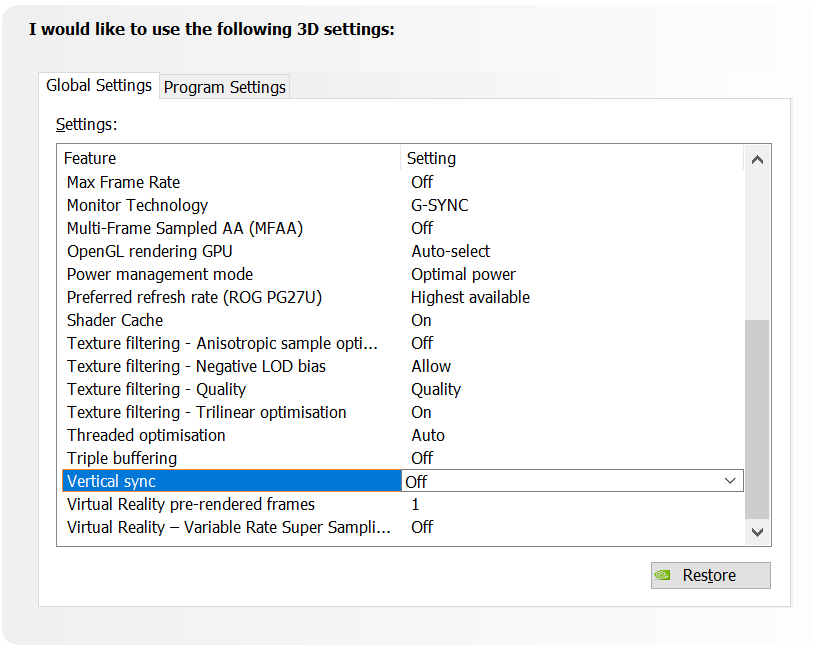
If the stutter started suddenly, rule out a damaged shader cache. NVIDIA says damaged cache files can make games “exhibit lower performance”; its fix is to set Shader Cache Size to Off, restart, delete the contents of %LOCALAPPDATA%\NVIDIA\DXCache, GLCache and %LOCALAPPDATA%\NVIDIA Corporation\NV_Cache, then set the cache size back to the driver default (NVIDIA). On AMD, use Reset Shader Cache in AMD Software. There’s no Riot or GPU maker source saying Valorant stutters because of shaders, so treat this as a one-time check, not a regular tweak.
Updates can also break things: in late 2025, NVIDIA shipped a hotfix driver after a Windows update lowered performance in some games (NVIDIA, archived). If the stutter began right after a driver or Windows update, rolling the driver back is a fair test (our suggestion).
Fix 6: check the Valorant patch you’re on
Riot has fixed several performance bugs in the last year. Patch 12.03 caused “significant stuttering” for some players, fixed by a hotfix and then patch 12.04 (Riot). KAY/O’s NULL/cmd could cause “framerate drops with each pulse”, the only repeating drop we found in Riot’s notes, fixed in 13.05 (Riot). Jett’s Drift caused performance drops until 12.09 (Riot).
Valorant moved to Unreal Engine 5.3 in patch 11.02, and Riot said it had no direct effect on how the game plays apart from small performance gains (Riot). None of the 40 Riot patch notes from 2025 and 2026 that we could load mention shaders, so don’t blame UE5 shaders without a source. Since 8 Oct 2026 some players on AMD Ryzen PCs have reported new stutters (community reported, r/ValorantTechSupport), especially around Clove’s smokes and Tejo’s salvos; as of 21 Oct 2026 Riot hadn’t acknowledged it in patch 13.08 or on its status page. Keep the game updated and check the next patch notes.
Fix 7: on a Ryzen PC, update the BIOS (don’t disable TPM)
AMD documented an “intermittent system stutter” on some Ryzen PCs with fTPM on, where the firmware TPM causes short pauses (AMD). The fix is a BIOS update based on AMD AGESA 1207 or newer, or a hardware TPM module. This dates from 2022, so most current BIOS versions already have it, but check if your board’s BIOS is old.
Don’t turn TPM off to fix it. Windows 11 needs TPM 2.0 and Secure Boot to run Valorant (Riot), so disabling it trades a stutter for a game that won’t start. Back up your BitLocker recovery key before a BIOS update (our suggestion).
Fix 8: power plan, laptops and heat
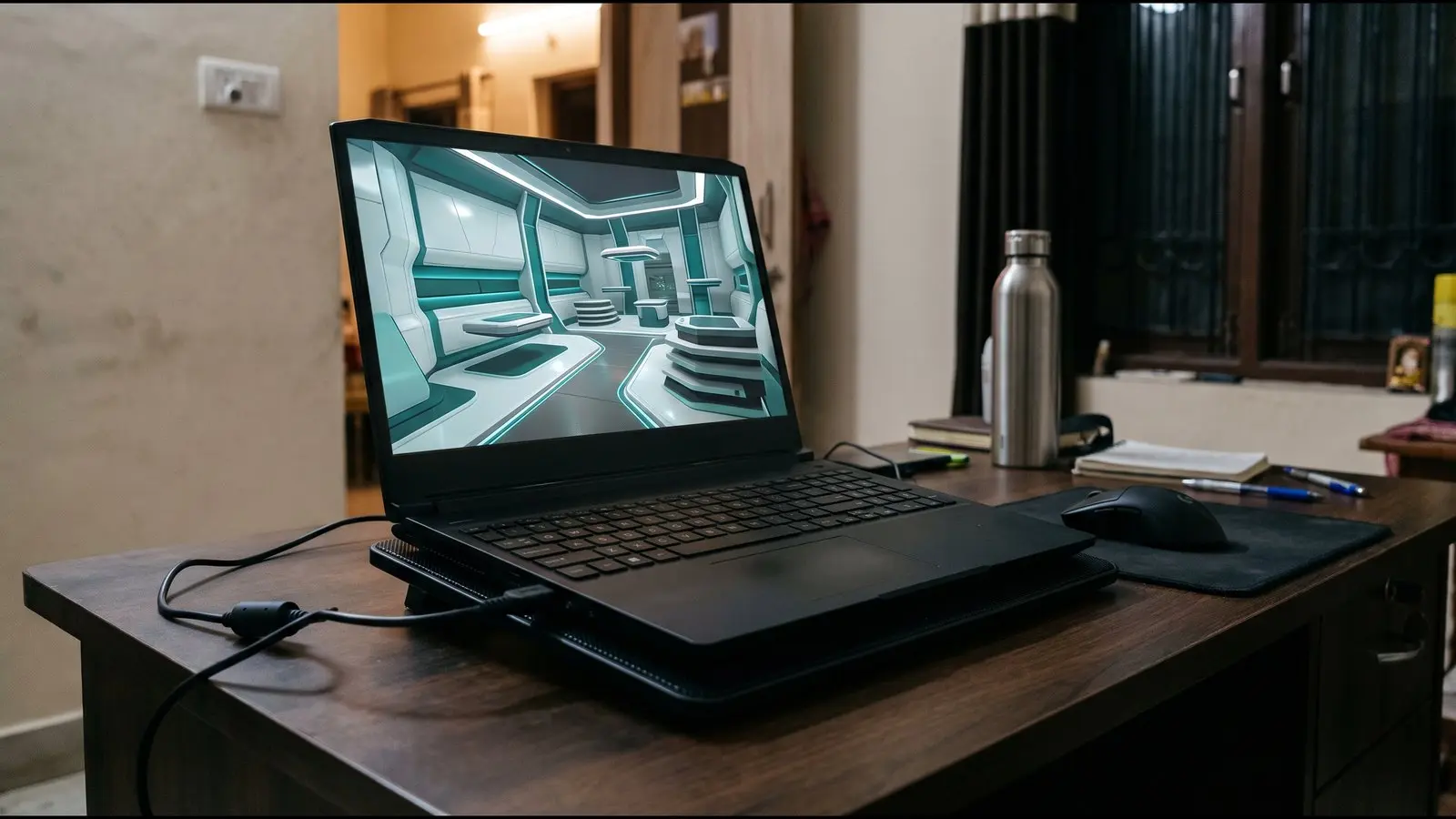
Riot recommends the High performance power plan (Control Panel > Hardware and Sound > Power Options) (Riot). If you only see Balanced, set Power mode to Best performance in Settings > System > Power & battery (Power on a desktop). On a laptop, plug in the charger: many laptops cut power on battery. Intel says a CPU that gets too hot “slows down (throttling)” to protect itself (Intel), so if the stutter starts only after a few minutes, checking temperatures in your laptop maker’s app and keeping the vents clear is a sensible step (our suggestion). A laptop cooling pad can help on a desk. Keep Windows Game Mode on (Settings > Gaming > Game Mode); Microsoft says it stops Windows Update installing drivers during play and “helps achieve a more stable frame rate” (Microsoft).
Fix 9: turn off background recording and overlays
Windows can record the last few moments of gameplay in the background. Microsoft says background recording “can affect your game’s performance because it uses some of your PC’s resources” (Microsoft). It’s off by default; check Settings > Gaming > Captures and turn off Record what happened if it’s on. Do the same for NVIDIA or AMD instant replay and the Discord in-game overlay (our suggestion; no vendor source measures their cost), then test. You lose clip saving, so turn them back on if nothing changes.
Fix 10: antivirus scans and cloud sync
Microsoft says a Defender scan “could slow down your system” while it runs (Microsoft), and that you can pause OneDrive if syncing is slowing your computer (Microsoft). If the hitches line up with a scan or a big sync, pause sync while you play and schedule scans for when you’re away.
Fix 11: Intel Arc and VRR near 60 FPS
Intel lists a known issue where Arc B570, B580 and Arc 140V GPUs on variable refresh screens show “severe refresh rate fluctuation and stuttering” around 60 FPS (Intel). Intel’s note doesn’t name Valorant, and there was no fix when Intel last reviewed it in August 2026. It matters only if your Arc PC or handheld runs near 60 FPS; lowering settings so the frame rate stays well above 60 avoids the problem area (our suggestion).
Reflex, V-Sync and frame caps: what to set
These settings change latency more than stutter, but a bad combination can make frame pacing worse. NVIDIA and Riot give slightly different advice, so here’s both:
- NVIDIA card: set NVIDIA Reflex Low Latency to On; NVIDIA “highly recommend[s]” it (NVIDIA).
- Without G-SYNC or FreeSync: NVIDIA recommends V-Sync off for the lowest latency, if you can live with some tearing.
- With G-SYNC: V-Sync on together with Reflex caps the frame rate just below your refresh rate, at slightly higher latency, according to NVIDIA.
- Riot’s view: with V-Sync off you may see visual artifacts (Riot). If tearing bothers you more than a little extra latency, turn it on.
- AMD card: Anti-Lag 2 works in Valorant since patch 12.09 on compatible hardware with drivers from 9 March 2026 or later (Riot).
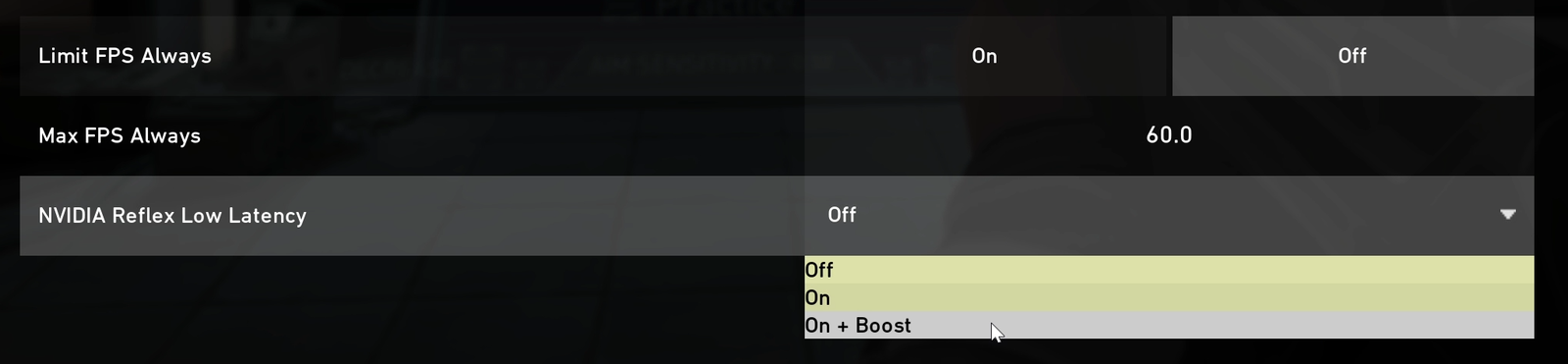
Change one setting at a time and keep the one that gives the flattest frame time graph.
What not to do
- Don’t disable Vanguard. Riot requires it to stay active while you play (Riot).
- Don’t turn off Memory Integrity. Vanguard may now refuse to start without it, with error VAN: RESTRICTION: 5 (Riot).
- Don’t disable TPM. Windows 11 needs TPM 2.0 for Valorant; on Ryzen, update the BIOS instead.
- Skip HPET and bcdedit timer tweaks. Microsoft says those boot options “should only be used for debugging” and can leave a PC unable to start (Microsoft).
- Skip timer resolution tools. Since Windows 10 version 2004 they no longer change the timer for the whole system (Microsoft).
- Don’t expect much from HAGS. Microsoft says users “should not notice any significant changes” with hardware accelerated GPU scheduling (Microsoft). Try it, and switch it back if nothing changes.
- Avoid tweak packs and “FPS booster” scripts. No Riot or Microsoft source backs them, and they make it hard to undo what changed.
Still micro stuttering? Find the driver behind it
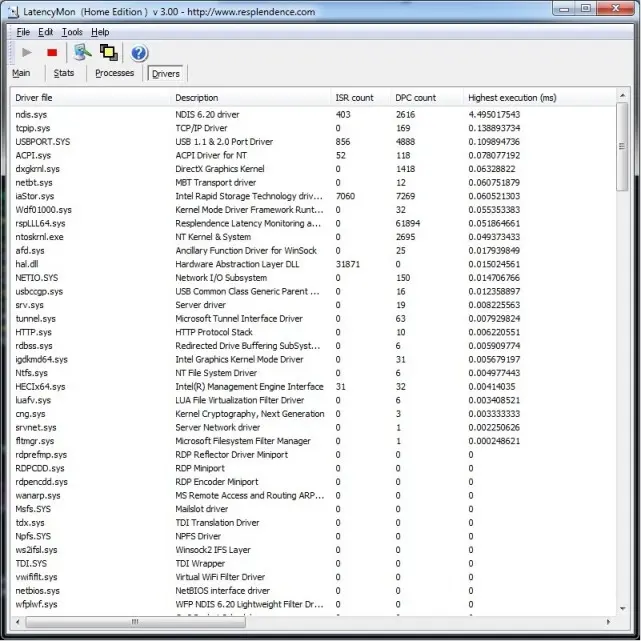
- LatencyMon. Start it, play until the hitch happens, stop it and read the Drivers tab. If tcpip.sys or ndis.sys is at the top, its author says the wireless adapter is the likely cause (Resplendence). Its red and green thresholds were set for audio and the author calls them “chosen arbitrarily”, so use it to find a suspect driver, not as a pass or fail.
- Event Viewer. Open Windows Logs > System and look for WHEA-Logger errors at the time of the hitches. AMD lists WHEA hardware errors among signs of an unstable system (AMD).
- Run at stock. Turn off XMP or EXPO and any CPU or GPU overclock for a test. AMD’s first stability step is to run the PC in a stock configuration.
- Reset Valorant’s settings. Close Valorant and the Riot Client, back up and empty %LOCALAPPDATA%\VALORANT\Saved\Config (Riot). Riot says to delete your Agent Profiles first. You’ll need to set your settings again.
- Contact Riot Player Support with your graphs, your PC specs and when it started.
 Watch
What players report most
We read 25 posts from Valorant players with this exact problem, dated July 2025 to September 2026. These are what they reported, not tested results. The most common themes: the hitch arrives with an audio crackle, a buzz or a noise from the PC (6 posts), it only starts a few minutes into a match or after alt tabbing (4), a fresh Windows install helped for a few hours or a day, then it came back (2 posts, plus 1 more in a related thread), and the FPS counter stayed high while the game still hitched. One player in the sample, and one more in a related thread, said turning TPM off fixed it, which also stops Valorant running on Windows 11, so don’t copy that. More than half the posts came from new AMD desktops, which tells you who posts, not what causes it.
Frequently Asked Questions
Why does Valorant stutter every few seconds even when my FPS is high?
Your FPS counter shows an average, while a stutter is one slow frame. A background tool reading sensors, a high polling rate mouse or a network adapter can delay single frames without moving the average much. Turn on the frame time graph in Settings > Video > Stats to see the spikes.
How do I know if it is my PC or my internet?
Turn on the frame time and network graphs in Settings > Video > Stats. If the frame time spikes with the hitch, it’s your PC. If the Network RTT, jitter or packet graphs spike while the frame time stays flat, it’s your connection.
Can a network driver cause stutter even on Wi-Fi?
It can. Intel’s Valorant article for Arc PCs names the Realtek 2.5GbE controller and suggests disabling it, and some players report that disabling an unused wired adapter helped even on Wi-Fi. Others say it made no difference, so test it and switch it back if nothing changes.
Why does it only start after a few minutes or after alt tabbing?
A slow build up often points to heat or power limits, especially on laptops, or to a background task that starts later. Check temperatures, plug the laptop in and use the High performance power plan.
Why does the stutter come with a crackle in my audio?
That usually means a driver is holding up the system for a moment. Run LatencyMon while it happens and check which driver tops the list.
Is it safe to turn off TPM or fTPM to stop the stutter?
No. Windows 11 needs TPM 2.0 for Valorant, so turning it off stops the game from launching. On Ryzen PCs, AMD’s fix for fTPM stutter is a BIOS update based on AGESA 1207 or newer.
Did the Unreal Engine 5 update make Valorant stutter more?
Riot moved Valorant to Unreal Engine 5.3 in patch 11.02 and said it had no direct effect apart from small performance gains. No patch note since then mentions shader stutter, so there’s no source blaming UE5 for this.
Should I turn off Memory Integrity to fix stutter?
No. Vanguard may need Memory Integrity and can block the game with error VAN: RESTRICTION: 5 if it’s off. Keep it on.
Does an 8,000 Hz mouse cause stutter in Valorant?
It can on PCs that can’t keep up with 8,000 reports a second. Razer suggests 4,000 or 2,000 Hz in that case, and Corsair lists a 9th gen Core i7 or a 2nd gen Ryzen 7 as the minimum for 8,000 Hz.
Why is Valorant the only game that stutters on my PC?
Valorant runs at very high frame rates, so a single slow frame stands out more than it would at 60 FPS (our view). Start with the Valorant specific checks: the stats graphs, the current patch, overlays and mouse polling.