

Updated October 2026 with current Indian retail prices.
For the lowest gaming ping in India, ACT Fibernet wins in the metros it covers. Airtel Xstream Fiber is the most consistent pick nationwide, and JioFiber has the widest reach for Tier-2 and smaller cities. You do not need 100 Mbps to game, you need stable ping under 40ms.
Key facts
- Best ping (metros): ACT Fibernet, 5 to 25ms to Mumbai servers
- Most consistent nationwide: Airtel Xstream Fiber, 20 to 45ms
- Widest coverage: JioFiber, 30 to 60ms, best in Tier-2 cities
- Speed you actually need: 10 Mbps is enough, 50 to 100 Mbps for comfort and fast downloads
- What really matters: ping, jitter and packet loss, not raw Mbps
- Mobile (BGMI, Free Fire): Airtel 5G or Jio 5G, 20 to 40ms in covered metros
How we make money: GamingNation runs ads and earns from some links. The ISP plan links above are not affiliate links, and all prices were independently checked on each provider’s official site in June 2026.
You grind for three hours to climb out of Bronze. You get into a close gunfight. You know you had the shot. And then you see it: 180ms. Dead. Again.
High ping is the one problem in gaming that has nothing to do with your skill. You can have perfect aim, perfect game sense, and perfect game settings. If your internet connection is giving you garbage latency, you are fighting at a disadvantage every single match. The enemy client sees you a full half-second before your client sees them.
The frustrating part for Indian gamers is that most of the information online about “best internet for gaming” is either written for American gamers or written by content farms that have never actually played a single match on these ISPs. This article fixes that. We are covering Jio Fiber, Airtel Xstream, ACT Fibernet, BSNL Bharat Fibre, and mobile 5G plans with actual ping ranges, peak hour behaviour, and city-specific recommendations.
If you are also optimizing your gaming setup beyond just internet, check our guides on best PC games under 10GB, best PC games under 5GB, best gaming keyboard under 2000 rupees, and best gaming chair under 10000 rupees in India.
What Internet Speed Do You Actually Need for Gaming?
Here is the myth that keeps getting spread: “You need at least 100Mbps for smooth gaming.” That is completely wrong. And you can verify it yourself.
Open any game, open Task Manager (or the network monitor in your router’s admin panel), and watch how much data gaming actually uses. Valorant uses around 50 to 100 MB per hour. CS2 uses roughly 100 to 150 MB per hour. BGMI on mobile uses around 40 to 80 MB per hour. These are small numbers. A 10Mbps connection can comfortably transfer 4,500 MB per hour. You are using less than 3% of a 10Mbps connection while playing.
The number that actually matters is ping (also called latency). Ping is the time it takes for a signal to travel from your computer to the game server and back, measured in milliseconds. Lower is better. This is what determines whether your shots register properly, whether your movement feels responsive, and whether you can react to enemies in real time.
Three things matter for gaming internet quality:
- Ping (latency): Round-trip time to the game server. Under 40ms is the target for competitive play.
- Jitter: How much your ping fluctuates. A connection with ping bouncing between 20ms and 80ms is worse than a stable 50ms connection. Jitter causes that “rubber banding” feeling where your character teleports back after moving.
- Packet loss: Percentage of data packets that get dropped. Even 1% packet loss causes hiccups. 3% and above makes games unplayable.
Download speed only matters when you are downloading games. A 50GB game on a 50Mbps connection takes roughly 2 to 2.5 hours (accounting for real-world overhead). On a 100Mbps connection, that drops to about 1 to 1.25 hours. For that specific use case, faster is better. But once the game is downloaded, that speed advantage disappears entirely during actual play.
10 Mbps with stable ping under 40ms beats 200 Mbps with fluctuating ping every single time. Stop chasing speed numbers. Chase stability and low latency.
Best Broadband Plans for Gaming in India (2026)
We are comparing the main ISPs available across India. Prices shift regularly so treat these as approximate ranges, not locked-in figures. Always verify the current plan on the ISP’s official app or website before you subscribe. New subscriber offers and area-specific pricing can differ significantly from what is listed nationally.
| ISP | Speed range | From / month | Typical metro ping | Best for |
|---|---|---|---|---|
| ACT Fibernet | 50 to 500 Mbps | ₹675 | 5 to 25ms | Lowest ping (metro cities) |
| Airtel Xstream Fiber | 40 to 100+ Mbps | ₹499 + GST | 20 to 45ms | Most consistent nationwide |
| JioFiber | 30 to 300 Mbps | ₹599 | 30 to 60ms | Widest coverage, Tier-2 cities |
| Jio / Airtel AirFiber | up to 100+ Mbps | varies | 40 to 80ms | No fibre at your address |
| BSNL Bharat Fibre | 30 to 100 Mbps | ~₹329 * | 60 to 120ms | Cheapest, rural fallback |
Plans and prices checked on each ISP’s official site, June 2026. Pricing and availability vary by city and change often, always confirm the live plan for your pincode. * BSNL entry price approximate, confirm on bsnl.co.in.
Jio Fiber
Jio Fiber is the most widely deployed home fiber network in India, and that reach is its biggest advantage. If you are not in a metro city, Jio Fiber is likely your best or only fiber option. For gaming, the Silver plan at 100Mbps is the sweet spot. Ping to Mumbai-based Valorant and CS2 servers from Jio Fiber typically sits between 30 to 60ms under normal conditions. That is perfectly fine for Diamond-level ranked play.
The main issue with Jio Fiber is peak hour congestion. Between 7PM and 11PM, Jio’s shared infrastructure gets crowded. In densely populated residential areas you will see ping climb from 40ms to 80ms or even 100ms during these windows. If you game in the late evening, which most Indian students and working professionals do, this is a real concern. The Diamond tier at 1,499 rupees handles congestion somewhat better but it is not immune in every locality.
One thing Jio does well: the truly unlimited plans above the Silver tier have no throttling on gaming traffic specifically during normal usage. You will not get shaped mid-session unless you blow through the FUP cap. The Diamond plan has no FUP at all. That matters for long weekend gaming sessions. For Tier-2 cities where ACT and Airtel are weak, Jio Fiber is genuinely the best choice available and performs well given the options.

JioFiber 100 Mbps (Silver), the gaming sweet spot
Plan checked June 2026Not an affiliate linkConfirm live for your city
Airtel Xstream Fiber
Airtel Xstream Fiber is generally the most consistent performer for gaming among mass-market ISPs in India. Airtel has invested in better network peering with data centers that host game servers, which translates to lower round-trip times to Mumbai and Singapore servers compared to Jio in the same locality. Typical ping to Valorant Mumbai servers on Airtel runs 20 to 45ms. To Singapore servers (which some games route through), expect 60 to 90ms, which is typical for India regardless of ISP.
Airtel handles peak hour congestion better than Jio in most urban areas. The ping spike between 7PM and 11PM is real on Airtel too, but the ceiling tends to be lower. Most users in well-covered areas report staying under 60ms even during peak hours on the 100Mbps plan. That is good enough for top-tier ranked play in Valorant, CS2, or BGMI.
Airtel’s plans come with truly unlimited data across most tiers, which removes the anxiety around FUP caps during marathon grind sessions. The 100Mbps Standard plan is the top pick for gamers who want a balance of price and performance on Airtel. One note: Airtel’s availability in Tier-2 and Tier-3 cities is improving but still trails Jio’s coverage footprint.
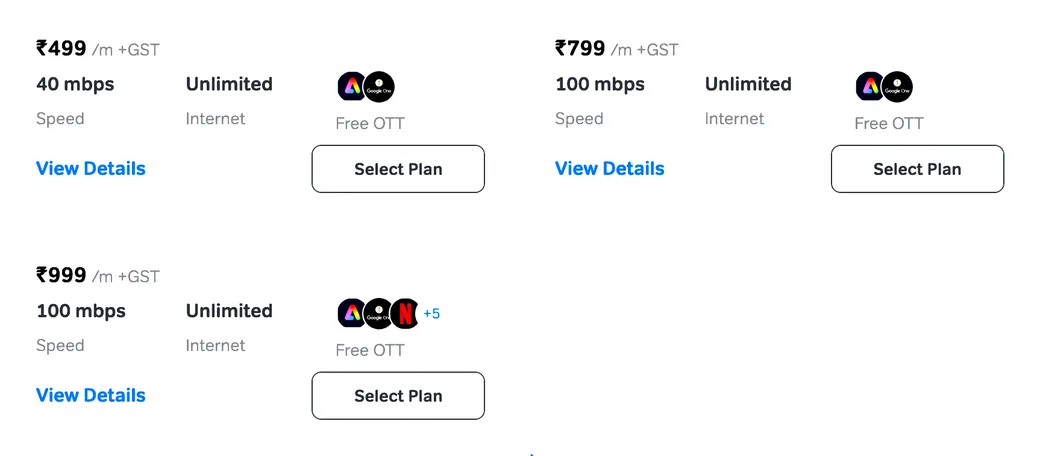
Airtel Xstream Fiber 100 Mbps, the all-round pick
Plan checked June 2026Not an affiliate linkConfirm live for your city
ACT Fibernet
ACT Fibernet is the best ISP for gaming in India. In cities where ACT operates (primarily Bangalore, Hyderabad, Chennai, Delhi, and Mumbai), the ping numbers are consistently the lowest of any ISP you can get at home. Valorant players in Bangalore regularly report 5 to 20ms to Mumbai servers on ACT. That is genuinely world-class latency for a home broadband connection.
Why does ACT win on ping when they are not the biggest ISP? Two reasons. ACT runs its own fiber infrastructure in coverage areas and has strong peering agreements with CDNs and game server providers. And because ACT has fewer subscribers per fiber node compared to Jio and Airtel, there is less contention on the network. Your share of bandwidth is more reliable even during peak evening hours. In Bangalore, ACT barely flinches during 9PM traffic. That is the ACT advantage.
The catch is obvious: ACT is not available everywhere. If you are in Bangalore, Hyderabad, or Chennai, ACT should be your first call. If you are in Mumbai or Delhi, check if your specific building is covered before assuming. For Tier-2 cities and rural areas, ACT is simply not an option. Availability is ACT’s biggest weakness and it is a dealbreaker for most of India. But if you are lucky enough to live in an ACT city, there is no debate.
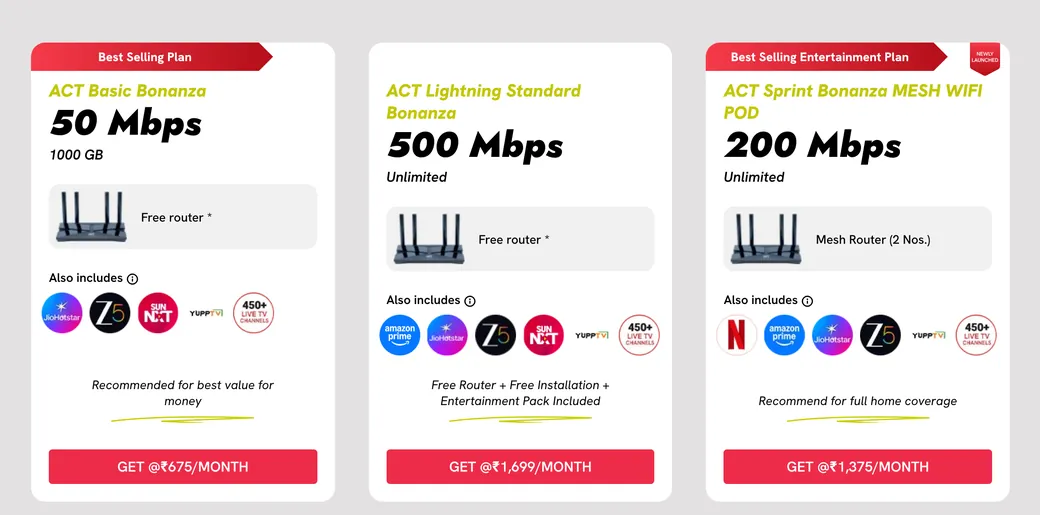
ACT Fibernet, the lowest gaming ping where it is available
Plan checked June 2026Not an affiliate linkConfirm live for your city
BSNL Bharat Fibre
BSNL has the widest geographic reach of any ISP in India, covering towns and districts where Jio and Airtel fiber have not arrived yet. The prices are the lowest in the market. For many gamers in Tier-3 cities and semi-rural areas, BSNL Bharat Fibre is either the only option or the cheapest by a large margin. That reality matters and we are not going to pretend BSNL does not exist for those users.
For competitive gaming, BSNL is a disappointment. Ping to game servers is higher on average, often 60 to 120ms to Mumbai servers, and the inconsistency is the real problem. Packet loss complaints on BSNL are significantly more common than on private operators. You can be playing at 60ms and suddenly hit 200ms spikes that get you killed in ways you cannot explain to your team. It is not your aim. It is the connection.
If BSNL is your only option, it will work for casual gaming and story-mode games with online components. The moment Jio Fiber or any private operator reaches your area, switch. BSNL’s infrastructure improvements have been slow. The speed you pay for and the speed you consistently get are often different things.
Jio AirFiber and Airtel AirFiber (Fixed Wireless)
Fixed wireless broadband is the middle ground between mobile 5G data and wired fiber. You get a small device installed at your home that connects to a nearby 5G tower and delivers home broadband-level speeds without needing a physical fiber cable run to your door. This is a big deal for semi-urban areas where fiber cabling has not reached yet.
For gaming, fixed wireless adds more latency than wired fiber. Typical ping on Jio AirFiber to Mumbai game servers is around 40 to 80ms under good conditions, compared to 30 to 50ms on wired Jio Fiber. The wireless hop adds jitter that a cable simply does not have. If you are choosing between wired fiber and AirFiber at the same address, always go wired. The cable wins every time for gaming.
But if fiber is not available at your address, Jio AirFiber or Airtel AirFiber is a solid upgrade from mobile hotspot gaming and genuinely playable for most titles. Airtel AirFiber tends to show slightly more consistent ping in urban areas, matching the pattern of their wired service. Both options beat BSNL 4G hotspot gaming for anything competitive.
Best Mobile Data Plans for Gaming (BGMI, Free Fire, COD Mobile)
Mobile gaming in India is massive. BGMI alone has tens of millions of active players, and most of them play on mobile data rather than WiFi. Here is how the mobile carriers stack up for gaming-specific use.
| Carrier | 5G coverage | Typical ping | Best for |
|---|---|---|---|
| Jio 5G | Widest in India | 20 to 40ms | Coverage + value (unlimited 5G on many plans) |
| Airtel 5G | Strong in metros | 20 to 40ms | Most consistent ping for ranked |
| Vi 5G | Limited pockets | varies | Not yet ready for competitive play |
| BSNL 4G | Wide but slow | High, unstable | Avoid for competitive gaming |
Mobile ping depends heavily on tower proximity and congestion. Check 5G coverage at your exact location in the carrier app before switching.
Jio 5G has the widest 5G coverage in India by a significant margin. Jio’s True 5G uses standalone architecture, which delivers better ping and lower jitter than older 5G implementations. In Mumbai, Delhi, Bangalore, and Hyderabad with good 5G signal, expect 20 to 40ms to game servers. The biggest Jio 5G advantage is that many of their budget prepaid plans include unlimited 5G data in eligible areas. You can game for hours without burning through a data cap. For players in cities with good Jio 5G coverage, the value proposition is hard to beat.
Airtel 5G is slightly more consistent in dense urban areas. Where both Jio 5G and Airtel 5G are available, Airtel’s ping tends to be marginally lower and with less jitter. For BGMI competitive players who care about every millisecond, Airtel 5G is the recommended pick in cities with strong coverage. The downside is that Airtel’s 5G outside metro cities is still catching up to Jio’s network rollout pace. Check coverage at your specific location before switching.
Vi 5G has very limited rollout as of 2026. Vi is still consolidating after the merger and their 5G is only available in select pockets of major cities. Until their network matures, Vi is not a serious option for competitive gaming. Their 4G is decent for casual play but the network instability is a known issue among Vi subscribers.
BSNL 4G should be avoided for any competitive gaming on mobile. BSNL’s 4G upgrade has been slow and uneven across India. Ping is high and inconsistent. Use BSNL mobile data for calls, WhatsApp, and YouTube. Not for ranked BGMI or Free Fire matches where 60ms vs 150ms is the difference between winning and losing chicken dinners.
City-Wise ISP Recommendations
India is not a uniform market. The best ISP in Bangalore is completely different from the best option in a small city in UP or Bihar. Here is a practical breakdown by city and region based on real network infrastructure and reported user experience.
| City / Region | Best for gaming | Backup option | Quick note |
|---|---|---|---|
| Bangalore | ACT Fibernet | Airtel Xstream | ACT dominates on ping here |
| Hyderabad | ACT Fibernet | Airtel Xstream | ACT strong, low congestion |
| Chennai | ACT Fibernet | Airtel Xstream | ACT well covered |
| Delhi NCR | Airtel Xstream | ACT (select areas) | Airtel widest, ACT in pockets |
| Mumbai | Airtel Xstream | ACT (building-dependent) | Check your building for ACT |
| Pune | Airtel Xstream | JioFiber | Airtel most consistent |
| Tier-2 cities | JioFiber | Airtel Xstream | Jio has the widest reach |
| Rural / Tier-3 | JioFiber | BSNL Bharat Fibre | Coverage decides it |
General guidance based on reported network performance, June 2026. Coverage varies street by street, always check availability for your exact pincode before subscribing.
A practical note: always check availability at your specific address, not just your city. ISP coverage can vary street by street in Indian cities. ACT Fibernet might be available three lanes from you but not at your building. Jio Fiber may have coverage in your colony but the fiber may not have reached your specific apartment block yet. Call the ISP or check their official app with your pincode before making a decision based on this table.
How to Test and Reduce Your Gaming Ping
You do not have to take any ISP’s word for their ping performance. Test it yourself, find the weak points, and fix them. Here is the practical approach.
Step 1: Test Your Actual Gaming Ping (Not Speedtest)
Speedtest.net measures your ping to their nearest server. That number means nothing for gaming. Game server locations and Speedtest server locations are different. Use these methods instead:
- In Valorant: Go to Settings, then Video, and enable the Network Statistics overlay. Play a match and watch the real-time ping to Mumbai servers. This is the only number that matters.
- In CS2: Open the developer console with the tilde key and type
net_graph 1to see live ping, loss, and choke. - For a general test: Open Command Prompt on Windows and type
ping 8.8.8.8 -tand run it for 5 minutes. Look for consistent numbers versus random spikes. Spikes indicate jitter or packet loss. - Cloudflare’s speed test at cloudflare.com/en-gb/speed/ shows latency, jitter, and packet loss together, which is more useful than a plain ping number.
Step 2: Switch Your DNS
Your ISP’s default DNS server is often slow and adds extra milliseconds to connection setup times. Switching DNS does not reduce your in-game ping directly but it speeds up how quickly your game client resolves server addresses and can fix intermittent lobby connection errors.
- Cloudflare DNS: Primary 1.1.1.1, Secondary 1.0.0.1 (generally the fastest for India)
- Google DNS: Primary 8.8.8.8, Secondary 8.8.4.4 (reliable and consistent)
To change: Go to your router admin panel (usually 192.168.1.1 or 192.168.0.1 in your browser), find DNS settings under WAN or Internet configuration, and replace the ISP default with Cloudflare’s addresses. Takes 2 minutes. Worth trying if you hit random connection errors when joining lobbies.
Step 3: Use an Ethernet Cable Instead of WiFi
This is the single highest-impact change most Indian gamers can make right now. WiFi adds 5 to 20ms of jitter on top of your real ping, and that jitter is invisible in basic ping monitors but very visible in gameplay. Your shots feel slightly delayed. Movement feels off. You assume it is the server but it is your wireless connection introducing inconsistency.
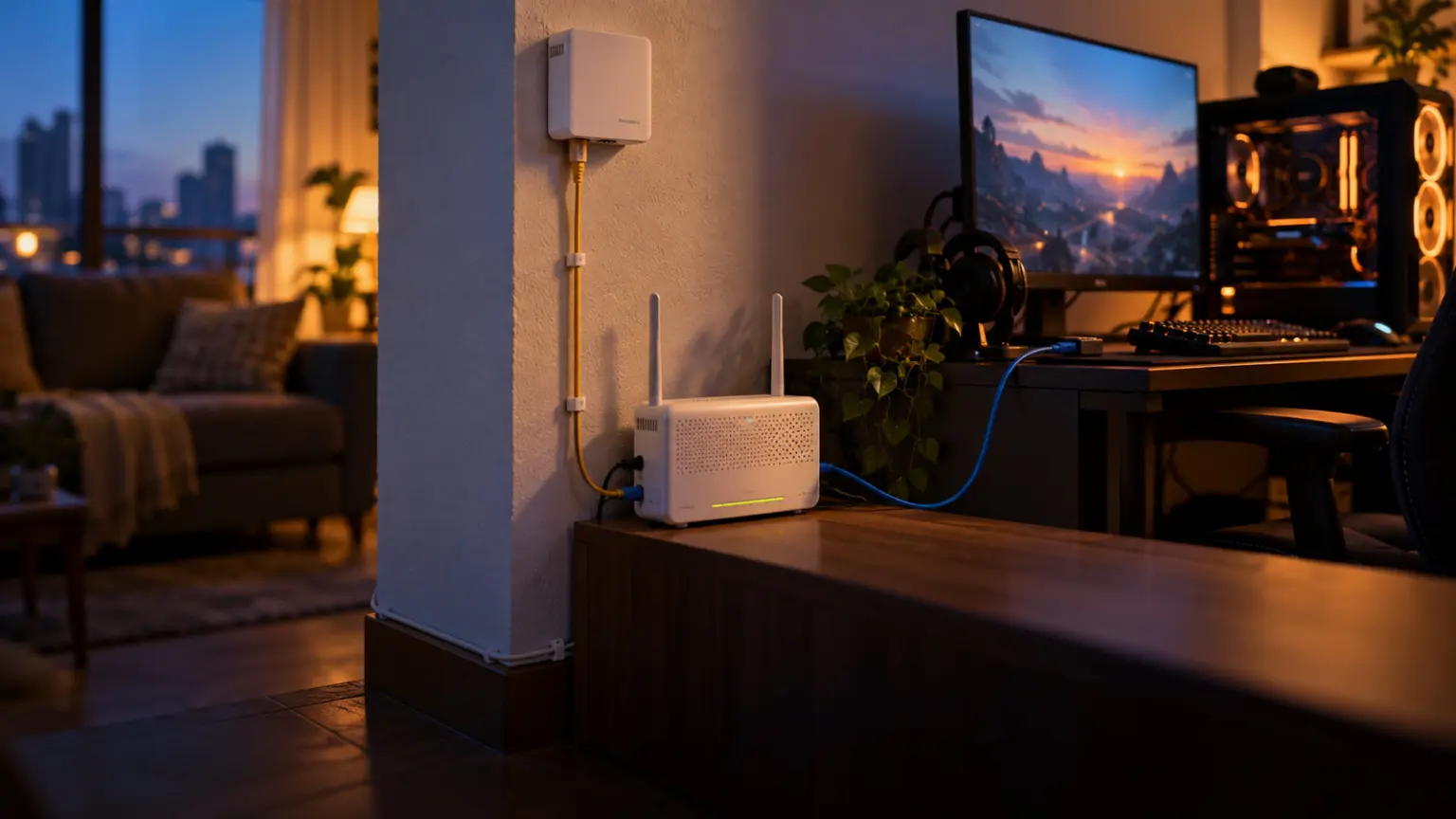
A CAT5e ethernet cable costs around 50 to 200 rupees for a 10-metre length at any electronics shop or online. Plug it from your router to your PC or console. Your average ping may only drop by 5ms but the consistency improves dramatically. Random 100ms spikes from WiFi interference disappear completely when you are wired.
Step 4: Enable QoS on Your Router
If multiple people in your household use the internet while you game (streaming video, downloading updates, video calls), your game traffic can get de-prioritized by the router and the ISP. Most modern routers have QoS (Quality of Service) settings that let you prioritize traffic from specific devices.
Log into your router admin panel and look for QoS, Traffic Prioritization, or Bandwidth Control. Set your gaming PC’s local IP address or MAC address as high priority. When a family member starts a 4K stream on the same connection, your game ping stays stable instead of spiking. This one change can completely transform your gaming experience on a shared home connection.
Step 5: Game at the Right Hours
On Jio Fiber, the 7PM to 11PM window is when the network is most congested. This is a documented, consistent pattern reported across multiple Indian cities. If you have flexibility, gaming between 11AM and 6PM or after midnight gives significantly better ping on Jio. Airtel handles peak hour congestion better but is not immune, especially in densely populated areas. ACT is the most resilient during peak hours and shows the least variation throughout the day.
Common Internet Myths Indian Gamers Believe
Bad information about gaming internet is everywhere online. Most of it is recycled from articles written for North American markets and does not apply to the Indian ISP landscape. Here are the most common myths and why they are wrong.
Myth 1: Higher Speed Means Lower Ping
False. Ping depends on network routing quality, server proximity, and infrastructure. Not speed. A 10Mbps fiber connection with good routing gives you 30ms ping. A 1Gbps plan on a badly configured network gives you 80ms ping. Speed and latency are completely separate measurements that happen to appear on the same Speedtest result. Stop assuming that upgrading from 50Mbps to 200Mbps will fix your lag. It almost certainly will not.
Myth 2: 5G Is Always Better Than WiFi for Gaming
False. When you are at home, WiFi on a good fiber connection will almost always give you lower latency than mobile 5G. Wired home internet has lower and more stable latency than a wireless cell tower connection. 5G is great when you are outside or in areas without fiber. Inside your home with a fiber connection available, connect to your router instead. The only exception is if your WiFi setup is genuinely poor (ancient router, very long distance from router, multiple thick concrete walls) and you have excellent 5G signal with a clear tower line of sight.
Myth 3: A VPN Will Reduce Your Gaming Ping
For most Indian players, false. VPNs add extra routing hops and encryption overhead, which increases ping and jitter. The VPN claim makes sense only in specific cases: if your ISP is actively throttling traffic to a specific game server, or if the VPN can route you through a better network path to an overseas server. For BGMI, Valorant, or CS2 connecting to Mumbai or Singapore servers from India, a VPN will raise your ping. Do not pay for a gaming VPN expecting ping improvements in India unless you have tested your specific situation first.
And when the plan is fine but the route is not, our gaming VPN comparison for India shows what a route optimizer can and cannot fix.
Myth 4: Jio Is Always Worse Than Airtel for Gaming
It depends entirely on your area and the time of day. In some Tier-2 cities, Jio delivers better ping than Airtel because Jio has newer infrastructure there and Airtel’s older equipment in that area has not been upgraded. The best ISP in your specific apartment building can only be determined by testing. Ask neighbours who currently subscribe to each service about their real experience. Specific-area reviews on Indian tech forums are more useful than generic national comparisons.
Myth 5: The Most Expensive Plan Always Means Better Gaming
Not necessarily. The jump from a 100Mbps plan to a 300Mbps plan on the same ISP will not reduce your ping at all. Ping is determined by network infrastructure and routing, not the tier you pay for. Where the expensive plan genuinely helps: no FUP throttling if you download games frequently, slightly better prioritization on congested networks during peak hours, and faster game downloads. For pure competitive gaming, the mid-tier plan on a good ISP beats the premium plan on a bad ISP every time.
Decision time
Pick the ISP that matches your city, then confirm the live plan for your pincode
Frequently Asked Questions
Which internet plan is best for gaming in India?
ACT Fibernet is the best for gaming in cities where it is available. For wider India coverage, Airtel Xstream Fiber is the second-best pick. Jio Fiber is a solid third and the best option in Tier-2 and smaller cities. BSNL Bharat Fibre works for casual gaming but is not reliable for competitive ranked play.
How much internet speed do I need for gaming?
10Mbps is genuinely enough to play any online game. What matters is ping stability, not speed. Gaming uses 50 to 150 MB of data per hour, which is nothing. Get a 50Mbps or 100Mbps plan for comfortable gaming plus reasonably fast game downloads, and focus on the ISP’s latency quality rather than raw Mbps numbers.
What is a good ping for gaming in India?
Under 30ms is excellent. 30 to 60ms is good for competitive play. 60 to 100ms is playable for casual games. Above 100ms you will start losing gunfights you should win and feel consistent timing disadvantages in games like Valorant, BGMI, and CS2.
Is Jio Fiber good for gaming?
Yes, on the 100Mbps Silver plan and above. Ping sits around 30 to 60ms to Mumbai game servers in most areas. The main issue is peak hour congestion from 7PM to 11PM. Go for the Silver or Diamond plan depending on your budget, and avoid the entry Bronze plan if competitive gaming is your priority.
Is Airtel better than Jio for gaming?
In most urban and metro areas, Airtel Xstream Fiber delivers more consistent ping and handles peak hour congestion better than Jio. In Tier-2 cities and rural areas, Jio has better coverage so the comparison changes. Ask neighbours who use each service in your specific area for the most reliable answer.
Which ISP has the lowest ping for Valorant in India?
ACT Fibernet gives the lowest Valorant ping in cities where it operates, often 5 to 25ms to Mumbai servers. Airtel Xstream averages 20 to 40ms. Jio Fiber averages 30 to 60ms. For mobile Valorant, Airtel 5G gives the most consistent ping in metro areas.
Should I use WiFi or Ethernet for gaming?
Always ethernet for competitive gaming if you can. A CAT5e cable from your router to your PC costs under 200 rupees for 10 metres and removes the jitter that WiFi adds. Your ping number may not change much but the stability improvement is immediately noticeable in competitive play.
Does 5G reduce gaming ping?
5G gives good ping when you are away from home. Jio 5G and Airtel 5G both deliver 20 to 40ms in well-covered metro areas. But at home, a wired fiber connection will always beat 5G for consistency. Use 5G when fiber is not available at your location, not as a replacement for home broadband.
Is BSNL Bharat Fibre good for gaming?
For casual gaming, it works. For competitive ranked play, it falls short. BSNL has the cheapest plans but suffers from inconsistent ping and higher packet loss than private operators. Use BSNL if it is your only option. Switch to Jio Fiber or Airtel the moment a private operator reaches your area.
Which mobile plan is best for BGMI in India?
Airtel 5G for consistent competitive ping. Jio 5G for wider coverage and better data value. Both deliver 20 to 40ms in good 5G coverage areas. Avoid Vi and BSNL for competitive BGMI. At home, always connect to WiFi on fiber rather than using mobile data when the option exists.
Does changing DNS settings improve gaming ping?
Not directly in-game, but switching to Cloudflare (1.1.1.1) or Google DNS (8.8.8.8) improves connection setup times and can reduce intermittent lobby errors. It takes 2 minutes to change in your router settings and costs nothing. Worth doing as part of a basic gaming optimization setup.
What is the cheapest broadband plan for gaming in India?
BSNL Bharat Fibre starts around 329 rupees per month and is the cheapest available. For actual gaming performance at a low price, Jio Fiber’s entry plan around 599 rupees are the better value. Jio’s entry tier delivers playable ping in most cities and is the best budget option if competitive play matters to you.