


Updated August 2026 with current Indian retail prices.
Disclosure: This article has Amazon affiliate links. We earn a small commission if you buy through them, at no extra cost to you, and we do not accept payment for rankings.
Last updated 13 June 2026. Prices and stock verified live from Amazon.in.
One power cut in the middle of a ranked match does more than end the game. It can corrupt a save, drop you from a competitive lobby with a penalty, and over time the hard shutdowns wear on your drive and PSU. In most of India, the grid is not a question of if the power flickers but when, which is why a UPS is the least glamorous and most important part of a desktop setup. The best UPS for a gaming PC keeps you running long enough to save and shut down cleanly, or to ride out a short cut entirely.
The trap is sizing. A 600VA UPS that says “for desktop PC” on the box will not hold a gaming rig, because a gaming PC draws far more than the office machine that rating was meant for, and many cheap units output a stepped sine wave that a modern PSU refuses to run on. This article sorts the seven worth buying, from a 4,299 rupee unit for a basic desktop to a 2,200VA gaming UPS, with the capacity and whether it actually runs a gaming PC stated for each.
Top 7 UPS for Gaming PC and Desktop in India (2026)
| Rank | UPS | Price | Capacity | Runs a gaming PC? | Best For |
|---|---|---|---|---|---|
| 1 | APC Back-UPS BX1100C-IN | Rs 8,599 | 1100VA / 660W | Yes, mid rig | Best for a gaming PC overall |
| 2 | Artis PS-1000Eco | Rs 4,999 | 1000VA | Yes, entry rig | Best value for a gaming PC |
| 3 | CyberPower UT1200E | Rs 5,249 | 1200VA / 720W | Yes, mid rig | Best watts per rupee |
| 4 | Microtek Legend 1000 | Rs 5,770 | 1000VA / 600W | Yes, entry rig | Best for voltage fluctuation |
| 5 | APC Easy UPS BVX2200LI-IN | Rs 17,999 | 2200VA | Yes, high-end | Best premium gaming UPS |
| 6 | Artis 2000VA | Rs 9,999 | 2000VA | Yes, high-end value | Best high-capacity value |
| 7 | APC Back-UPS BX600C-IN | Rs 4,299 | 600VA / 360W | No, basic desktop only | Best for a non-gaming desktop |
How we picked: a UPS lives or dies on capacity and compatibility, not marketing. We weighed the VA and wattage rating against what a gaming PC actually draws, the sine wave type that decides whether a modern PSU will even run on it, the AVR for India’s swinging voltage, and the rating pattern across the full review base. Prices and stock were checked live on Amazon.in on 13 June 2026. Where a unit is too small for a gaming rig, we say so plainly rather than let the “for PC” label mislead you.
1. APC Back-UPS BX1100C-IN: Best UPS for a Gaming PC Overall
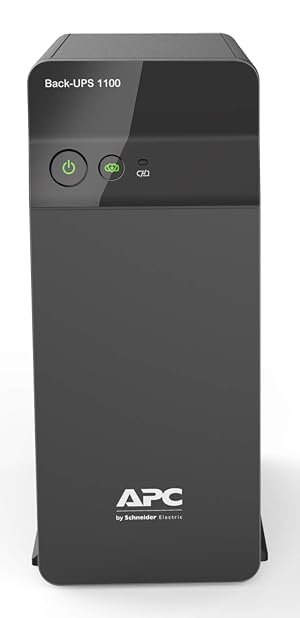
If you have a real gaming PC and want the safe choice, this is it. The BX1100C-IN delivers 1100VA and, more importantly, 660 watts, which is enough to hold a mid-range gaming rig long enough to save and shut down. It is also the most trusted UPS in India by a mile, with more than 8,000 ratings, backed by APC’s wide service network.
Why wattage is the number that matters: a gaming PC with a discrete GPU pulls 250 to 450 watts under load. A 600VA office UPS rated at 360W cannot carry that, so it trips instantly when the power cuts. The BX1100C-IN’s 660W headroom is what lets it actually run a gaming machine, not just a router. This is the single most common mistake buyers make, and APC’s rating here avoids it.
Backup and reality: expect a few minutes of runtime under a gaming load, which is the point of a UPS at this tier: it is a clean-shutdown and short-cut bridge, not a generator. APC’s AVR steadies minor voltage swings before they reach your PSU. The 3.9 rating reflects that batteries age in 2 to 3 years, which is true of every UPS, not a fault of this one.
What works
- 660 watts holds a mid range rig long enough to save and shut down
- Trusted APC brand and service
- Safe overall choice
What’s bad
- Pricey at Rs 8,599
- 660W is tight for high end rigs
- Bulky
2. Artis PS-1000Eco: Best Value for a Gaming PC

The Artis PS-1000Eco is the value pick for an entry to mid gaming PC at 4,999 rupees, roughly half the price of the APC, with a 1000VA line-interactive design and more than 1,200 ratings to back it. Artis has become a reliable budget power brand in India, and this is its bread-and-butter PC UPS.
Who it fits: a build with a GTX 1650, RX 6600, or similar mid GPU, where total draw stays in the range a 1000VA unit can carry for a clean shutdown. If your rig is a power-hungry RTX 4070 or higher, step up to the 1200VA CyberPower or a 2000VA unit instead.
The honest note: at this price the build and battery are functional rather than premium, and like all budget UPS the runtime is a short bridge, not long backup. But for the money it does the core job, and the large review base means it is well proven, not a gamble.
What works
- Roughly half the price of the APC at Rs 4,999
- Line interactive 1000VA for entry to mid PCs
- Backed by 1,200+ ratings
What’s bad
- Lower wattage headroom than the APC
- Budget power brand
- Not for high end rigs
3. CyberPower UT1200E: Best Watts Per Rupee

The CyberPower UT1200E gives you the most usable power for the money: 1200VA and 720 watts at 5,249 rupees, more wattage than the APC BX1100C-IN for less than two-thirds the price. CyberPower is a name PC builders abroad trust specifically for desktop UPS, and that pedigree shows in the spec sheet.
Why it stands out: 720W is the highest wattage at this price point, which gives a mid gaming rig real headroom rather than running the UPS at its limit. A unit that is not maxed out runs cooler and its battery lasts longer. For a sensibly-priced gaming PC, the watts-per-rupee here is the best on the list.
The honest caveat: this is a newer listing in India with a smaller review base (around 24 ratings at the time of writing), so it is less battle-tested locally than the APC or Artis. If you want the best spec for the price and are comfortable being an earlier buyer of a globally trusted brand, it is the pick. For maximum local track record, the APC is safer.
What works
- Most usable power per rupee, 720W for Rs 5,249
- More wattage than the APC for less money
- Trusted by PC builders
What’s bad
- Less common service network in India
- Brand less known to mainstream buyers
- Mid tier build
4. Microtek Legend 1000: Best for Voltage Fluctuation

If your real problem is not full cuts but wild voltage, the lights dimming and surging that is common on weak grids, the Microtek Legend 1000 is built for it. It has a wide 140 to 300V input range with Buck/Boost AVR, so it corrects bad voltage to a safe level for your PC instead of passing it through or tripping to battery constantly. Microtek is one of India’s most established power brands, with more than 1,000 ratings here.
Why the wide input matters: on a grid that swings to 150V or spikes to 280V, a normal UPS flips to battery every time, draining it and aging it fast. The Legend 1000’s AVR absorbs those swings on mains power, saving the battery for actual cuts. For tier-2 and tier-3 cities and older wiring, that is the feature that matters most.
Who should buy it: anyone on an unstable supply with an entry to mid gaming PC (1000VA / 600W). If your power is stable and you just need cut protection, the Artis or CyberPower give more usable wattage for similar money.
What works
- Wide 140 to 300V AVR built for unstable grids
- Handles dimming and surging well
- Reliable Indian brand
What’s bad
- Lower 600W output
- Aimed at voltage more than long runtime
- Not the cheapest 1000VA
5. APC Easy UPS BVX2200LI-IN: Best Premium Gaming UPS
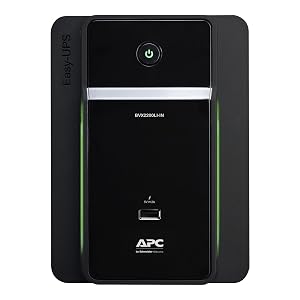
For a high-end rig, the APC Easy UPS BVX2200LI-IN is the no-compromise choice. At 2200VA it is APC’s purpose-built gaming UPS, with enough capacity for a power-hungry build with an RTX 4070 or higher, plus headroom to cover a console and monitor on the same unit. At 17,999 rupees it is the priciest here, and for the right setup it is worth it.
What the capacity buys: a 2200VA unit runs a high-wattage PC comfortably and gives meaningfully longer runtime than the 1000 to 1200VA units, which matters if your cuts last more than a minute or two. APC backs it with the same service network as the cheaper models, and a 211-rating base shows it is proven, not niche.
Who should buy it: owners of high-end gaming PCs or a combined PC-and-console setup who want real runtime and zero capacity worries. If your rig is mid-range, this is more UPS than you need, and the BX1100C-IN or Artis 2000VA save you a lot of money.
What works
- Purpose built 2200VA for high end rigs with an RTX 4070 or higher
- APC reliability
- Big headroom
What’s bad
- Expensive at Rs 17,999
- Overkill for mid range PCs
- Large unit
6. Artis 2000VA: Best High-Capacity Value

The Artis 2000VA is the high-capacity pick for builders who want big headroom without paying APC premium money. At 9,999 rupees it offers 2000VA, close to the APC BVX2200’s capacity for nearly 8,000 rupees less, marketed specifically for gaming PCs.
Why consider it over the APC premium: for a high-end rig that needs the capacity, this gets you most of the way for a lot less. The 2000VA rating gives a powerful PC genuine headroom and longer runtime than the 1000 to 1200VA tier. A 137-rating base is modest but not new, and Artis has earned trust in the budget power space.
The trade-off: you give up some of APC’s service-network reassurance and brand polish. If you want the absolute safest high-end option and the best support, the APC BVX2200 justifies its premium. If you want maximum capacity per rupee, this is the smarter buy.
What works
- Close to APC BVX2200 capacity for nearly Rs 8,000 less
- Big 2000VA headroom
- Value high capacity pick
What’s bad
- Budget brand for a high end role
- Less proven than APC at this capacity
- Bulky
7. APC Back-UPS BX600C-IN: Best for a Non-Gaming Desktop

The BX600C-IN is the most reviewed UPS in India, with more than 21,000 ratings, and it is an excellent unit, as long as you buy it for the right job. At 600VA and 360 watts it is built for a basic office desktop, a WiFi router, or a CCTV setup, not a gaming PC.
The honest sizing truth: 360 watts cannot carry a gaming rig with a discrete GPU. If you put a gaming PC on this, it will trip the moment the power cuts. We include it because the listing’s “Desktop PC” label leads thousands of gamers to buy the wrong UPS every year. For an integrated-graphics office machine, a media PC, or your router and modem, it is the trusted, affordable, correct choice.
Who should buy it: anyone protecting a non-gaming desktop, a work-from-home setup, or networking gear. If you game, scroll back up to the 1000VA-and-above picks. Buying capacity you need beats buying the cheapest box with “PC” on it.
What works
- Most reviewed UPS in India, 21,000+ ratings
- Excellent for an office desktop or router
- Affordable APC
What’s bad
- Only 360W, not enough for a gaming PC
- Small capacity
- Wrong tool for a real gaming rig
Which UPS for Your PC?
The right UPS is the one that matches your PC’s power draw. Buy too little capacity and it trips; buy way too much and you overspend.
| Your setup | Best pick | Why |
|---|---|---|
| Mid gaming PC, want the safe brand choice | APC BX1100C-IN (Rs 8,599) | 660W actually runs a gaming rig, most trusted in India |
| Entry to mid gaming PC on a budget | Artis PS-1000Eco (Rs 4,999) | 1000VA at half the APC price, well proven |
| Mid gaming PC, want the most headroom for the money | CyberPower UT1200E (Rs 5,249) | 720W is the best watts per rupee here |
| Unstable voltage, dimming and surging power | Microtek Legend 1000 (Rs 5,770) | Wide 140 to 300V input with Buck/Boost AVR |
| High-end rig (RTX 4070+) or PC plus console | APC BVX2200LI-IN (Rs 17,999) or Artis 2000VA (Rs 9,999) | 2000 to 2200VA for real capacity and runtime |
| Office desktop, media PC, or router only | APC BX600C-IN (Rs 4,299) | 600VA is right for a non-gaming machine, do not use it for a gaming PC |
How to Choose a UPS for a Gaming PC
Watts matter more than VA. The big number on the box is VA, but the figure that decides whether your PC stays on is the watt rating. A gaming PC with a discrete GPU draws roughly 250 to 450 watts under load. A 600VA unit rated at 360W cannot carry that, no matter what “for PC” says on the box. Aim for at least 1000VA, and check the wattage is comfortably above your real draw. Add up your components, or use your PC build‘s PSU wattage as a rough ceiling.
The sine wave warning no listing makes clear. Many budget UPS output a simulated or stepped sine wave. Modern gaming power supplies with Active PFC can refuse to run on that, so when the power cuts the PC may not switch to battery, or the UPS may buzz and the PC shut down anyway. If your PSU is an 80 Plus active-PFC unit, which most decent gaming PSUs are, prefer a pure sine wave UPS, or at minimum confirm buyers with similar PSUs report a clean transfer. This single detail trips up more gaming builds than capacity does.
AVR is essential on an Indian grid. Automatic Voltage Regulation corrects high and low mains voltage without going to battery. On a weak supply that dims and surges, AVR saves the battery for real cuts and protects the PSU. A wide input range like the Microtek’s 140 to 300V is a genuine advantage in tier-2 and tier-3 areas.
A consumer UPS is a bridge, not a generator. At this price the job is a few minutes of runtime to save your game and shut down cleanly, or to ride out a short flicker. Do not expect to keep gaming through a long outage. If you need real runtime, you are looking at a much larger inverter setup, not a desk UPS.
Common Mistakes When Buying a UPS
Buying on VA and ignoring watts. A 600VA / 360W unit labelled “for desktop PC” is the most common wrong buy for gamers. It cannot carry a gaming rig. Always check the wattage against your PC’s real draw.
Ignoring the sine wave type. A cheap stepped-sine-wave UPS paired with a modern active-PFC PSU can fail to transfer to battery, defeating the whole purpose. Check this before you buy, especially on a quality PSU.
Expecting hours of backup. A desk UPS gives minutes, not hours, under a gaming load. It exists to bridge short cuts and let you shut down safely, not to replace the grid.
Forgetting the rest of the setup needs protecting too. Your monitor and router draw power as well. Size the UPS for the whole desk you want to keep alive, and remember the cleanest gaming session also depends on a stable network and a PC that is not overheating, not just steady power.
Frequently Asked Questions
Which is the best UPS for a gaming PC in India in 2026?
The APC Back-UPS BX1100C-IN at around 8,599 rupees is the best overall for a gaming PC, because its 660W rating actually carries a mid gaming rig and it is the most trusted UPS in India with over 8,000 ratings. For the best value the Artis PS-1000Eco at 4,999 rupees suits an entry to mid build, and for high-end rigs the APC BVX2200LI-IN or Artis 2000VA give the capacity you need.
What size UPS do I need for a gaming PC?
Aim for at least 1000VA, and focus on the watt rating, not just the VA. A gaming PC with a discrete GPU draws roughly 250 to 450 watts under load, so you want a UPS comfortably above that, such as a 1000 to 1200VA unit with 600 to 720W. A 600VA / 360W UPS is only enough for a non-gaming desktop or a router, and it will trip under a gaming load.
Do I need a pure sine wave UPS for a gaming PC?
Often, yes. Modern gaming power supplies with Active PFC can refuse to run on the simulated or stepped sine wave that cheap UPS output, so the PC may not switch to battery when the power cuts. If your PSU is an 80 Plus active-PFC unit, prefer a pure sine wave UPS, or confirm that buyers with a similar PSU report a clean transfer to battery.
How long will a UPS run a gaming PC?
A consumer desk UPS gives a few minutes under a gaming load, not hours. That is by design: its job is to bridge short cuts and give you time to save and shut down cleanly. A higher-capacity unit like a 2000 to 2200VA model lasts longer than a 1000VA one, but for real long backup you need a dedicated inverter setup, not a desk UPS.
Is AVR important in a UPS in India?
Yes. Automatic Voltage Regulation corrects high and low mains voltage without draining the battery, which matters on India’s swinging grids. A unit with a wide input range, like the Microtek Legend 1000’s 140 to 300V, protects your PC from surges and dips and saves the battery for actual power cuts, so it lasts longer.
Can a UPS protect my PS5 or Xbox too?
Yes, a UPS protects any device plugged into its battery-backed sockets, including a PS5 or Xbox. Just size it for the total load. A high-capacity unit like the APC BVX2200LI-IN can cover a gaming PC plus a console and monitor, while a small 600VA unit is only enough for a single low-draw device.
How long does a UPS battery last before replacement?
Most consumer UPS batteries last 2 to 3 years before backup time drops noticeably, regardless of brand. This is normal wear, not a fault, and is why even good UPS models carry mixed long-term ratings. AVR helps the battery last longer by avoiding needless switches to battery on voltage swings. Replacement batteries are widely available for the major brands.
Is a 600VA UPS enough for a gaming PC?
No. A 600VA UPS is typically rated around 360 watts, which cannot carry a gaming PC with a discrete GPU, so it will trip the moment the power cuts. A 600VA unit like the APC BX600C-IN is the right choice for a basic office desktop, a media PC, or a router, but for gaming you need 1000VA and above.
The Verdict
For most gamers the APC Back-UPS BX1100C-IN at around 8,599 rupees is the best UPS for a gaming PC in India: its 660W rating genuinely runs a mid rig, and it is the most trusted unit in the country. If you want the same job for less, the Artis PS-1000Eco at 4,999 rupees and the CyberPower UT1200E at 5,249 rupees are the value picks, with the CyberPower giving the most watts per rupee. On an unstable grid, the Microtek Legend 1000’s wide-input AVR is the smart buy, and for high-end rigs the Artis 2000VA and APC BVX2200LI-IN deliver real capacity. Whatever you choose, size it by watts, check the sine wave type against your PSU, and never put a gaming PC on a 600VA box.