

Updated August 2026 with current Indian retail prices.
Disclosure: This article has Amazon affiliate links. We earn a small commission if you buy through them, at no extra cost to you, and we do not accept payment for rankings.
Last updated 11 August 2026. Prices and stock verified live from Amazon.in.
For years, a gaming mouse under 1,000 rupees meant a heavy plastic brick with a sensor that spun out the moment you flicked. That has changed. Today this budget buys a genuine PixArt sensor, a 54-gram ultralight shell, or even a tri-mode wireless mouse, the kind of hardware that only lived above 3,000 rupees two years ago. The best gaming mouse under 1000 now keeps up with Valorant and BGMI without the spin-outs and double-clicks that used to define this price.
The trap is that “12800 DPI gaming mouse” on a listing tells you almost nothing. No one games at 12800 DPI, and a big number often hides a cheap sensor and mushy switches. What matters is the sensor quality, the weight, and whether the switches survive a year of clicking. This article sorts the seven worth buying, from a 339 rupee workhorse with 756 ratings to a 54-gram ultralight, with the spec that actually counts called out for each.

Top 7 Gaming Mice Under 1000 in India (2026)
| Rank | Mouse | Price | Connection | Standout | Best For |
|---|---|---|---|---|---|
| 1 | EvoFox Blaze Ultra | Rs 629 | Wired | 8 programmable buttons | Best overall value |
| 2 | Kreo Harpy | Rs 699 | Wired | 55g ultralight | Best ultralight |
| 3 | daWg Slay 25 | Rs 889 | Wired | PixArt 3327 sensor | Best sensor for aim |
| 4 | Zebronics Transformer M Plus | Rs 549 | Wired | 12800 DPI, 6 buttons | Best budget value |
| 5 | EvoFox Phantom Air | Rs 599 | Wired | 54g, 7000 FPS | Lightest pick |
| 6 | Ant Esports GM100 V2 | Rs 339 | Wired | 7 buttons, RGB | Cheapest that works |
| 7 | Ant Esports GM320 | Rs 599 | Wired | 8 programmable buttons, braided cable | Best for extra buttons |
How we picked: the rankings come from what you can verify, not the DPI number on the box. The sensor and switches that decide tracking and click feel, the weight that decides flick speed, the connection type, and the rating pattern across the full review base. Prices and stock were checked live on Amazon.in on 11 August 2026. Where a mouse is newer with a thin review base, we say so rather than rank it on hype.
1. EvoFox Blaze Ultra: Best Gaming Mouse Under 1000 Overall
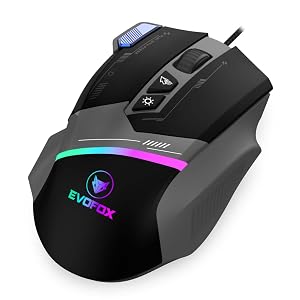
The Blaze Ultra is the one to buy if you want the safest all-round pick, and the numbers prove it: a 4.4 average across more than 3,500 ratings, by far the largest validated review base on this list. At 629 rupees it gives you 8 programmable buttons, a 1000Hz polling rate, and software to remap and store macros, which is rare at this price from a known Indian brand.
Tracking and feel: the optical sensor tracks cleanly at the 400 to 1600 DPI range where actual gaming happens, with no perceptible spin-out in fast flicks. The 1000Hz polling means the cursor reports its position to the PC a thousand times a second, the same rate as mice that cost ten times more. For Valorant, BGMI on PC, or everyday play, that is all you need.
Buttons and software: the two extra side buttons plus the programmable layout suit MOBA and MMO players who want abilities bound to the mouse, and the EvoFox software lets you save profiles. The shape is a medium right-handed design that suits palm and claw grip for most hand sizes.
What works
- Largest validated review base here, over 3,500 ratings at 4.4 stars
- 8 programmable buttons is generous at Rs 629
- Safest all round pick for most players
What’s bad
- Not the lightest option for fast flick aim
- Brand does not name the sensor model
- Wired only, no wireless option
2. Kreo Harpy: Best Ultralight Gaming Mouse Under 1000

The Kreo Harpy is the ultralight pick, and it is the most validated lightweight mouse here with more than 250 ratings at 4.3 stars. At 55 grams it is less than half the weight of an office mouse, which is the single biggest upgrade for flick aim in shooters.
Why weight matters: a lighter mouse changes direction faster and tires your wrist less over a long session. At 55g the Harpy lets you whip across the mousepad for a 180-degree flick in Valorant without the inertia of a heavy mouse fighting you. The customizable RGB is cosmetic but looks the part.
Who should buy it: FPS players who play at low sensitivity and make big arm movements, and anyone whose wrist aches after a session with a heavy mouse. It is the gateway to the modern ultralight style that pro players use, at a budget price.
What works
- Very light at 55 grams, a real help for flick aim
- Most validated lightweight here, over 250 ratings at 4.3
- Suits claw and fingertip grips
What’s bad
- Costs more than heavier picks at Rs 699
- Ultralight shells can feel less solid
- Wired only
3. daWg Slay 25: Best Sensor for Serious Aim

The daWg Slay 25 is the spec-savvy pick, because it names its parts and they are the right ones: a PixArt 3327 optical sensor and 20-million-click Huano switches at 889 rupees. The PixArt 3327 is the same sensor class found in mice that cost two to three times more, so this is genuine gaming hardware, not a mystery sensor behind a big DPI number.
Why the sensor is the headline: the PixArt 3327 tracks accurately with no smoothing or acceleration at normal gaming sensitivities, which is exactly what you want for consistent aim. The named Huano switches are rated for 20 million clicks, so they should not develop the double-click fault that kills cheaper mice within months.
The honest caveat: this is a newer listing with a smaller review base (around 34 ratings at 4.4 stars at the time of writing), so it is less battle-tested than the EvoFox or Kreo above. If you want the best components on paper and are comfortable being an early buyer, this is the pick. If you want maximum proof, go with the top two.
What works
- Names real parts, a PixArt 3327 sensor and 20 million click Huano switches
- Best sensor honesty on the list
- Strong choice for serious aim
What’s bad
- Most expensive pick here at Rs 889
- Smaller review base than the EvoFox
- Brand is less widely known
4. Zebronics Transformer M Plus: Best Budget Value
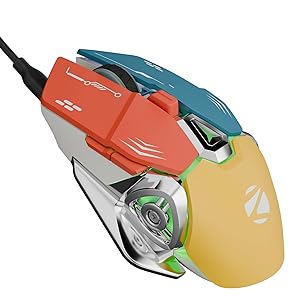
The Zebronics Transformer M Plus is the value sweet spot at 549 rupees, with a 4.4 average across more than 150 ratings. Zebronics is one of the most widely stocked Indian brands, so service and replacement are easy, and the Transformer line has been a budget staple for years.
What you get for 549: a 6-button layout with a 6-level adjustable DPI switch, RGB lighting, and a braided cable. The adjustable sensitivity steps let you drop to 400 to 800 DPI for aiming and bump up for desktop work with a button press. It is a simple, reliable wired mouse that does the basics well.
Who should buy it: anyone who wants a dependable wired gaming mouse from a trusted brand for the least money without dropping to bare-bones territory. It is the safe budget default.
What works
- Best value on the list at Rs 549
- Widely stocked brand, so service and replacement are easy
- Solid 4.4 average rating
What’s bad
- Smaller review base at about 150 ratings
- Basic build and feature set
- Wired only
5. EvoFox Phantom Air: Lightest Mouse on the List

The EvoFox Phantom Air is the lightest mouse here at 54 grams, one gram under the Kreo Harpy, for 599 rupees. It holds a 4.4 average across more than 400 ratings, so it is well proven for an ultralight at this price.
Why pick it over the Kreo: price and weight. At 54g it is the lightest on the list, and at 599 rupees it undercuts the Harpy by 100 rupees. Up to 1000Hz polling and a responsive sensor make it a clean budget ultralight for flick-heavy FPS play. The two are close rivals, so it often comes down to which shape fits your hand and which is cheaper on the day.
Who should buy it: FPS players who want the absolute lightest mouse for the least money, and who prefer a compact shell. If you have larger hands or want a few hundred more reviews of reassurance, the Kreo Harpy is the alternative.
What works
- Lightest mouse here at 54 grams
- Cheaper than the Kreo Harpy at Rs 599
- Well proven with a 4.4 average across 400+ ratings
What’s bad
- Fewer ratings than the Blaze Ultra
- Ultralight shell is less durable
- Wired only
6. Ant Esports GM100 V2: Cheapest Gaming Mouse Worth Buying

At 339 rupees the Ant Esports GM100 V2 is the floor of real gaming mice, and it is no fluke: a 4.1 average across more than 750 ratings, from one of India’s most established budget gaming brands. It is a 7-button wired optical mouse with RGB and an adjustable sensor.
What you get for the money: a dependable optical sensor that tracks fine at gaming sensitivities, seven buttons including two side buttons, and RGB lighting, in a comfortable medium shell. It will not win awards, but it does everything a gaming mouse needs to do for the price of a couple of coffees.
Who should buy it: a student on the tightest budget, a backup mouse, or a first gaming mouse for someone testing the waters. It is the honest entry point, far better than the unbranded 150 rupee mice that spin out and die in weeks.
What works
- Cheapest real gaming mouse at Rs 339
- From an established budget gaming brand
- 7 buttons and RGB with 750+ ratings
What’s bad
- Lowest rating on the list at 4.1 stars
- Basic sensor performance
- Build quality reflects the rock bottom price
7. Ant Esports GM320: Most Programmable Buttons Under 1000

At around 599 rupees the Ant Esports GM320 is the pick to reach for if you want more buttons than the rest of this list. It carries a 4.5-star average and pairs eight programmable buttons with a braided cable, which is rare at this price where most mice ship a rubber cable that kinks over time.
What you get for the money: eight programmable buttons you can bind to reloads, pings or push-to-talk, a stable optical sensor that tracks cleanly through the 800 to 1600 DPI range most players actually use, RGB lighting, and that braided cable for drag-free movement on the pad.
Who should buy it: anyone who wants extra bindable buttons for MOBAs, MMOs or utility keys without leaving the sub-1000 budget, or a player who has been burned by cheap rubber cables and wants a braided one.
What works
- Eight programmable buttons, the most on this list
- Braided cable, uncommon under 1000
- Strong 4.5-star average
What’s bad
- Heavier than the ultralight picks here
- Sensor is dependable, not elite
- No wireless option
Which Gaming Mouse Matches Your Grip and Game?
The right mouse depends on how you hold it and what you play, not just the price.
| How you play | Best pick | Why |
|---|---|---|
| One safe all-round mouse for any game | EvoFox Blaze Ultra (Rs 629) | Most proven here, 8 programmable buttons, real software |
| Low-sensitivity FPS with big flick aim | Kreo Harpy (Rs 699) or EvoFox Phantom Air (Rs 599) | 54 to 55g ultralight shells for fast, low-fatigue flicks |
| You care most about the sensor and switches | daWg Slay 25 (Rs 889) | Named PixArt 3327 sensor and 20M Huano switches |
| Lowest price from a trusted brand | Zebronics Transformer M Plus (Rs 549) | Reliable wired mouse, adjustable DPI, easy service |
| Absolute cheapest that still works | Ant Esports GM100 V2 (Rs 339) | Real gaming mouse with a 750-plus review base |
What to Look For in a Budget Gaming Mouse
The sensor matters, the DPI number does not. Almost every competitive player games between 400 and 1600 DPI, so a “12800 DPI” claim is marketing. What counts is whether the sensor tracks without smoothing, acceleration, or spin-out at those normal sensitivities. A named sensor like the PixArt 3327 on the daWg is a far better sign than a huge DPI figure on an unnamed sensor.
Weight is the biggest feel upgrade. A lighter mouse moves faster and tires your hand less. Dropping from a 100-gram office mouse to a 54 to 55-gram ultralight like the Phantom Air or Kreo Harpy is the most noticeable change you can make to your aim at this budget. If you play claw or fingertip grip and make big arm movements, go light.
Switches decide how long it lasts. The most common death of a cheap mouse is the double-click fault, where one click registers as two. A mouse that names its switches and their click rating, like the daWg’s 20-million-click Huano switches, is telling you it expects to survive. Unnamed switches are a coin flip.
Wired is the safe default at this price. A 2.4GHz wireless mouse needs good internals to avoid latency, and under 1,000 rupees that budget is thin. For pure performance per rupee a wired mouse wins at this budget. Save wireless for the 4,000 rupee tier, covered in our best gaming mouse under 5000 guide.
Common Mistakes When Buying a Budget Gaming Mouse
Buying on the DPI number. A 16000 DPI mouse is not better than a 6400 DPI one for gaming, because you will use neither. Ignore the headline number and look at the sensor name and the reviews.
Buying the heaviest, biggest mouse you can find. Heavier does not mean more premium for gaming. For aim, lighter is better. The ultralights here exist for a reason.
Trusting a 5-star average on ten reviews. A new “gaming mouse” listing with a perfect score and few sales tells you little. The EvoFox Blaze Ultra at 4.4 across 3,500-plus ratings or the Kreo Harpy across 250 is far more trustworthy than a flawless score on a handful, which is why the newer daWg carries honest caveats above.
Pairing a great mouse with a bad surface. Even the best sensor tracks poorly on a scratched desk. A cheap cloth mousepad fixes it, and it is the easiest upgrade to forget. If you are still on bare desk, sort that out alongside the mouse. And if you also game on your phone, a pair of low-latency gaming earbuds and a fix for in-game lag matter just as much as the mouse.
Frequently Asked Questions
Which is the best gaming mouse under 1000 in India in 2026?
The EvoFox Blaze Ultra at around 629 rupees is the best overall, with the largest review base on the list, 8 programmable buttons, software, and 1000Hz polling. For flick-heavy FPS the ultralight Kreo Harpy (55g) and EvoFox Phantom Air (54g) are the picks, and the daWg Slay 25 has the best named sensor for players who care about tracking.
Is a gaming mouse under 1000 good enough for Valorant and BGMI?
Yes. At this price you now get clean optical sensors, 1000Hz polling, and ultralight shells that handle Valorant and BGMI on PC without spin-outs. You do not need an expensive mouse to aim well. Sensor quality and weight matter far more than the DPI number, and the picks here cover both.
Does DPI matter for gaming?
Not the way listings imply. Almost all competitive players game between 400 and 1600 DPI, so a 12800 or 16000 DPI claim is meaningless for actual play. What matters is that the sensor tracks accurately at those low sensitivities without smoothing or acceleration. Judge a mouse by its sensor and switches, not its peak DPI.
Should I buy a wired or wireless gaming mouse under 1000?
Wired is the safer choice at this budget. Good 2.4GHz wireless needs internals that are hard to fit under 1,000 rupees, so wired delivers more performance per rupee. For competitive play a wired pick is the better call at this price. Proper wireless gaming mice start to make sense around the 4,000 rupee tier.
Are ultralight gaming mice better for aiming?
For most players, yes. A lighter mouse changes direction faster and reduces wrist fatigue, which helps flick aim in shooters. Dropping to a 54 to 55-gram mouse like the EvoFox Phantom Air or Kreo Harpy is the biggest feel upgrade at this budget. The exception is if you have large hands or prefer a heavier, planted feel, in which case a standard-weight mouse suits you better.
What causes the double-click problem in cheap mice?
It is usually worn or low-quality switches registering one press as two clicks. The fix is to buy a mouse with named, higher-rated switches, like the daWg Slay 25’s 20-million-click Huano switches, which are built to outlast the cheap unnamed switches that fail within months.
Which gaming mouse under 1000 is lightest?
The EvoFox Phantom Air at 54 grams is the lightest on this list, just ahead of the Kreo Harpy at 55 grams. Both are genuine ultralight shells aimed at FPS players who want fast, low-fatigue flick aim, and both cost under 700 rupees.
Is a 339 rupee gaming mouse any good?
The Ant Esports GM100 V2 at around 339 rupees is the cheapest mouse here worth buying, with a real optical sensor, 7 buttons, and a 750-plus review base from a trusted brand. It is fine for casual gaming and as a first or backup mouse. For serious competitive aim, step up to an ultralight or the EvoFox Blaze Ultra.
The Verdict
For most people the EvoFox Blaze Ultra at around 629 rupees is the best gaming mouse under 1000 in India: the largest proven review base here, 8 programmable buttons, real software, and 1000Hz polling. If you play flick-heavy FPS, the ultralight Kreo Harpy at 699 rupees and EvoFox Phantom Air at 599 rupees are the picks, and the daWg Slay 25 gives spec-savvy buyers a named PixArt 3327 sensor. For the lowest prices the Zebronics Transformer M Plus and Ant Esports GM100 V2 deliver real gaming mice from trusted brands. Buy for the sensor and the weight, not the DPI number, and your aim will thank you.