
Updated April 2026 with current Indian retail prices.
HP Victus vs Lenovo IdeaPad Gaming 3 (2026): Which Budget Gaming Laptop Should You Buy in India?
These are the two laptops every Indian student and budget gamer keeps going back and forth on. You open Flipkart, add both to the cart, and spend three days reading reviews that never actually answer your question. So here is the straight answer from someone who has used both: they are close, but not equal, and which one you should buy depends entirely on what matters to you.
Both sit in the Rs 55,000 to 65,000 range, both run Ryzen 5 or Ryzen 7 processors with Nvidia graphics, and both will run Valorant, GTA 5, and Fortnite without you needing to beg. But the differences in thermals, display, keyboard, and after-sales service in India are real and they matter especially if you are in a city that hits 42 degrees in May.
Before we get into it, if your budget is tight, also check our PC build under 25000 guide, which honestly gives you better gaming performance per rupee than any laptop in this range. If you do go laptop, pair it with a good gaming monitor under 10000, a gaming keyboard under 2000, and a proper gaming chair under 10000 for the full setup.
Quick Specs Comparison: HP Victus 15 vs Lenovo IdeaPad Gaming 3 (2025/2026)
| Spec | HP Victus 15 (2025/2026) | Lenovo IdeaPad Gaming 3 (2025/2026) |
|---|---|---|
| CPU Options | AMD Ryzen 5 7535HS / Ryzen 7 7735HS / Intel Core i5-13420H | AMD Ryzen 5 7535HS / Ryzen 7 7745HX / Intel Core i5-12450H |
| GPU Options | Nvidia RTX 3050 (6GB) / RTX 4050 (6GB) | Nvidia GTX 1650 (4GB) / RTX 3050 (6GB) / RTX 3050 Ti (4GB) |
| RAM | 8GB DDR5 (1 soldered + 1 SO-DIMM) / 16GB option | 8GB DDR5 (1 soldered + 1 SO-DIMM) / 16GB option |
| Storage | 512GB PCIe NVMe SSD | 512GB PCIe NVMe SSD |
| Display | 15.6″ FHD IPS, 144Hz, ~250 nits, 62-72% sRGB | 15.6″ FHD IPS, 120Hz or 144Hz, ~300 nits, 45-72% NTSC |
| Weight | 2.29 kg | 2.2 kg |
| Battery | 52.5 Whr (3 to 4 hours light use) | 45 Whr (2.5 to 3.5 hours light use) |
| Price Range India | Rs 55,000 to 70,000 | Rs 50,000 to 65,000 |
| Where to Buy | Amazon India, Flipkart, HP India website | Flipkart, Amazon India, Lenovo India website |
Prices checked 2026. Variants differ across retailers. Always confirm exact specs before buying.
1. Build Quality and Design
Neither of these laptops will win any design awards. They are both budget gaming machines and they look like it. But there are real differences in how they feel.
The HP Victus 15 has a dark teal or silver plastic chassis that feels solid enough for the price. The lid flex is minimal, the hinge is firm, and the overall build feels like it can survive a college bag. The mica silver and spruce blue colorways look decent. The bottom panel has large vents which is good for airflow. For RTX 5060 options, see the best RTX 5060 gaming laptops in India.
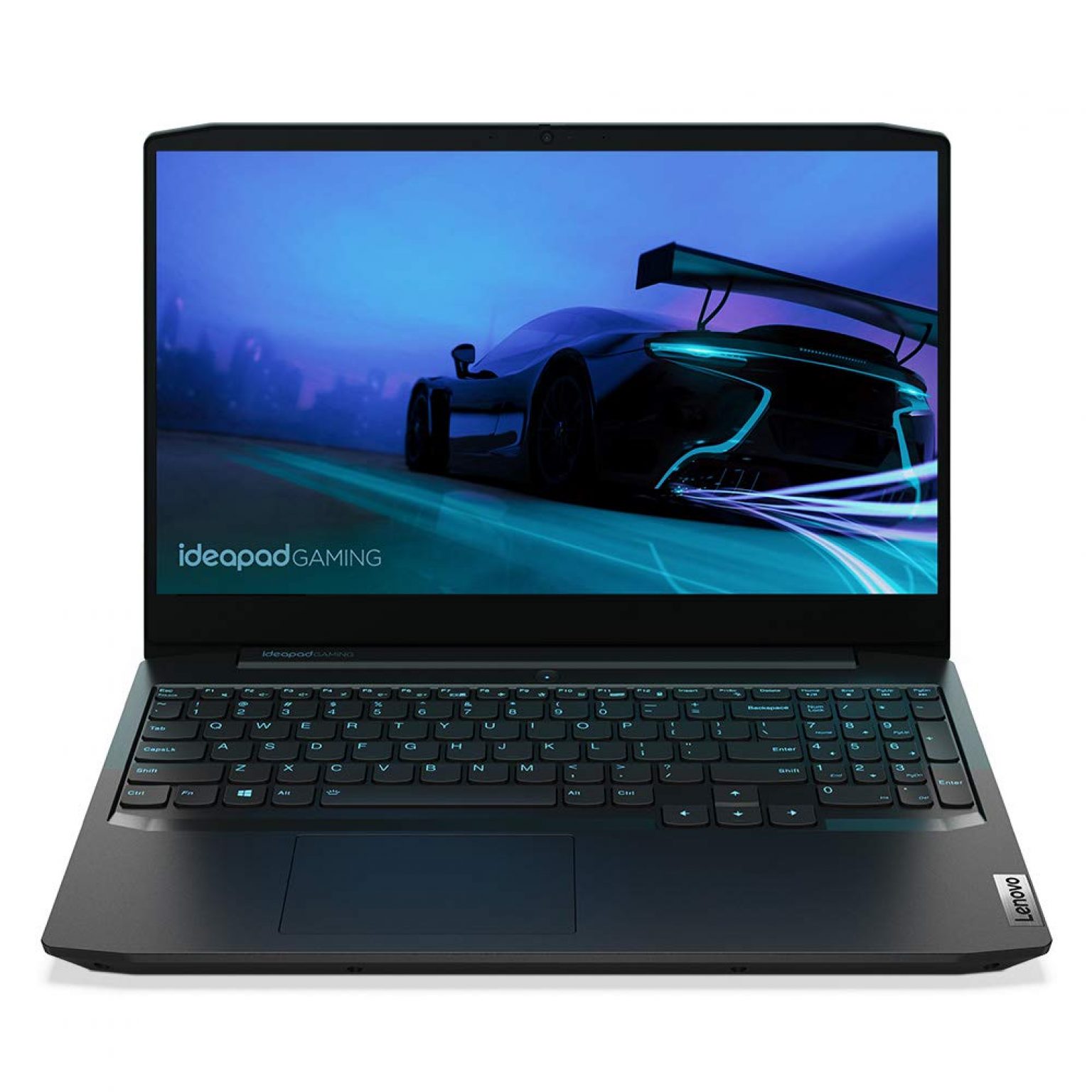
The Lenovo IdeaPad Gaming 3 has a slightly more premium matte black or storm grey finish. The lid is thinner and the laptop looks cleaner overall. Lenovo has been refining this chassis for four generations and it shows. The IdeaPad Gaming 3 also feels slightly lighter in hand at 2.2 kg vs the Victus at 2.29 kg. Not a huge difference but you notice it after carrying it all day.
Both have the webcam at the top (not the bottom, unlike some cheap laptops), full size USB ports, and HDMI 2.0 or 2.1 for connecting a monitor. The HP Victus has a slightly better port layout with the full size HDMI and USB-A on the left side, which is where most users want them.
Build quality winner: Lenovo IdeaPad Gaming 3, by a small margin. It just feels slightly more put together.
2. Display Comparison
This is one area where the difference matters if you play competitive games.
The HP Victus 15 ships with a 15.6 inch FHD IPS panel at 144Hz. The actual brightness hovers around 250 nits which is fine indoors but looks washed out in direct sunlight. sRGB coverage is around 62 to 72 percent depending on which panel batch you get. Response time is decent at around 7 to 9 ms for gaming purposes.
The Lenovo IdeaPad Gaming 3 variants split between 120Hz and 144Hz IPS panels. The 144Hz version is better. Brightness is slightly higher at around 300 nits on paper, though real world measurements put it closer to 270 nits. Color coverage is similar at 45% NTSC or 72% sRGB depending on variant.
The key thing to note: both panels have variable quality depending on which factory batch was used. This is a known issue with budget laptops. Some users get a better panel, some don’t. Reading user reviews on Flipkart specifically mentioning display quality for the exact variant you are buying is worth doing.
For Valorant, CSGO, and other e-sports titles, 144Hz makes a genuine difference. If the IdeaPad Gaming 3 you are looking at is only 120Hz, factor that in.
Display winner: HP Victus, slightly. The 144Hz is more consistent across variants and the brightness is adequate for Indian room lighting.
3. Performance: CPU, GPU, and Real Game Benchmarks
Both laptops use AMD Ryzen 5 7535HS as the base CPU in most configurations. This is a solid processor, a 6-core 12-thread chip that handles gaming, streaming, and multitasking without breaking a sweat. The Ryzen 7 variants cost more and give meaningful uplift for content creation or streaming while gaming simultaneously.
The GPU story is where the models diverge. Here is what you need to know:
- HP Victus with RTX 3050 (6GB): Strong GPU for the budget. The 6GB VRAM is more future proof than the older 4GB cards.
- HP Victus with RTX 4050 (6GB): Noticeably faster but costs Rs 62,000 to 70,000. Worth it if you can stretch.
- Lenovo IdeaPad Gaming 3 with GTX 1650 (4GB): Avoid this variant in 2026. It is dated and the 4GB VRAM is limiting.
- Lenovo IdeaPad Gaming 3 with RTX 3050 (6GB): Comparable to HP Victus RTX 3050. Same tier.
- Lenovo IdeaPad Gaming 3 with RTX 3050 Ti (4GB): Slightly faster than RTX 3050 but the 4GB VRAM is a problem for newer titles.
Real Benchmark Numbers (Ryzen 5 7535HS + RTX 3050, 16GB dual channel RAM)
| Game | Settings | HP Victus RTX 3050 | IdeaPad Gaming 3 RTX 3050 |
|---|---|---|---|
| Valorant | Medium, FHD | 130 to 160 fps | 125 to 155 fps |
| GTA 5 | High, FHD | 75 to 90 fps | 70 to 85 fps |
| Fortnite | Performance Mode, FHD | 90 to 110 fps | 85 to 105 fps |
| CS2 | High, FHD | 80 to 100 fps | 75 to 95 fps |
| BGMI / PUBG PC | Ultra, FHD | 55 to 70 fps | 55 to 68 fps |
| Minecraft (Java) | Max render, shaders off | 160 to 200+ fps | 155 to 195 fps |
Note: Benchmarks with 16GB dual channel RAM. 8GB single channel variants will be 15 to 20% slower across the board. These numbers are from ambient temperature around 28 to 30 degrees Celsius. In Indian summers, expect 10 to 15% lower sustained performance due to thermal throttling.
Performance verdict: at the same GPU tier (RTX 3050 vs RTX 3050), both laptops are within 5 to 8% of each other. The HP Victus is marginally faster in most titles due to better thermal headroom in some configurations, but it is not a night and day difference.
4. Thermal Performance in Indian Summers (35 to 45 Degrees Ambient)
This is the section nobody else covers properly. Most reviews are done in air-conditioned labs at 22 to 24 degrees Celsius. The reality for most Indian users is a hostel room, a PG flat, or a home without 24 hour AC, hitting 38 to 45 degrees in summer.
Budget gaming laptops in India face a real enemy: heat. And both of these laptops have their own thermal personalities.
HP Victus Thermals
The HP Victus uses a dual heat pipe and single fan exhaust configuration on most RTX 3050 variants. This was a cost-cutting decision that shows under sustained load. In an air-conditioned room at 24 degrees, the Victus handles gaming fine. When ambient temperatures climb to 35 to 40 degrees, which is normal from March to June across most of India, the CPU can throttle from its base 3.0 GHz down to 2.4 to 2.6 GHz during hour-long gaming sessions.
The RTX 4050 variant of the HP Victus has a better dual fan cooling solution and handles Indian summers noticeably better. If you are in Mumbai, Delhi, Hyderabad, or anywhere in north India during peak summer, the RTX 4050 variant is worth considering over the RTX 3050 for thermal stability alone.
GPU temperatures on the Victus RTX 3050 during GTA 5 at 40 degree ambient: 87 to 92 degrees Celsius. That is within acceptable range but close to thermal limits. The fan noise at this point is significant.
Lenovo IdeaPad Gaming 3 Thermals
The IdeaPad Gaming 3 has a slightly better cooling layout with more exhaust vents on the back edge. Lenovo also offers a “Performance Mode” toggle that ramps up fans aggressively before thermals become a problem. The result is that the IdeaPad Gaming 3 is louder at idle in performance mode, but it throttles less under sustained load at high ambient temperatures.
GPU temperatures on IdeaPad Gaming 3 RTX 3050 during GTA 5 at 40 degree ambient: 83 to 88 degrees Celsius. Slightly better than the Victus.
CPU temperatures during extended gaming at 38 degree ambient: IdeaPad Gaming 3 runs about 4 to 6 degrees cooler on average. That translates to slightly more consistent frame rates during 2 to 3 hour gaming sessions.
What You Should Actually Do in Indian Summers
- Buy a laptop cooling pad. A basic Rs 500 to 1500 cooler pad reduces temperatures by 5 to 8 degrees.
- Never game with the laptop on a blanket, pillow, or bed. Block the bottom vents and both laptops will throttle hard within 15 minutes.
- Use Performance mode on IdeaPad Gaming 3 (Fn + Q shortcut). Use HP OMEN Gaming Hub performance mode on Victus.
- Repaste after 18 to 24 months. Budget laptops often ship with thin factory thermal paste that degrades faster in high heat conditions.
Thermal winner: Lenovo IdeaPad Gaming 3. It runs cooler under sustained load in hot ambient conditions, which matters more in India than it does in European or US reviews.
5. Battery Life: Both Are Bad, Here Is Which Is Less Bad
Let’s be straight here. Both of these are gaming laptops and gaming laptops have terrible battery life. Anyone who buys an HP Victus or IdeaPad Gaming 3 expecting MacBook-level battery is going to be disappointed.
HP Victus Battery
The HP Victus ships with a 52.5 Whr battery. On light tasks like notes, YouTube at low brightness, and Chrome with a few tabs, you get 3 to 4 hours. In gaming, with the dGPU active, expect 60 to 90 minutes before you need the plug. The charger is a big 150W brick that you will carry everywhere.
Lenovo IdeaPad Gaming 3 Battery
The IdeaPad Gaming 3 has a 45 Whr battery on most variants, which is actually smaller than the Victus. Real world light use gives 2.5 to 3.5 hours. Gaming on battery is barely 45 to 60 minutes and performance drops noticeably without the power adapter since the GPU underclocks on battery.
Battery winner: HP Victus. The larger 52.5 Whr battery gives you a meaningful extra 45 to 60 minutes of non-gaming use. Still carry your charger everywhere, but the Victus is slightly less painful on battery.
One practical note for college students: most hostels and PG accommodations have limited power sockets. The Victus charger is bulkier. The IdeaPad Gaming 3 charger is slightly more compact, which matters when you are packing a bag daily.
6. Keyboard and Trackpad
For a laptop you will type on daily for college assignments, this matters more than most people realize when buying online.
HP Victus Keyboard
The HP Victus has a full size keyboard with numpad, 1.5mm key travel, and a single zone white backlight on some variants. The keys are slightly mushy with less tactile feedback. Typing long assignments or code on it is fine but not enjoyable. The numpad is useful for Excel and number-heavy work. The key spacing is good and accidental key presses are rare.
Lenovo IdeaPad Gaming 3 Keyboard
Lenovo keyboards are generally better than HP keyboards at this price range and the IdeaPad Gaming 3 continues that trend. The key travel is 1.5mm, similar to the Victus, but the actuation feels more positive and the feedback is crisper. The white or RGB single-zone backlight (depending on variant) is well-lit. The layout is clean without numpad on most versions, which means wider spacing on the main keys.
If you are writing a lot, the IdeaPad Gaming 3 keyboard is the one you want. Gamers who want the numpad for other tasks might prefer the Victus.
Trackpad Comparison
Both trackpads are adequate. Neither is good enough for precision work. Buy a budget gaming mouse for Rs 500 to 800 and you will never touch the trackpad during gaming. The IdeaPad Gaming 3 trackpad is slightly larger and smoother. The Victus trackpad has better palm rejection during gaming when your wrists rest near it.
Keyboard and trackpad winner: Lenovo IdeaPad Gaming 3.
7. After-Sales Service in India: HP vs Lenovo
This is a section that almost no review covers but it is genuinely important in India. A gaming laptop that breaks down in warranty is not just a technical problem, it is a logistics problem if you are not in a metro city.
HP Service Network in India
HP has over 800 authorized service centers across India. More importantly, they have good coverage in tier 2 cities like Nashik, Coimbatore, Surat, Lucknow, Patna, Bhopal, Indore, and Vizag. The HP Care Pack system is transparent and warranty claims are generally processed in 7 to 14 working days for hardware issues. HP’s walk-in service experience in India is consistently rated better than most competitors in this price range.
HP also offers on-site warranty on some laptop categories. For the Victus, most warranties are carry-in, but the HP India website lets you check exact service center locations by PIN code before you buy.
Lenovo Service Network in India
Lenovo has around 700 plus authorized service partners in India. In the four metros, Mumbai, Delhi, Bangalore, and Chennai, the service experience is excellent. Same-day pickup and 3 to 5 day turnaround for common issues like keyboard replacement or display issues is achievable in metros.
The problem is outside major cities. Users in tier 2 and tier 3 towns report waiting 3 to 4 weeks for parts that need to be ordered from regional distribution hubs. Lenovo’s service center density in smaller cities is noticeably lower than HP’s.
If you are in a metro or a large tier 2 city with a Lenovo authorized service center, both brands are roughly equivalent in service quality. If you are in a smaller city or town, HP’s wider service network is a genuine advantage.
Common Warranty Issues to Know
- Both brands void warranty if you repaste the CPU or GPU yourself in most cases. Check your specific warranty terms.
- Physical damage is not covered under standard warranty. A cracked screen from a drop costs Rs 8,000 to 15,000 to replace out of warranty.
- Buying from authorized sellers on Flipkart and Amazon India is essential. Third-party sellers sometimes send refurbished or grey market units that have no valid Indian warranty.
After-sales winner: HP Victus for users outside major metro cities. Lenovo is equally good in metros.
8. Pricing, Availability, and Deals on Flipkart and Amazon India
Both laptops are widely available but there are smart ways to buy them.
HP Victus 15 Pricing in India (2026)
- Ryzen 5 7535HS + RTX 3050 6GB + 8GB RAM: Rs 55,000 to 58,000
- Ryzen 5 7535HS + RTX 3050 6GB + 16GB RAM: Rs 58,000 to 62,000
- Ryzen 7 7745HX + RTX 4050 6GB + 16GB RAM: Rs 65,000 to 72,000
Buy on Amazon India using our affiliate link (supports GamingNation at no extra cost to you): HP Victus 15 on Amazon India
Lenovo IdeaPad Gaming 3 Pricing in India (2026)
- Ryzen 5 7535HS + RTX 3050 6GB + 8GB RAM: Rs 53,000 to 57,000
- Ryzen 5 7535HS + RTX 3050 6GB + 16GB RAM: Rs 57,000 to 61,000
- Ryzen 7 7745HX + RTX 3050 Ti 4GB + 16GB RAM: Rs 60,000 to 65,000
Buy on Amazon India: Lenovo IdeaPad Gaming 3 on Amazon India
Sale Seasons to Watch
- Flipkart Big Billion Days (October): Both laptops typically drop Rs 4,000 to 7,000. The IdeaPad Gaming 3 often sees deeper discounts on Flipkart since Lenovo has a stronger partnership there.
- Amazon Great Indian Festival (October): HP Victus deals tend to be better on Amazon India. Watch for bank card offers that add another Rs 1,500 to 3,000 off.
- Republic Day and Independence Day sales: Smaller drops of Rs 2,000 to 3,000 but combined with exchange offers and card discounts, can be meaningful.
- Back to school season (June to July): Student offers from HP and Lenovo directly through their India websites, sometimes including free accessories.
EMI Options
No Cost EMI is available on both laptops via HDFC, SBI, ICICI, and Axis Bank credit cards on Flipkart and Amazon India. A Rs 60,000 laptop on 12-month No Cost EMI works out to Rs 5,000 per month which is manageable for most college students with part-time income or parental support. Debit card EMI is also available on Axis and some other banks but check the fine print for processing fees.
Which One Should YOU Buy? The Decision Matrix
Stop overthinking it. Here is the direct answer based on your situation:
Buy the HP Victus 15 if:
- You are in a smaller city or town and HP has better service center coverage near you
- You want the RTX 4050 variant for better gaming performance and thermals in hot weather
- You need a numpad for spreadsheets, accounting, or CAD work alongside gaming
- Battery life matters at least a little (the Victus has the larger battery)
- You found it on a better deal on Amazon during a sale
Buy the Lenovo IdeaPad Gaming 3 if:
- You are in a metro city with good Lenovo service coverage
- You type a lot and care about keyboard quality
- Thermal performance in Indian summers is your top concern (the IdeaPad Gaming 3 runs cooler under sustained load)
- The IdeaPad Gaming 3 RTX 3050 is available for Rs 3,000 to 5,000 cheaper than the equivalent Victus at the time you are buying
- You prefer the cleaner, lighter design
Neither? Consider This:
If you are primarily gaming at home and not carrying the laptop to college, seriously read our PC build under 25000 guide. For the same budget as these laptops, a desktop PC gives you significantly better gaming performance, easier upgrades, better thermals, and a larger screen. The tradeoff is that it is not portable. If portability is not a must, a desktop wins every time at this budget.
Common Mistakes When Buying Budget Gaming Laptops in India
These are mistakes that I see people make constantly in gaming forums, YouTube comments, and Flipkart question sections.
1. Buying the 8GB Single Channel RAM Variant and Not Upgrading
The single biggest performance killer on both these laptops is the 8GB single channel RAM configuration. Both laptops have one RAM slot soldered to the motherboard and one free SO-DIMM slot. When you run a single 8GB stick, the memory controller runs in single channel mode, which cuts memory bandwidth roughly in half. This directly impacts gaming performance since the integrated graphics and the discrete GPU both share system memory bandwidth.
Upgrading from 8GB single channel to 16GB dual channel (adding a matching 8GB DDR5 SO-DIMM stick, which costs Rs 1,500 to 2,500) gives you 15 to 25% better gaming performance in CPU-limited titles. Do this on day one.
2. Buying from Unauthorized Sellers to Save Rs 2,000 to 3,000
Both Flipkart and Amazon India have marketplace sellers alongside official HP and Lenovo storefronts. Some third-party sellers offer units Rs 2,000 to 3,000 below official prices. These are sometimes open box, refurbished, or grey market imports with no valid Indian warranty. Always buy from HP India Official Store or Lenovo India Official Store on these platforms, or from authorized resellers listed on the HP and Lenovo India websites.
3. Ignoring Thermals and Buying Without a Cooling Pad
A Rs 800 to 1,500 cooling pad is not optional for gaming laptop users in India. It is a necessary purchase. Budget for it when calculating total cost of ownership. Most people who complain about laptop performance after a few months of use in Indian summers have never used a cooling pad.
4. Choosing Intel i5 Variants Over Ryzen 5 Variants at the Same Price
Some variants of the IdeaPad Gaming 3 and Victus ship with Intel Core i5-12450H or i5-13420H. At the same price point, the AMD Ryzen 5 7535HS consistently outperforms these Intel options in gaming benchmarks and runs cooler. Unless you have a specific reason to need Intel (certain software compatibility, for example), always pick the Ryzen variant when prices are equal.
5. Overlooking the Storage Situation
Both laptops ship with 512GB NVMe SSDs. Modern games are large. GTA 5 is 95 GB, Fortnite is around 30 GB, Valorant is 20 GB, and a few others add up fast. You will fill 512GB within 6 months. Both laptops have an extra M.2 slot for a second SSD. A 1TB NVMe SSD (Samsung 980 or WD SN580) costs Rs 4,500 to 6,000 and is the second upgrade to make after the RAM.
6. Buying the GTX 1650 Variant of the IdeaPad Gaming 3 in 2026
Some retailers are still selling off the GTX 1650 4GB variant of the IdeaPad Gaming 3 at Rs 48,000 to 52,000. This card was budget in 2020. In 2026 it is genuinely inadequate for modern titles, especially at the textures and resolutions you want to run. The 4GB VRAM limitation is a hard wall for many games. Do not buy this variant. Spend the extra Rs 5,000 to 7,000 and get the RTX 3050 6GB version.
Frequently Asked Questions
Which is better for gaming in India, HP Victus or Lenovo IdeaPad Gaming 3?
For pure gaming performance, the HP Victus with RTX 4050 edges out the IdeaPad Gaming 3 with GTX 1650 or RTX 3050. But the IdeaPad Gaming 3 with RTX 3050 Ti at a similar price point is a close fight. It depends on which variant you are comparing at your budget.
Does HP Victus overheat in Indian summers?
Yes, the HP Victus can thermal throttle during extended gaming sessions when ambient temperatures are above 38 to 40 degrees Celsius. The single exhaust design on some variants struggles. Using a cooling pad and keeping the laptop improved helps significantly. The RTX 4050 variant has better cooling and is more suitable for hot Indian conditions.
Which laptop has better service center support in India?
HP has a stronger authorized service network in tier 2 and tier 3 Indian cities. Lenovo service is excellent in metros but users in smaller cities report longer TAT for warranty repairs. If you live outside a major city, HP gives more peace of mind for after-sales support.
What is the price of HP Victus 15 in India in 2026?
The HP Victus 15 with Ryzen 5 7535HS and RTX 3050 typically sells for Rs 55,000 to 60,000 on Amazon and Flipkart. The RTX 4050 variant is priced Rs 62,000 to 70,000 depending on the sale and variant.
What is the price of Lenovo IdeaPad Gaming 3 in India in 2026?
The Lenovo IdeaPad Gaming 3 with Ryzen 5 7535HS and RTX 3050 is available for Rs 55,000 to 62,000 on Flipkart and Amazon India. During Big Billion Days and Great Indian Festival, it often drops below Rs 55,000.
Can I play Valorant well on HP Victus or IdeaPad Gaming 3?
Both laptops handle Valorant very well. On the HP Victus with RTX 3050, you can get 120 to 160 fps at medium settings. The IdeaPad Gaming 3 with RTX 3050 gives similar numbers. Valorant is an e-sports title designed to run efficiently and both laptops exceed 120 fps at 1080p medium settings.
Which laptop is better for college students in India?
The Lenovo IdeaPad Gaming 3 is a slightly better all-rounder for college use because of its better keyboard, quieter fans during non-gaming tasks, and the brand reputation among Indian students. The HP Victus is better if gaming is the primary use case and portability is secondary.
Does HP Victus have a good battery life?
Honest answer: No. HP Victus gives around 3 to 4 hours of battery life on light tasks like browsing and notes. During gaming, expect 1 to 1.5 hours maximum. Carry the charger everywhere. That said, it is still better than the IdeaPad Gaming 3’s 2.5 to 3.5 hours on light tasks due to the larger 52.5 Whr battery.
Is the HP Victus display better than Lenovo IdeaPad Gaming 3?
The HP Victus 15 comes with a 144Hz IPS panel with around 62 to 72 percent sRGB coverage depending on the variant. The IdeaPad Gaming 3 also offers 120Hz or 144Hz IPS with similar color coverage. The Victus panel is marginally brighter on most variants. Neither is suitable for serious color grading or design work without calibration.
Should I buy HP Victus or IdeaPad Gaming 3 on EMI?
Both are available on No Cost EMI on Flipkart and Amazon India via HDFC, SBI, and Axis Bank cards. The IdeaPad Gaming 3 also has Lenovo finance options through their website. Always compare the effective price after cashback and card offers before deciding. A sale day purchase with card offers can save Rs 3,000 to 5,000.
Can I upgrade RAM in HP Victus and IdeaPad Gaming 3?
Yes. Both have one soldered RAM slot and one free SO-DIMM slot. The base 8GB configurations run games in single channel mode which hurts performance significantly. Upgrading to 16GB dual channel by adding an 8GB DDR5 SO-DIMM stick (Rs 1,500 to 2,500) is the single best performance upgrade you can make on either laptop and should be done as soon as possible.
Which laptop runs quieter?
The IdeaPad Gaming 3 runs quieter during light tasks and browsing. Under full gaming load, both laptops are loud at 45 to 50 dB. The HP Victus fans can be more aggressive in their default performance mode. If noise matters in your living situation, the IdeaPad Gaming 3 in its Quiet mode is slightly more bearable during non-gaming use.
Final Verdict: HP Victus vs Lenovo IdeaPad Gaming 3
If you are comparing like-for-like, both laptops at the RTX 3050 6GB tier with Ryzen 5 7535HS and 16GB dual channel RAM are within 5 to 8% of each other in gaming performance. The choice comes down to everything else around the gaming performance.
The Lenovo IdeaPad Gaming 3 is the better buy if you are in a metro city, care about keyboard quality, and the thermals in Indian summers are your priority. It runs cooler, has a better keyboard, and the slightly cleaner design is a bonus.
The HP Victus is the better buy if you live outside a major metro and need reliable service center access, want the RTX 4050 variant for a notable performance jump, need a numpad, or found it significantly cheaper during a sale.
Both are solid choices for their price range. Neither is perfect. If you are still unsure, go to a Croma or Reliance Digital store near you and physically type on both keyboards, look at both displays in person, and check which one feels better to carry. That 30-minute visit can save you 3 years of regret.
And remember: if you are mostly going to game at home, a desktop PC build under 25000 genuinely outperforms both these laptops in every gaming metric. Think about it before spending Rs 60,000 on a laptop that throttles in Indian summers.