

Updated October 2026 with current Indian retail prices.
Best value: Corsair MP600 Elite 1TB (heatsink) at ₹21,500, the cheapest complete PS5-ready drive. Best 2TB: Crucial P310 2TB (heatsink) at ₹35,999. Best premium: Samsung 990 Pro (heatsink) at ₹36,777. Honest truth: any Gen4 drive at 5500MB/s or faster with a heatsink works, you do not need the pricey Sony-licensed one.
Key facts
- An internal M.2 SSD lets you PLAY more PS5 games, not just store them. Unlike an external USB drive (which can only store PS5 games), an internal M.2 SSD in the PS5 expansion slot runs PS5 games directly. This is the upgrade you want to actually install and play more games.
- The compatibility rule: M.2 2280, PCIe Gen4, 5500MB/s or faster, with a heatsink. A Gen3 drive will not work, and a slow Gen4 drive (5000MB/s) fails Sony’s minimum. Every pick here meets the full spec. Watch out for cheap-looking drives that are only 5000MB/s.
- You do not need a Sony-licensed drive. Any drive that meets the spec above works exactly the same in a PS5. The licensed WD SN850P is convenient (guaranteed fit, PS logo) but you pay a premium for the badge, not for compatibility.
- A heatsink is mandatory, and doubly so in Indian heat. The PS5 needs the drive cooled, and in a closed cabinet without AC in a 35 degree room that matters even more. Buy a drive with a heatsink included, or add a cheap M.2 heatsink, total height must stay under about 11.25mm.
- Prices roughly doubled in 2026 (NAND shortage). A 1TB heatsink drive now starts around ₹21,500 and 2TB around ₹35,000, with no relief expected before 2027. If you need the space for GTA 6, buy now rather than waiting for a drop that analysts do not expect.
- Do not overpay for a Gen5 drive. The PS5 slot is PCIe Gen4, so a Gen5 SSD just runs at Gen4 speed. Buy a good Gen4 drive and save the money.
The best internal SSD for a PS5 in India in 2026, for most people, is the Corsair MP600 Elite 1TB with heatsink at ₹21,500, the cheapest drive that meets Sony’s full spec and drops straight into the console. But there is one honest thing to know before you spend: an internal M.2 SSD lets you actually play more PS5 games from the expansion slot, which is different from an external USB drive that can only store them. With GTA 6 confirmed for late 2026 and its huge install size, a stock PS5 fills up fast, so this is the upgrade to make. This guide gives you the simple compatibility rule (so you never buy the wrong drive), explains why a heatsink is mandatory (especially in Indian heat), tells you honestly that you do not need the pricey Sony-licensed drive, helps you choose 1TB or 2TB, and walks you through the five-minute install. Every price and spec was checked live on Amazon.in in July 2026.
Quick comparison table
Prices verified on Amazon.in, July 2026. SSD prices are volatile after the 2026 shortage, always check the live link. Every pick meets the PS5 spec (Gen4, 5500MB/s or faster).
| Pick | SSD | Price | Capacity | Best for | Buy |
|---|---|---|---|---|---|
| Best Value | Corsair MP600 Elite 1TB | ₹21,500 | 1TB | Most PS5 owners | Amazon |
| Cheapest 2TB | Corsair MP600 Elite 2TB | ₹28,991 | 2TB | Most storage per rupee | Amazon |
| Best 2TB | Crucial P310 2TB | ₹35,999 | 2TB | GTA 6 + big library | Amazon |
| Best Premium | Samsung 990 Pro 1TB | ₹36,777 | 1TB | Fastest + trusted | Amazon |
| PS5-Licensed | WD Black SN850P 1TB | ₹40,602 | 1TB | Zero-guess official fit | Amazon |
Best value: Corsair MP600 Elite 1TB (with heatsink)
The Corsair MP600 Elite 1TB at ₹21,500 is the value pick and the cheapest complete solution here, because it already includes the heatsink you must have. After the 2026 price spike, 1TB heatsink drives now start around this price. It reads at 7,000 MB/s, comfortably above Sony’s 5,500 MB/s minimum, and the heatsink is pre-fitted so there is nothing extra to buy or install, you just slot it into the PS5 expansion bay and format it. The only limit is capacity: 1TB roughly doubles your usable PS5 game space, which is plenty for many, but if you want room for GTA 6 plus a big library, step up to one of the 2TB picks below. For most PS5 owners who just need more space affordably, this is the one to buy.

Corsair MP600 Elite 1TB Gen4 M.2 with heatsink
Price checked July 2026Heatsink includedCheapest complete drive
Cheapest 2TB: Corsair MP600 Elite 2TB
The Corsair MP600 Elite 2TB at ₹28,991 is the cheapest way to get a full 2TB of PS5 storage that meets the spec, and 2TB is the sensible upgrade with GTA 6 on the way and its large install size. It reads at 7,000 MB/s, well over Sony’s minimum. The one catch: this version does not include a heatsink, so you must add one, a suitable M.2 heatsink costs roughly ₹200 to ₹2,400 and a heatsink is mandatory on the PS5 (see below). If you are comfortable fitting a small heatsink, this gets you the most gigabytes per rupee. If you would rather it come ready to drop in, the Crucial P310 2TB below includes the heatsink for a little more.

Corsair MP600 Elite 2TB Gen4 M.2 (add a heatsink)
Price checked July 2026Cheapest 2TBAdd a heatsink
Best 2TB, plug-and-play: Crucial P310 2TB (with heatsink)
The Crucial P310 2TB at ₹35,999 is the no-fuss 2TB pick, because the heatsink is already fitted, so it drops straight into the PS5 expansion slot with nothing extra to buy. It reads at 7,100 MB/s, clears Sony’s spec easily, and gives you a full 2TB, the sweet spot for a PS5 that has to hold GTA 6 and a big library. It costs a little more than the bare Corsair 2TB, and that difference is essentially the price of the included heatsink and the convenience of not fitting one yourself. Stock on this can be thin, so confirm availability before you count on the price. For the cleanest 2TB upgrade with no extra steps, this is the one.

Crucial P310 2TB Gen4 M.2 with heatsink
Price checked July 2026Heatsink includedNo-fuss 2TB
Best premium: Samsung 990 Pro 1TB (with heatsink)
The Samsung 990 Pro with heatsink 1TB at ₹36,777 is the premium pick: it is the fastest drive here at 7,450 MB/s, and Samsung’s low-profile heatsink is designed to fit the PS5 slot cleanly. Samsung is also the most trusted storage brand for many Indian buyers. The honest note is value: at ₹36,777 for 1TB you are paying for speed and the badge, and a 2TB drive gives you far more room for a similar amount of money, so buy this only if you specifically want the fastest, most-trusted 1TB drive. One important buying tip: get the ₹36,777 Amazon-listed version, and avoid the importer variants of the exact same drive that sell for ₹52,000 to ₹62,000 from third-party sellers. For a premium, fast, cleanly-fitting 1TB PS5 drive, this is the pick.

Samsung 990 Pro 1TB Gen4 M.2 with heatsink
Price checked July 2026Fastest Gen4Samsung India trust
Best officially-licensed: WD Black SN850P 1TB
The WD Black SN850P 1TB at ₹40,602 is the officially Sony-licensed drive, with a PS-logo heatsink built for the PS5, so it is guaranteed to fit and work with zero thinking required. Here is the honest truth, though: you do not need a licensed drive at all. Any Gen4 SSD that reads at 5,500 MB/s or more with a heatsink works exactly the same in a PS5 (see the compatibility section), so the licensed drive is convenience and peace of mind, not a requirement, and at ₹40,602 it is the most expensive way to get 1TB here. It is sold by a Top-Brand third-party seller, shipped by Amazon with a 5 year warranty. Buy it if the official badge and total zero-doubt fit are worth the premium to you, otherwise the value picks above do the identical job for less.

WD Black SN850P 1TB, Sony-licensed with PS heatsink
Price checked July 2026Sony-certifiedZero-guess fit
Internal M.2 vs external USB SSD: which do you need?
This is the confusion that leads to the wrong purchase, so clear it up first. The two are completely different. An internal M.2 SSD (what this guide covers) fits inside the PS5 expansion slot and lets you install and play PS5 games directly from it, exactly like the built-in drive. An external USB SSD plugs into a USB port and can only store PS5 games (move them off to free space) and play PS4 games, you cannot run a PS5 game from a USB drive, you have to move it back to internal storage first. So if your goal is to expand how many PS5 games you can actually play, especially with GTA 6 coming, you need an internal M.2 SSD, which is what we rank here. If you only want cheap backup storage and to play PS4 games, an external USB SSD is fine and cheaper, and we cover those in a separate guide. Many owners eventually use both.
The PS5 SSD compatibility rule (read before you buy)
Getting this wrong is the most common and most expensive PS5 SSD mistake, so here is the simple rule. Your drive must be all four of these: an M.2 2280 size (the standard stick length), a PCIe Gen4 drive (a Gen3 drive will not work at all), with a read speed of 5,500 MB/s or faster (Sony’s official minimum), and fitted with a heatsink. Miss any one and it either will not fit, will not be accepted, or will overheat. The trap to watch for: several cheap-looking Gen4 drives, like some Crucial P3 Plus, ADATA and Crucial E100 models, read at only 5,000 MB/s, which is below Sony’s minimum, so they are not suitable for a PS5 even though they look like a bargain. Every drive we recommend in this guide meets all four requirements. Before you buy any drive not on this list, check its exact read speed on the product page, if it does not clearly state 5,500 MB/s or more, do not buy it for your PS5.
You do not need a Sony-licensed drive
Sony sells officially-licensed PS5 drives like the WD Black SN850P, and stores will happily push you toward them, but here is the money-saving truth: a licensed drive is not required. The PS5 accepts any drive that meets the compatibility rule above, and a licensed drive performs identically to an unlicensed one of the same speed. What the licence actually buys you is convenience: a guaranteed-correct heatsink that definitely fits, the PS logo, and a bit of peace of mind, which is genuinely nice if you want zero doubt. But you pay a premium for it, the licensed SN850P 1TB costs more than faster unlicensed drives here. So if you are comfortable checking the spec (and this guide has done that for you), you can save real money by buying a qualifying unlicensed drive like the Corsair, Crucial or Samsung picks, and they will work exactly the same. Buy licensed only if the official badge and zero-effort fit are worth the extra to you.
Why a heatsink is mandatory, especially in Indian heat
The PS5 requires the expansion SSD to have a heatsink, and this matters more in India than almost anywhere. A fast Gen4 drive runs hot under load, and inside the PS5’s enclosed bay, in a closed TV cabinet, in a room without AC at 35 degrees or more, that heat has nowhere to go. Without a heatsink the drive can overheat, throttle or, in a poorly ventilated setup, cause the console to warn or shut down. So you have two clean options: buy a drive that comes with a heatsink already fitted (like the Corsair MP600 Elite, Crucial P310 and Samsung 990 Pro picks here), which is the easiest route, or buy a bare drive and add a low-profile M.2 heatsink yourself (roughly ₹200 to ₹2,400). One size rule if you add your own: the total height of the drive plus heatsink must stay under about 11.25mm so the PS5 cover still closes. Do not skip the heatsink to save money, in Indian conditions it is the part that keeps your expensive drive alive.
1TB or 2TB for your PS5?
Both are worth buying, and the right one depends on your library and budget. A stock PS5 gives you only about 825GB of usable space, and a PS5 Pro about 1.86TB, and modern games are huge, GTA 6 alone is expected to need roughly 150 to 200GB. So a 1TB expansion (like the value Corsair pick) roughly doubles your PS5 game space and is plenty if you keep a focused set of games installed, it is the best-value choice after the price spike. A 2TB expansion is the sweet spot if you keep a large library installed or want comfortable room for GTA 6 plus everything else, but note that the 2026 shortage has made 2TB drives disproportionately expensive, so you pay a real premium for the extra space. Our honest steer: if budget is tight, get a 1TB now and add more later, if you keep many games installed and want to future-proof for GTA 6, get a 2TB. Skip 4TB, it costs far more than it is worth for a console right now.
How to install an M.2 SSD in your PS5 (5 minutes)
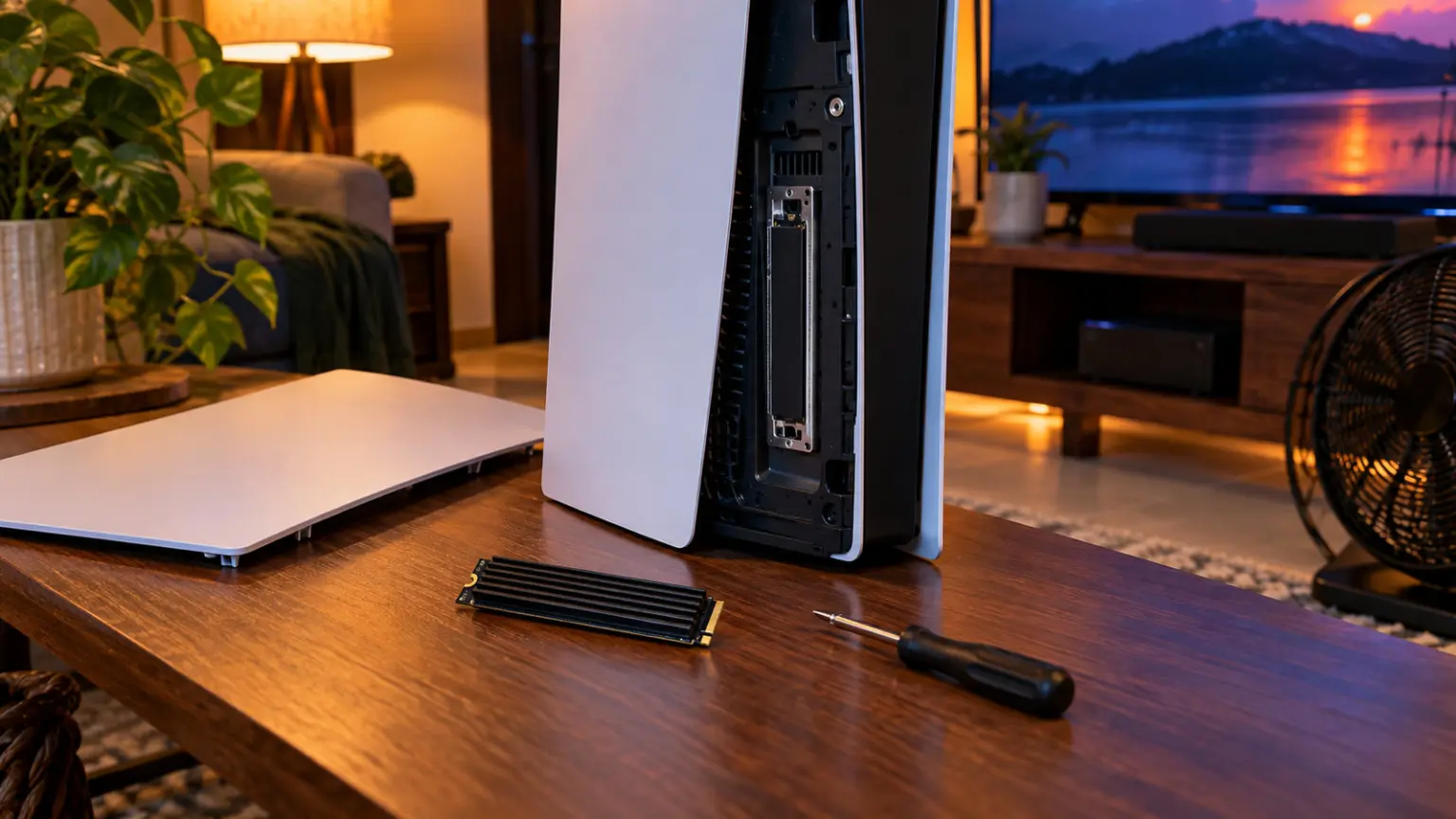
Installing a PS5 SSD is genuinely easy and, importantly, it does not void your warranty, Sony designed the slot for this. You need one Phillips screwdriver and about five minutes. In short: turn off and unplug the PS5, lay it flat, and lift off the white cover (it slides off with a gentle pull). You will see a rectangular expansion slot with a metal cover held by one screw. Remove that screw and the cover, insert your M.2 drive at an angle into the slot and press it flat, then secure it with the screw (moving the standoff to match your drive length if needed, 2280 is standard). Replace the metal cover and the white cover, plug the PS5 back in, and when you boot up the console will prompt you to format the new drive, follow the on-screen step and you are done. After that you can install and move PS5 games to it freely in Settings, Storage. If the drive does not show up, it is almost always a compatibility issue (wrong speed or Gen3), which is exactly why the compatibility rule above matters.
Prices spiked in 2026: buy now or wait?
If PS5 SSDs look shockingly expensive, you are right. A global memory shortage, with chip makers diverting production to AI, has roughly doubled SSD prices through 2026, and India also adds import duty and a weaker rupee on top. That is why 1TB heatsink drives now start around ₹21,500 and 2TB around ₹35,000, and why the Sony-licensed 2TB drives have become unbuyable at over ₹67,000. The honest advice: if you need the space, especially to be ready for GTA 6 in late 2026, buy now, because analysts expect these high prices to persist into 2027, so waiting is unlikely to save you money. If your PS5 is not full yet and you can hold off, there is no harm in waiting, but do not expect a crash. And whatever you buy, do not fall for the inflated importer-variant listings of popular drives (the same SSD at nearly double the price from a grey-market seller), stick to the clean Amazon-listed versions in this guide.
How we chose these SSDs
We searched Amazon.in from an Indian address and confirmed on each product page the exact capacity, interface, read speed and whether a heatsink is included, then checked each drive against Sony’s PS5 requirement (M.2 2280, Gen4, 5,500 MB/s or faster, heatsink). We deliberately excluded drives that look cheap but fail the spec, such as several 5,000 MB/s Gen4 models that are below Sony’s minimum, and we avoided the inflated importer-variant listings of popular drives that sell for nearly double from grey-market sellers. We flagged which picks are sold by Amazon-fulfilled sellers versus reputable third-party sellers, and we were honest that the 2026 price spike has pushed the whole category up, so we picked the genuine best value at each capacity rather than pretending cheap options still exist. Prices and stock were verified in July 2026 and move quickly, so always check the live listing. We did not lab-test each drive, picks are based on verified specifications, PS5 compatibility, heatsink fit, seller trust and known performance.
Affiliate disclosure: links to Amazon are affiliate links. If you buy through them, GamingNation may earn a small commission at no extra cost to you. It does not affect our picks or the order above.
Decision time
Get a Gen4 drive at 5500MB/s or faster with a heatsink, then pick 1TB for value or 2TB for GTA 6 and a big library
Frequently Asked Questions
Which is the best internal SSD for PS5 in India in 2026?
For most people the Corsair MP600 Elite 1TB with heatsink (around ₹21,500) is the best value, the cheapest complete PS5-ready drive. For 2TB, the Crucial P310 2TB with heatsink (₹35,999) is the best no-fuss pick, and the Samsung 990 Pro (₹36,777) is the fastest. You do not need the pricey Sony-licensed drive, any Gen4 drive at 5,500 MB/s or faster with a heatsink works.
What are the PS5 SSD requirements?
The drive must be M.2 2280 size, PCIe Gen4 (Gen3 does not work), read at 5,500 MB/s or faster (Sony minimum), and have a heatsink. Miss any one and it will not work properly. Watch out for cheap Gen4 drives that read only 5,000 MB/s, which are below the minimum. Every pick in this guide meets all four requirements.
Do I need a heatsink for a PS5 SSD?
Yes, a heatsink is required, and it matters even more in Indian heat because the PS5 bay is enclosed and rooms are often warm without AC. The easiest option is a drive with the heatsink already fitted. If you buy a bare drive, add a low-profile M.2 heatsink (roughly ₹200 to ₹2,400), keeping the total height under about 11.25mm so the cover closes.
Do I need a Sony-licensed SSD for the PS5?
No. Any drive that meets the spec (M.2 2280, Gen4, 5,500 MB/s or faster, heatsink) works exactly the same in a PS5. The licensed WD SN850P is convenient with a guaranteed-fit heatsink and PS logo, but you pay a premium for the badge, not for performance. Unlicensed drives like the Corsair, Crucial and Samsung picks perform identically for less.
Is 1TB or 2TB better for a PS5?
2TB is the sweet spot if you keep a large library or want room for GTA 6, but the 2026 price spike has made 2TB disproportionately expensive. A 1TB drive roughly doubles your PS5 game space and is the best value now. If budget is tight, get 1TB and add more later; if you install many big games, get 2TB. A stock PS5 has only about 825GB usable, so any expansion helps.
Does an internal SSD make PS5 games load faster?
Not really, and that is not the point. A good Gen4 PS5 expansion drive loads games at essentially the same speed as the built-in SSD, so you will not see a big speed jump versus internal storage. The real benefit is capacity, holding and playing many more games. The speed advantage only appears versus an external USB drive, which is much slower, so buy an internal drive for space, not for faster loading.
Should I buy a Gen5 SSD for my PS5?
No. The PS5 expansion slot is PCIe Gen4, so a Gen5 drive simply runs at Gen4 speed and gives you no benefit, while costing more. Buy a good Gen4 drive that meets the 5,500 MB/s minimum and put the savings toward more capacity. Gen5 only matters on a PC with a Gen5 slot.
Does installing an SSD void the PS5 warranty?
No. Sony designed the PS5 with a user-accessible expansion slot specifically for adding an M.2 SSD, so installing one does not void your warranty. It takes about five minutes and one Phillips screwdriver: remove the cover, unscrew the slot cover, insert and secure the drive, replace the covers, and format it when the PS5 prompts you on the next boot.