
Updated June 2026 with current Indian retail prices.
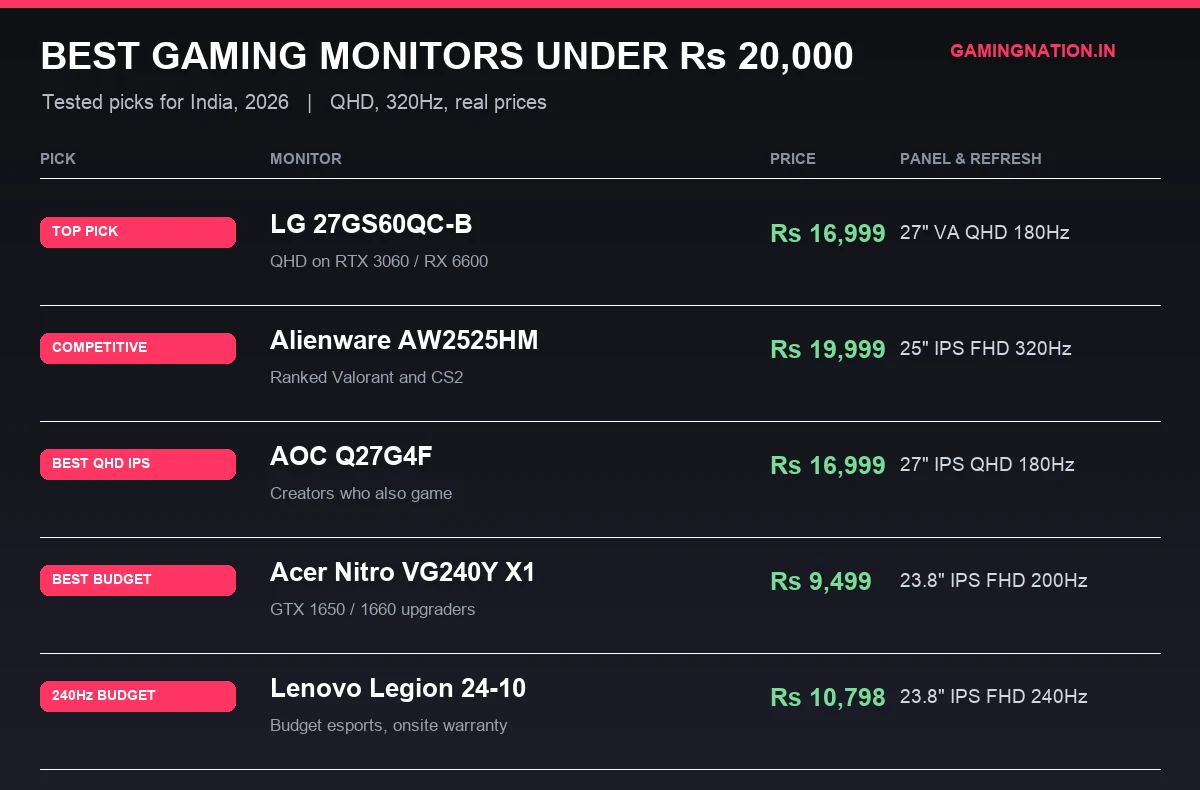
Best overall: LG 27GS60QC-B at Rs 15,999 (27 inch curved VA, QHD 1440p, 180Hz). Best for ranked play: Alienware AW2525HM at Rs 19,999 (25 inch Fast IPS, FHD, 320Hz). Two picks verified on Amazon.in, curated for the under Rs 20,000 bracket.
Key facts
- QHD 1440p at 180Hz is the value sweet spot under Rs 20,000 in 2026.
- Every pick is a live Amazon.in listing, price-checked in May 2026.
- Check the dead-pixel and return policy first: Amazon Fulfilled and Flipkart replacement windows differ by seller.
- No-Cost EMI brings the top picks to roughly Rs 2,800 per month over six months.
The best gaming monitor under Rs 20,000 in India right now is the LG 27GS60QC-B at Rs 15,999, a 27 inch QHD 180Hz curved VA panel that brought 1440p gaming under seventeen grand for the first time. If you grind ranked Valorant or CS2 instead, the Alienware AW2525HM at Rs 19,999 gives you a 320Hz Fast IPS that no other monitor in this band touches. Below are the two panels worth buying right now, who each one is for, plus the India buying details that decide if you keep the monitor or end up fighting an RMA.
Best gaming monitors under Rs 20,000 at a glance
Quick read for the impatient. Want immersive QHD on an RTX 3060 or RX 6600, get the LG. Want raw refresh for ranked shooters, get the Alienware. The table puts the two picks side by side so you can match the panel to your build and your budget in one scan.
| Pick | Monitor | Price | Resolution | Refresh | Buy |
|---|---|---|---|---|---|
| Top Pick | LG 27GS60QC-B 27 Inch QHD 180Hz Curved VA Gaming Monitor | Rs 15,999 | QHD 2560×1440 | 180Hz | Amazon |
| Best Competitive | Alienware AW2525HM 25 Inch 320Hz Fast IPS Gaming Monitor | Rs 19,999 | FHD 1920×1080 | 320Hz | Amazon |
The two monitors, and who each one is for
LG 27GS60QC-B 27 Inch QHD 180Hz Curved VA Gaming Monitor
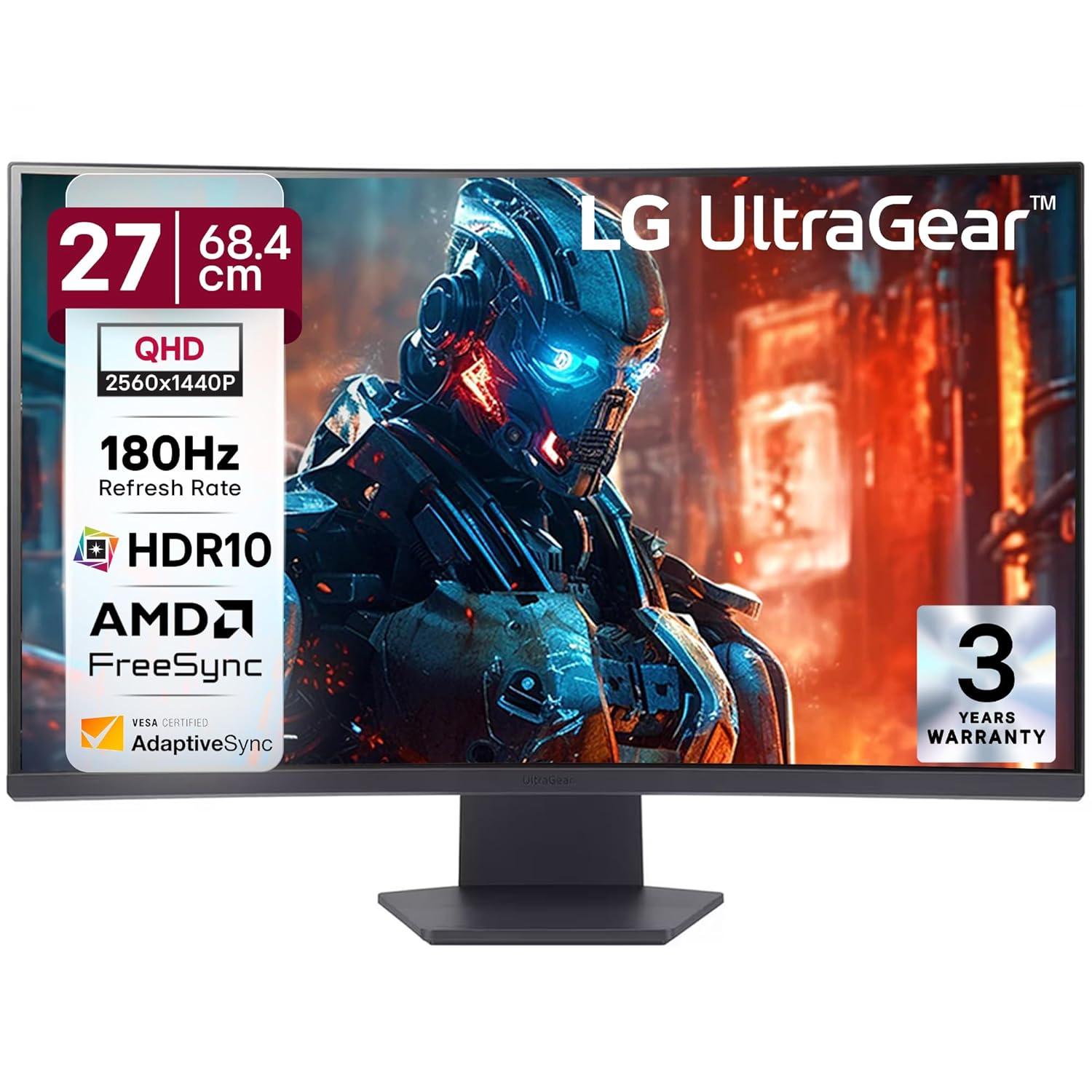
LG 27GS60QC-B 27 Inch QHD 180Hz Curved VA Gaming Monitor
Price verified May 2026Sold by Amazon.inManufacturer warranty
What works
- QHD 180Hz at Rs 17,000 was not a thing until this panel landed, the cheapest 1440p option used to sit near Rs 22K
- 3000:1 VA contrast and the 1000R curve make single player RPGs look richer than any IPS at this price
- Pairs with an RTX 3060 or RX 6600 for 100 plus fps in QHD in a dim bedroom
What is bad
- Competitive players will notice VA smearing on dark flick shots versus a proper IPS
- QHD 180Hz needs a 3060 class card, so a GTX 1650 or 1060 cannot feed it
Alienware AW2525HM 25 Inch 320Hz Fast IPS Gaming Monitor
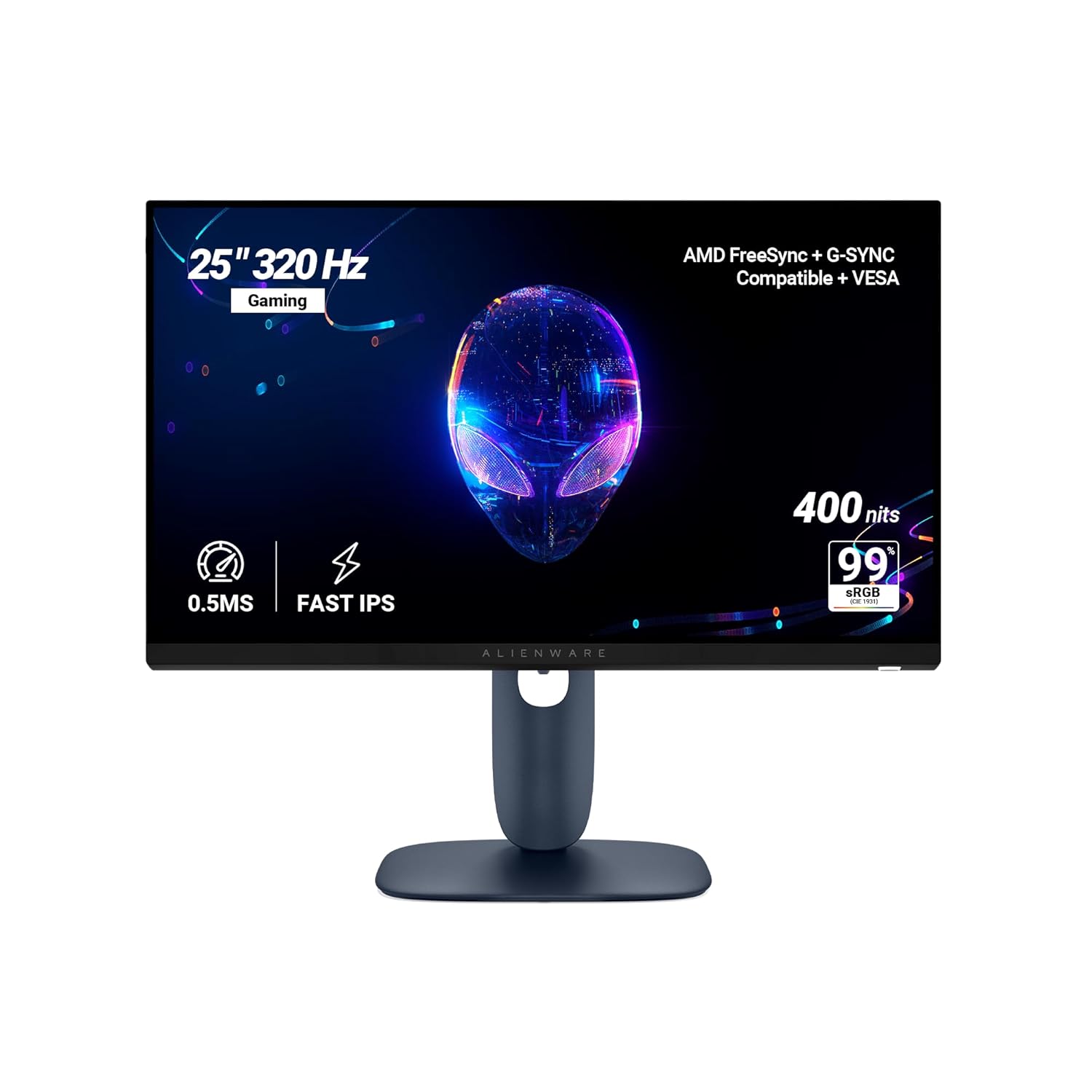
Alienware AW2525HM 25 Inch 320Hz Fast IPS Gaming Monitor
Price verified May 2026Sold by Amazon.inManufacturer warranty
What works
- 320Hz drops the gap between frames to 3.125ms versus 6.06ms at 165Hz, which shows up in how cleanly you track and peek
- The only sub-20K panel that hits 320Hz on a real Fast IPS with a full ergonomic stand
- 0.5ms GtG and a full tilt, swivel, height and pivot stand suit a serious ranked setup
What is bad
- 320Hz is wasted unless your GPU already pushes 250 plus fps in your main game
- Wrong monitor if you mostly play story games at 60 to 100fps or want QHD for colour work
The India buying details nobody else tells you
Specs are the easy part. What actually decides if you keep a monitor or spend a week on RMA calls is how the panel lottery, return windows and EMI work in India. Most listicles skip all of this. Here is what to know before you click buy.
Dead pixels and the return window, Amazon vs Flipkart vs brand
Every panel ships with a small chance of a stuck bright pixel or a dark dead pixel. The first line of defence is the retailer return window, not the warranty. An Amazon.in listing that says Sold by and Fulfilled by Amazon takes the unit back inside the standard return window with no questions, which is the cleanest path: open the box, run a dead pixel test on day one, and if you spot a bright dot, raise a replacement before the window closes. A third party seller on the same page is slower and may push you to the brand instead, so check who actually ships it. Flipkart treats monitors as a replacement only category, so a faulty panel gets swapped rather than refunded, and the technician visit can add a few days. The lesson is the same on both: inspect on arrival, because once the retailer window shuts, the claim moves to the brand, and that is where the next table decides your fate.
Brand dead pixel policy is where the two picks split apart. Dell and Alienware run a Premium Panel Exchange that replaces at a single bright pixel, the strictest and most buyer friendly policy you will find at this price. LG replaces at 3 plus bright pixels, which is still lenient. So a stuck pixel that Dell would swap on day one might need a second or third before LG signs off. If panel perfection matters to you, that policy is a real reason to lean toward the Alienware.
One practical tip on the day one test. Open a full screen image of pure white, then pure black, then pure red, green and blue, and look closely. A bright pixel shows as a coloured or white dot on the black screen, a dead pixel shows as a black dot on the white screen. Do this within an hour of unboxing, while the retailer return window is wide open. That five minute habit is the single biggest thing that separates a smooth purchase from a month of RMA emails.
| Brand | Warranty | Service reach | Dead pixel policy |
|---|---|---|---|
| Dell / Alienware | 3 yrs Premium Panel Exchange | Cross-ship replacement, next business day in metros, 3 to 5 days in Tier 3 | Replace at 1 bright pixel (strictest, best for buyers) |
| LG | 3 yrs panel and backlight | Onsite in metros, carry-in via partner in Tier 3 | Replace at 3+ bright pixels (lenient threshold) |
No-Cost EMI puts these in reach
Almost every monitor here qualifies for No-Cost EMI on Amazon and Flipkart with HDFC, ICICI, SBI and Axis cards, usually across 3, 6 and 9 month plans. That turns the Rs 19,999 Alienware into roughly Rs 3,333 a month over six months with no interest added, which is how a lot of students and first jobbers buy in this band. The LG works out to about Rs 2,666 a month, small enough to clear in a month or two if money frees up.
Two things to watch. A processing fee of around Rs 199 sometimes applies even on a No-Cost plan, so the real cost is a touch above the sticker. And during sale events the No-Cost EMI offer can quietly disappear, because the festival discount and the EMI subsidy do not always stack on the same purchase. Check that the No-Cost line still shows on the final payment screen, not just the product page, before you confirm. Cardless EMI through the Amazon Pay Later and Flipkart Pay Later lines also covers most of these for buyers without a credit card, though the no-cost window there is usually 3 months only. One more thing the listings bury: save the GST tax invoice you get on delivery, not just the order confirmation email. Indian service centres ask for that invoice to start any warranty claim, and a screenshot of the order page is not enough at most carry-in counters.
Always price check Amazon against Flipkart
Indian monitor pricing swings between the two platforms week to week, and the gap can hit Rs 1,000 to Rs 2,000 on the exact same model. Before you buy either pick above, open the model on both Amazon.in and Flipkart and compare the landed price including any coupon and bank offer. The price often moves depending on which seller is pushing stock that week. A two minute check is worth a fair bit on a Rs 16,000 to Rs 20,000 purchase.
Time the buy around the festival sales
The single biggest lever on price in this band is timing. Amazon Great Indian Festival and Flipkart Big Billion Days, both around October, are when monitors see their deepest cuts of the year. The LG and the Alienware both tend to shed another thousand or two in that window, so if you can hold a few weeks, set price alerts on both and let the festival come to you. If you cannot wait, the LG at Rs 15,999 and the Alienware at Rs 19,999 hold steady enough that you are not losing much by buying off season.
One last safety net. If a faulty panel arrives and the seller stalls on a replacement, do not argue in the chat for days. On Amazon, escalate through the A-to-z Guarantee claim, which forces a resolution when a Fulfilled by Amazon order goes wrong. On Flipkart, push for a technician visit in writing through the app rather than over a call, so there is a record. Pay with a card, not a wallet or UPI, because a card gives you a chargeback route if both the seller and the platform go quiet. None of the competing guides in this band tell you any of this, and it is exactly the part that saves a Rs 17,000 purchase from turning into a write-off.
So which one should you buy
It comes down to what you play. If single player and story games are your thing and you run a 3060 class card or better, buy the LG and start gaming in immersive QHD tonight, the 1000R curve and VA contrast do the heavy lifting. If you grind ranked Valorant or CS2 and your GPU already pushes 250 plus fps, the Alienware and its 320Hz Fast IPS is the esports pick, no other panel in this band keeps up. There is no wrong answer between the two, only the one that matches how you actually game.
Gaming on a PS5 or Xbox Series X changes the maths a little. The LG 27GS60QC-B and the Alienware both take a console fine, just remember the LG caps at 1440p 120Hz over its HDMI 2.0 ports, which is plenty since the PS5 has output 1440p since the September 2022 system update and most console games target 60 or 120fps anyway. Skip the HDMI 2.1 panic for this band. Whatever you pick, run the dead pixel test the day it arrives, every single time.
Building the full rig? Step down to the best gaming monitor under Rs 15,000 or step up to the best under Rs 25,000, and pair your screen with the right tower from our Rs 1,00,000 PC build.
Decision time